Материал: Английский Косова
14. Before the design (to be) ready they (to work) on it for 3 hours.
**Task VII Practice the use of Active Voice Tenses.
Variant one
1. Where is your luggage? — I (to leave) it at the station. I (to take) it tomorrow when Nick (to come) to help me. 2.1 (to read) about an hour when he (to come). 3. The play (not yet to begin) and the people (to talk) in the hall. 4. Yesterday I (to buy) a new pair of gloves, as I (to lose) the old ones. 5. We (to walk) in silence. He already (to tell) me all that (to. be) interesting about himself, and I (to have) nothing to tell him. 6. The moon (not to rise) yet, and only two stars, like two distant lighthouses, (to shine) in the dark blue sky. 7. What you (to do) these three months? 8 Our train starts late in the evening, so if you (to come) at seven o'clock, we still (to pack) our luggage. 9 When you (to see) him last? 10. I (to meet) him when he (to walk) across the park.
11. You ever (to act) on the stage? — Why, yes, that's what I (to do) for the last six years.
12. Don't enter the bedroom! The child (to sleep) there, and he always (to wake) up when somebody (to open) the door.
Variant two.
1.What you (to do) when I (to come) in? 2. When (to come) to his house, they (to tell) me that he (to leave) an hour before. 3. On checking up his answers he (to find) out that he (to make) several mistakes. 4. When I (to leave) home, the snow already (to stop), but a strong wind (to blow). 5. You (to read) this book? — Yes, I (to read) it. I (to think) it (to be) very interesting. 6. What the children (to do) now? — Oh, they (to play) the new table game which I (to buy) for them the day before yesterday. 7. They (to reach) the corner of the street by now and (to stand) at the bus stop.8. After we (to walk) about two hours, we arrived at a picturesque glade covered with fresh grass.9. We could not go out because it (to rain) hard since early morning. 10. She (to teach) at our school for twenty years now. 11. Ring me up as soon as you (to come) home. 12. He (to begin) to write his composition at three o'clock. It is already eleven, and he still (to write) it. He says he (to finish) it by twelve. 13. We (to help) our librarian to put the books in the right order for already three days, but we (to arrange) only half the books.
***Task V. Divide into groups: those who stand for advantages of computers an those for disadvantages. Give your reasons.
Unit II.
The Main Functions of Computer. The Use of Grammar Tenses.
Lesson 10-11.
Understanding the Computer.
Participle I. Participle II.
*Task I Learn the new vocabulary
to process – обробляти, data – дані, to handle information - керувати інформацією, ассоunting - облік, error помилка, to eliminate – ліквідувати, to arrange – упорядковувати, to store – зберігати, circuit – схема, to recall – відзивати, to enable - надавати можливість, to erase – стерти.
*Task II. Give the translation to the following word-combinations:
The pieces of information, a general term, to refer to anything, a list of top records, to come from Latin, to treat as, to sort and rearrange information, data processing, set up to handle information, to keep records, to take care of accounting, millions of dollars worth computer equipment, to store information, computers memory, electronic circuits, to recall and erase data, to enable the computer to use
**Task II Read and translate the text
Understanding the Computer
The pieces of information that a computer processes -numbers, words, facts – are called data. Data is a general term that may refer to anything from sports statistics (numbers) to a list of the top records (words) for the last five years.
Data is actually the plural form of the word datum. Datum comes from Latin and originally meant "something given." However, you'll rarely hear anyone refer to "one datum." In fact, the word data has become so much more common that it's now treated as either singular or plural, as in: "Medical data is/are kept in the patient's file."
When computers sort, add, rearrange, or otherwise manipulate information that's called data processing. Many large businesses have a special data-processing department set up to handle information, keep records and take care of accounting. Such a department may contain millions of dollars' worth of computer equipment.
Storing data. You read a moment ago that one of the features that makes computers unique is that they can store information. Computers have memory. Their memory is electronic. They store data in electronic circuits. The data stored in a computer's memory can be recalled, erased or changed.
A microprocessor "brain" and electronic memory are the two most important parts of a computer. Working together, they enable the computer to use the data that it receives. If the computer couldn't remember numbers and letters, it wouldn't be able to process, them, just as you couldn't form; words if you couldn't remember the letters of the alphabet.
**Task III Answer the question
1 What is called data?
2 What does term data refer to?
3 What is called data-processing?
4 In what way can the computer store information?
5 Where is data stored?
6 What are the two most important parts of computer?
**Task IV Give the Ukrainian equivalents of the following:
Обробляти дані, обробка даних,пере упорядковувати дані, керувати інформацією, тримати записи, проводити обрахунки, комп’ютерне обладнання, зберігати інформацію, електронна схема, відзивати та стирати дані, електронна пам'ять, видаляти дані, надавати можливість користуватися даними.
*Task IV. The use of Participle I, Participle II
|
|
Participle I |
||
|
|
Active |
Passive |
|
|
Indefinite |
The man delivering this lecture is our professor. |
The lecture being delivered now is very interesting. |
|
|
Perfect |
Having delivered a lecture the professor thanked the students for attention. |
The lecture having been delivered, everybody left the hall. |
|
|
|
Participle II |
||
|
|
|
The lecture delivered was very interesting. Прочитана лекція була дуже цікавою. |
|
Функції дієприкметника
|
Функція |
Приклади |
|
Означення |
The director using the new methods is an experienced manager. Директор, який застосовує нові методи -досвідчений керівник. The new methods used by the manager give good results. Нові методи, які були застосовані керівником, дають гарні результати. |
|
Частина присудку |
They are using the new method. Вони вживають новий метод. The new method was used in their investigations. Нові методи були вжиті в їх дослідженнях. |
|
Обставина |
Using the new method they achieved good results. Використовуючи новий метод, вони досягли гарних результатів. |
Participle I-using (active), being used (passive)
Participle II- used (passive)
I. They passed the resolution calling for a world peace conference .- Вони прийняли резолюцію, яка закликала до участі у міжнародній мирній конференції.
The data obtained are being carefully analyzed and studied.. – Дані, які були отримані, ретельно аналізуються та вивчаються.
II. Given a chance , she was very glad. – Оскільки їй дали шанс, вона була дуже рада.
Commenting last night on the plan he warned of the critical situation which might happen.- Коментуючи вчора ввечері цей план, він попередив проте .що може скластися критична ситуація .
III. If + Participle, unless + Participle, though + Participle
If given the opportunity, this industry will develop quickly. – Якщо ця галузь матиме певні можливості, вона швидко розвиватиметься.
IV. Participle as:
1) Conjunction
Provided (providing) – за умови; беручи до уваги;
Supposing, assuming – якщо; припустимо, що;
Seeing – оскільки, враховуючи .що
2) Preposition
Given – за наявності, якщо, враховуючи
Failing – за відсутністю
Regarding, considering, respecting – відносно чогось
Pending – до , очікуючи тощо
**Task V. Read and translate the following sentences. Pay your attention to the use of Participle.
-
When operating the computer you must follow the instructions.
-
The data kept in patients’ cards are medical data.
-
Working together computer memory and microprocessor enable computer to use the data it receives.
-
If recorded these data would be very helpful.
-
Being electronic computer memory stores data in electronic circuits.
-
When processed this information becomes useful.
-
Taking care of accounting this department uses powerful computers.
**Task Translate the following sentences into Ukrainian paying attention to the function of the word with suffixes-ed and-ing
1. As mentioned above the method of working (обробка) depends on the mechanical properties of a metal. 2. The development of jet turbines raised an urgent need for a new metal which has to maintain its properties when subjected to high temperatures. 3. The metals used cannot be reheated. 4. The existing methods of extracting metals from ores are to be improved. 5. When selecting a metal the engineer must take into consideration its mechanical properties. 6. Mention should be made that the word "ferrous" is derived from the Latin word "ferrum".
**Task Define the-ed forms and translate the sentences into Ukrainian.
1. He improved his device a week ago. He had improved his device before they were able to examine the properties of this alloy. He has improved his device; you may use it. His device was improved at our laboratory. The device improved by him is very useful. 2. This fact was established some years ago. Newton established the law of gravity in 1666. Newton had established his law of gravity before 1670. The laws established by Newton are included in every text – book on physics. Who has established this daily routine at our laboratory? 3. The experiment prepared by our laboratory assistant was successfully carried out. My friend had prepared his report before we spoke to you. His report was prepared ahead of lime. Have you prepared your report? He prepared his lessons at the library yesterday. 4. He had published his new novel by the end of the year. The results of his research published a month ago have revealed many new facts. The results of their exploration were published long ago. My friend has already published the results of his discovery. He published his article a month ago.
Types of computer systems
**From mainframes to wearable computers

A mainframe is the most powerful type of computer. It can process and store large amounts of data. It supports multiple users at the same time and can support more simultaneous processes than a PC. The central system is a large server connected to hundreds of terminals over a network. Mainframes are used for large-scale computing purposes in banks, big companies and universities.
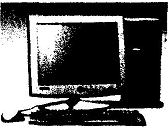
A desktop PC has its own processing unit (or CPU), monitor and keyboard. It is used as a personal computer in the home or as a workstation for group work. Typical examples are the IBM PC and the Apple Macintosh. It's designed to be placed on your desk. Some models have a vertical case called a tower.
A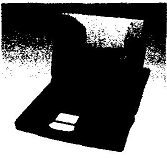 laptop (also called a notebook PC) is a lightweight computer that you
can transport easily. It can work as fast as a desktop PC, with
similar processors, memory capacity, and disk drives, but it is
portable and has a smaller screen. Modern notebooks have a TFT (Thin
Film Transistor) screen that produces very sharp images.
laptop (also called a notebook PC) is a lightweight computer that you
can transport easily. It can work as fast as a desktop PC, with
similar processors, memory capacity, and disk drives, but it is
portable and has a smaller screen. Modern notebooks have a TFT (Thin
Film Transistor) screen that produces very sharp images.
Instead of a mouse, they have a touchpad built into the keyboard - a sensitive pad that you can touch to move the pointer on the screen.
They offer a lot of connectivity options: USB (Universal Serial Bus) ports for connecting peripherals, slots for memory cards, etc.
They come with battery packs, which let you use the computer when there are no electrical outlets available.
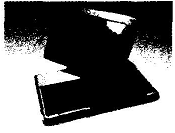
A tablet PC looks like a book, with an LCD screen on which you can write using a special digital pen. You can fold and rotate the screen 180 degrees. Your handwriting can be recognized and converted into editable text. You can also type at the detached keyboard or use voice recognition. It's mobile and versatile.
A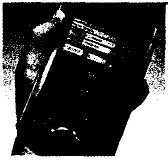 personal digital assistant or PDA is a tiny computer which can be
held in one hand. The term PDA refers to a wide variety of handheld
devices, palmtops and pocket PCs.
personal digital assistant or PDA is a tiny computer which can be
held in one hand. The term PDA refers to a wide variety of handheld
devices, palmtops and pocket PCs.
For input, you type at a small keyboard or use a stylus - a special pen used with a touch screen to select items, draw pictures, etc. Some models incorporate handwriting recognition, which enables a PDA to recognize characters written by hand. Some PDAs recognize spoken words by using voice recognition software.
2) Give the definition of the terms
|
data |
keeping data in electronic circuits |
|
data-processing |
the pieces of information that computer processes |
|
storing data |
sorting, adding, rearranging or otherwise manipulating information |
**Task III Translate the sentences into Ukrainian. Practice the use of Participle
1 .The pieces of information processed are called data.
2. Datum meant as something given comes from Latin.
3. When sorting, adding, rearranging information we manipulate it and it’s called data processing.
4. One of the features of computers making them unique is that they store information.
5. The data stored in a computer memory can be recalled, erased or changed.
6 .Being electronic the computer’s memory stores data in electronic circuits.
7. Working together a microprocessor and electronic memory enable the computer the data that it receives.
*Task IV Learn the new vocabulary.
To provide - забезпечувати
Basic - основний
Additional – додатковий
Usable – придатний для використання
To occur – траплятися
Display – зображення
Keyboard – клавіатура
*Task V. Translate the word-combinations given below:
The basic instructions, to provide the instructions, in order to do a specific job, data and additional instructions, to enable to do a specific job, in the form of letters, through a keyboard,
the human brain, a usable form, to do calculations, to display the results, to produce as a result of work, three-step process
*Task VI. Read and translate the text.
Three basic steps of the computer
INPUT
A program provides the basic instructions so the computer must follow in order to do a specific job. Like the basic rules of a game, the program is only the beginning, however. In order to do a job, the computer and the program must also have input. Input is the data and additional instructions you give to a computer to enable it to do a specific job. The input may be in the form of numbers, letters, words, or pictures The computer may receive input through a keyboard, which looks very much like the keyboard on an ordinary typewriter. It may also receive input from a disk. Until a computer receives input, it can do nothing.
Processing
What does a computer do with the information it receives? Like the human brain, it sorts information, puts it into usable form, and does calculations. This step is called processing.
OUTPUT
Finally, the computer does something with the information it processes. It usually displays the results, often on a screen or on paper. The product of computer processing is called output. Output is the information the computer produces as a result of its work.
You are likely to see this three-step process — input, processing, output — in many day-to-day activities, such as when you use a pocket calculator. In a calculator the input consists of numbers that you press on its keypad — let's say the numbers 3 and 7. The processing occurs after you tell the calculator what you want it to do for example, multiply. The output — 21 — appears on a little screen at the top of the calculator.
The calculator can process the same information in different ways. You might have asked it to add the two numbers, in which case "10" would have appeared on the screen.
**Task VII. Give the English translation to the following:
Основні інструкції до комп’ютера, трьох-ступеневий процес, зображати результати, забезпечувати роботу комп’ютера, схожий на клавіатуру, виконувати обчислення, для того, щоб виконати роботу, отримувати інформацію через клавіатуру, щоденна діяльність, з’явитися на моніторі, складатися з чисел