Материал: Английский Косова
They can be used as mobile phones or as personal organizers for storing notes, reminders and addresses. They also let you access the Internet via wireless technology, without cables.
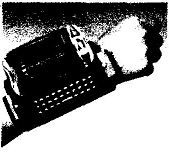
A wearable computer runs on batteries and is worn on the users body, e.g. on a belt, backpack or vest; it is designed for mobile or hands-free operation. Some devices are equipped with a wireless modem, a small keyboard and a screen; others are voice-activated and can access email or voice mail.
** Look at A opposite. Which type of computer do these descriptions refer to?
-
a hand-held computer which can be used as a telephone, a web explorer and a personal organizer
-
a typical computer found in many businesses and popular for home use
-
a large computer used for intensive data processing and often linked to many terminals
-
a small computer that fits into items of clothing
-
a portable computer that can be closed up like a briefcase, but it can be as powerful as a desktop PC
-
a full-function PC, though it only weighs 1.2 kg - you can go to a meeting and write your notes on it, like a paper notepad; its screen mode can be changed from portrait to landscape
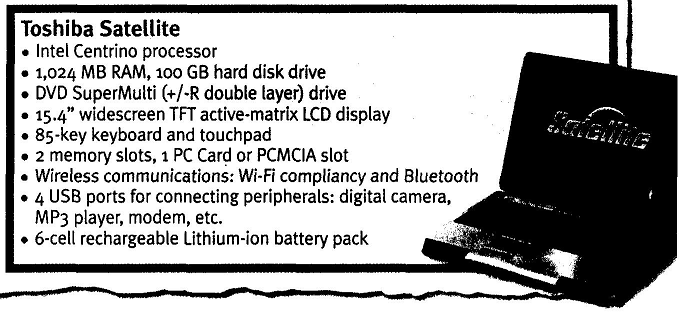
** Look at the computer advertisement and find this information.
-
What type of computer is advertised?
-
What kind of screen does it have?
-
Which pointing device replaces the mouse?
-
What type of ports does it have for connecting cameras and music players?
-
What sort of power supply does it use?
** Read this interview with Adam Hawkins, an IT manager, and complete it with words from the PDA section opposite.
Interviewer: What are the basic features of a PDA?
Adam: Well, a typical PDA is a (1) ……………. device that runs on batteries and combines computing, phone and Net capabilities.
Interviewer: And how do you enter information?
Adam: For input, you use a (2) ……………. or pen to write and make selections on a (3) …………; they also have
buttons for launching programs. Some models have a small keyboard. They may have a (4)………….. system that reacts to the user's voice.
Interviewer: Do they need special software?
Adam: Yes, most of them run on Windows Mobile. Palmtops supported by Palm
Inc. use Palm OS. Pen-based systems include (5) …………………. , so you write on the screen and the computer recognizes your handwriting and inserts the appropriate letters.
Interviewer: What sort of things can you do with a PDA?
Adam: You can store personal information, take notes, draw diagrams and make calculations. Many PDAs can access the Net via (6)……………. technology.
Participle I, Participle II.
Three Basic Steps of Computer.
The Use of Passive.
Lesson 11-12
*Task I Give the equivalents to the following:
Вирішувати проблеми
Усувати помилки
Порція інформації
Загальний термін
Записати у список
Упорядковувати інформацію
Обробка даних
Оперувати інформацією
Тримати записи
Вартістю в мільйони доларів
Зберігати інформацію
Електронні схеми
Відзивати та стирати
Надавати змогу
*Task II Sort the following word-combinations to the groups. Make up sentences with them.
1) data processing storing data
To handle information, electronic circuits, manipulate information, handle information, to recall data, to sort and add information, to take care of accounting
*Task VIII. Read the following sentences to understand 3-step process of computer and fill in the missing words.
1.A program provides the basic instruction so the computer must … to do a specific job.
2. In order to … the computer and the program must … .
3. The computer may receive input through … or from … .
4. After the inputting the information the computer sorts it, into … and does calculations.
5. Finally the computer … the results often on a … or paper… .
*Task IX. Give the definition oа the major items of the text – input, output, processing. Explain the difference between input and output.
*Task X . Translate the following words into Ukrainian:
To sort – sorting to use – usable available - unavailable
To process – processing to multiply – multiplication result – to result
To calculate –calculation to add – addition able – to enable
**Task XI. Organize the scheme of the 3-steps of the computer to get the main idea of the process:
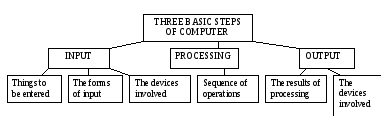
**Task XII. Answer the questions:
-
What do you need to a specific job on the computer?
-
What is the first step of doing the job?
-
What forms of input do you use?
-
What devices are involved to receive the input?
-
What does a computer do with the information it receives?
-
What is the 3-step process?
-
Name the devices you usually use for the input?
*Task XIII. Read the following sentences, translate them into Ukrainian. Pay your attention to the use of Passive Voice.
1.The basic instructions are provided by computer. 2. The data were given to the computer two minutes ago. 3. The input will be received trough the keyboard. 4. The information is being sorted and put into a usable form now. 5. The calculations were being done when he made records. 6. The results have been already displayed on a screen. 7. He said the output had been displayed on a screen. 8. The work may be done in two seconds.
*Task XIV. State the tense and type of Predicates and translate the sentences into Ukrainian.
1. When the engineer was measuring the temperature he used the ultrasonic technique. When measuring the temperature the engineer used the ultrasonic technique. 2. The temperature the engineer was measuring was of great value for our tests. The temperature was being measured great importance for our tests. 3. When the temperature was being measured it Proved extremely low. Being measured the temperature proved extremely low. 4. When the student had measured the temperature he wrote it down in the table.
**Task XV. Put the Verbs in the brackets in the required forms of the Tense and translate the sentences into Ukrainian.
1. For many years scientists (to study) the nucleus before they found that it is possible to split it. 2. By the first of January our plant (to use) atomic energy for running different machines for eight months. 3. Many power stations (to use) atomic energy for a long time before I knew it. 4. All this period scientists and engineers (to develop) rocket technology and electronics in close cooperation. 5. We widely (to use) electronic devices in industry for many years. 6. We know that our astronomers (to observe) the moon for a long time. 7. My friend (to make) these experiments to compare the weigh of elements since the first of September, 8. The question about the new experiment on this subject (to discuss) for some time before we came to a definite conclusion.
Task XI. State the functions of the words ending-ed and translate the sentences into Ukrainian.
1. Iron and steel are both produced from iron ore. 2. The steel produced by our plant is of high quality. 3. Scientists produced new elements in і nuclear reactors. 4. For very low-temperature work gases are the only substances that can be used. 5. The two very important types of thermometers widely used in industrial processes are electrical in character. 6. We used both types of thermometers in our work. 7. Our laboratory will be provided with all the necessary instruments. 8. The instruments provided by our plant are very accurate. 9. This plant provided a great number of accurate instruments last year. 10. The automatic space station created provides important information on space.
Interacting with your computer
Input devices are the pieces of hardware which allow us to enter information into the computer.
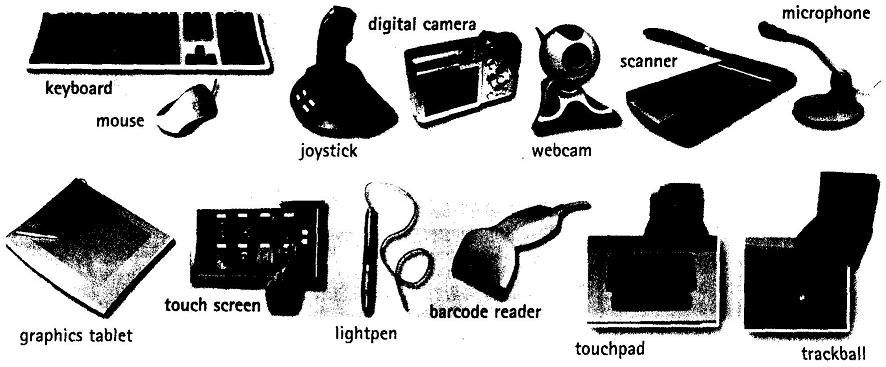
A standard PC keyboard has various groups of keys.
-
Alphanumeric keys - these represent letters and numbers, arranged as on a typewriter.
-
A numeric keypad appears to the right of the main keyboard and contains numeric and editing keys; the Num Lock key is used to switch from numbers to editing functions.
-
Function keys appear at the top of the keyboard and can be programmed to do special jobs.
-
Cursor keys include 'arrow keys' which move the insertion point, and keys such as Home, End, Page Up, and Page Down, which let you move around documents.
-
Dedicated keys are used to issue commands or produce alternative characters. For example: Ctrl changes the functions of other keys (e.g. Ctrl + X cuts the selected text).
Caps Lock sets the keyboard in 'CAPITALS' mode; it only affects letters.
Enter (or Return) is pressed to select options from a menu or to start a new paragraph.
Backspace deletes the character to the left of your current position.
The mouse
A mouse is a hand-held device that lets you move a pointer (or cursor) and select items on the screen. It has one or more buttons to communicate with the PC. A scroll wheel lets you move through your documents or web pages The pointer looks like an I-bar, an arrow or a pointing hand.
An optical mouse has an optical sensor instead of a ball underneath. A cordless (wireless) mouse has no cable; it sends data via infrared signals or radio waves. Mouse actions:
-
to click, press and release the left button.
-
to double-click, press and release the left button twice.
-
to drag, hold down the button, move the pointer to a new place and then release the button.
-
to right-click, press and release the right button; this action displays a list of commands.
Voice input
Today you can also interact with your computer by voice with a voice-recognition system that converts voice into text, so you can dictate text directly onto your word processor or email program. You can also control your PC with voice commands; this means you can launch programs, open, save or print files. Some systems let you search the Web or chat using your voice instead of the keyboard.
to copy images from paper into a computer
to read price labels in a shop
to select text and click on links on web pages
to enter drawings and sketches into a computer
to input voice commands and dictate text 1 to draw pictures or select menu options directly on the screen 8 to take and store pictures and then download them to a computer.
**Complete each sentence by choosing from the following devices: touch screen, trackball, touchpad, webcam.
1 A is a stationary device that works like a mouse turned upside down. You roll the ball with your hand to move the pointer on the screen.
2 Interactive are used in museums, information centres and Internet kiosks. You use your finger to point directly to objects on the screen.
3 ……………. is used to send live video images via the Internet.
4 A……………… is found on notebook PCs. You use it by pressing the sensitive pad with a finger.
** Label the groups of keys with terms from B opposite. Then identify the keys described below.
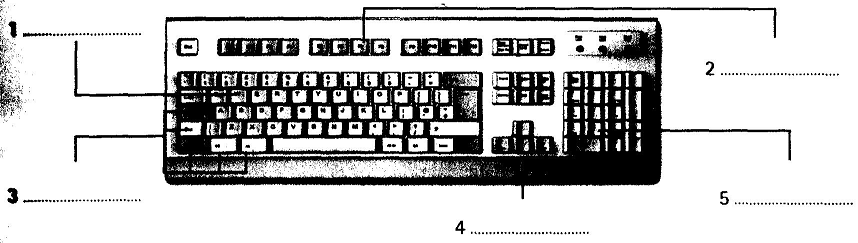
6 It produces upper-case letters, but it does not affect numbers and symbols.
7 It removes the character to the left of the cursor or any selected text.
8 It works in combination with other keys, e.g. you press this key and C to copy the selected text.
**Parts of a computer
A computer is an electronic machine that accepts, processes, stores and outputs information. A typical computer consists of two parts: hardware and software. Hardware is any electronic or mechanical part of the computer system that you can see or touch.
Software is a set of instructions, called a program, which tells a computer what to do. There are three basic hardware sections.
1 The CPU is the heart of the computer, a microprocessor chip which processes data and coordinates the activities of all the other units.
2 The main memory holds the instructions and data which are being processed by the CPU. It has two main sections: RAM (random access memory) and ROM (read only memory).
3 Peripherals are the physical units attached to the computer. They include: Input devices, which let us enter data and commands (e.g. the keyboard and the mouse).
Output devices, which let us extract the results (e.g. the monitor and the printer).
Storage devices, which are used to store information permanently (e.g. hard disks and DVD-RW drives). Disk drives are used to read and write data on disks. At the back of a computer there are ports into which we can plug external devices (e.g. a scanner, a modem, etc.). They allow communication between the computer and the devices
**Look at A opposite. Read these quotations and say which computer essential they refer to.
1. ‘Accelerate your digital lifestyle by choosing a Pentium at 4.3 GHz.’
2. ‘Right-click to display a context-sensitive menu.’
3. ‘You will see vivid, detailed images on a 17" display.’
4. ‘This will produce high-quality output, with sharp text and impressive graphics.’
5. ‘Use it when you want to let the grandparents watch the new baby sleeping.’
6. ‘Press any key to continue.’
**Match the terms with their definitions.
|
CD/DVD drive Speaker Modem port |
a any socket into which a peripheral device may be connected b device used to produce voice output and play back music c mechanism that reads and/or writes to optical discs d device that converts data so that it can travel over the Internet |
**Complete the diagram and sentences below with words from C opposite.
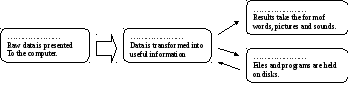
1 Computer is the visible or audible result of data processing – information that can be read, printed or heard by the user.
2 The CPU will process data as instructed by the programs you're running includes functions like calculating, sorting, editing, drawing and searching.
3 DVDs are expected to replace CDs as devices.
4 As a scanner, the Sigma-100 can be used to photographs as well as documents into the computer.
9 It is used to confirm commands; in a word processor, it creates a new paragraph.
**Look at C opposite. Complete these sentences with the correct 'mouse action'.
1 To start a program or open a document you ………….. on its icon - that is, you rapidly press and release the mouse button twice.
2 If you want to select a menu option, you just…………… on the left button.
3 If you want to find the commands for a particular text, image, etc., you have to ……………… on it.
4 If you want to move an object, press the button and ……………… the object to the desired location.