Материал: m013802e_b
5.2 Controller
750-812,
750-814,
750-815,
750-816
5.2.1 Settings
As opposed to the MODBUS coupler the factory configuration of the controller change is not made by DIP switch, but is changed using a PC. The communication between the controller and PC is described in the ‘Start-up and diagnosis’ chapter.
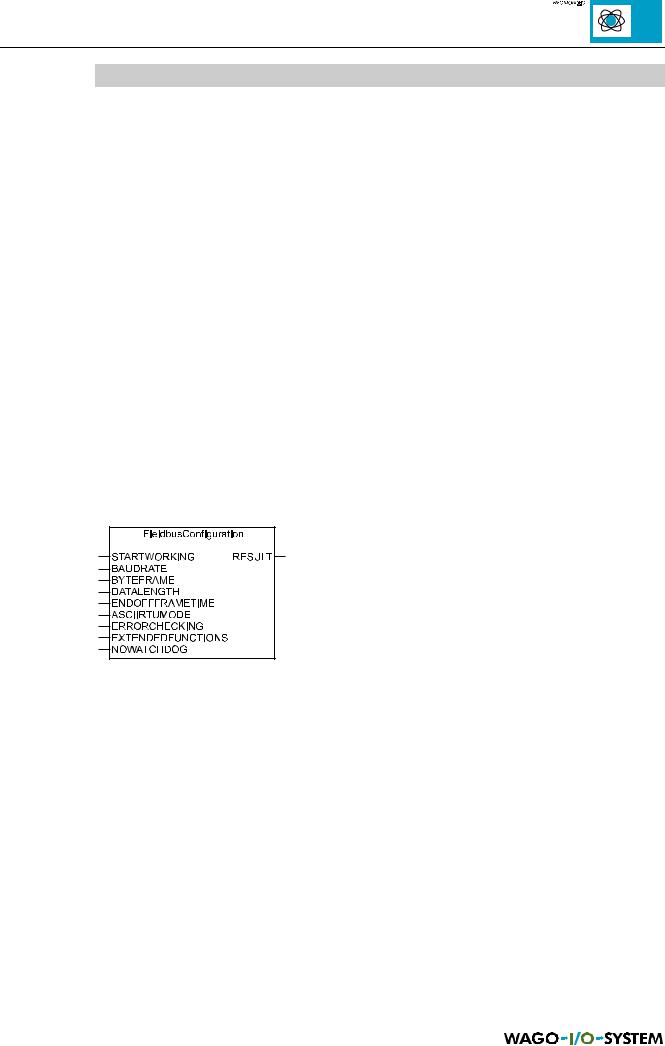
The controller is set on the software side using the ‘Fieldbus configuration’ function block of the WAGO-I/O-PRO library. If this module is taken up in the control program, the setting is made automatically even after changing the controller. The settings are taken over into the controller parameter block. If the desired values are not already set, a firmware reset is automatically made in bus operation and the controller restarts with the selected settings.
If the controller is to be set independent of a machine or plant, a program which only comprises of the configuration module can be downloaded and started from the programming system.
Fig. 5.5: Function block for controller setting
The coupler settings are described as follows. Here the term ‘Frame’ is frequently used. ‘Frame’ is a data transfer record.
MODBUS / Configuration |
35 |
15.12.99

5.2.1.1 Standard settings
The controller is delivered with the following standard values:
Input function block |
Setting |
Value |
Chapter |
FieldbusConfiguration |
|
|
|
|
|
|
|
BAUDRATE |
9600 Bd |
6 |
5.2.1.2 |
|
|
|
|
BYTEFRAME |
No Parity, 8 Bit |
0 |
5.2.1.3 |
|
1 Stop Bit |
|
|
DATALENGTH |
8 Bit |
FALSE |
5.2.1.3 |
|
|
|
|
ENDOFFRAMETIME |
3 x Frame Time |
0 |
5.2.1.4 |
|
|
|
|
ASCIIRTUMODE |
RTU mode |
TRUE |
5.2.1.5 |
|
|
|
|
ERRORCHECKING |
being processed |
TRUE |
5.2.1.6 |
|
|
|
|
EXTENDEDFUNCTIONS |
without |
FALSE |
5.2.1.7 |
|
|
|
|
NOWATCHDOG |
Watchdog switched on |
FALSE |
5.2.1.8 |
|
|
|
|
Table 5.12: Standard settings, controller
5.2.1.2 Baud rate setting
The following baud rates can be set:
Baud rate |
Baud rate |
BAUDRATE |
750-812/814 |
750-815/816 |
Value |
|
|
|
150 Bd |
38400 Bd |
0 |
|
|
|
300 Bd |
57600 Bd |
1 |
|
|
|
600 Bd |
115200 Bd |
2 |
|
|
|
1200 Bd |
1200 Bd |
3 |
|
|
|
2400 Bd |
2400 Bd |
4 |
|
|
|
4800 Bd |
4800 Bd |
5 |
|
|
|
9600 Bd |
9600 Bd |
6 |
|
|
|
19200 Bd |
19200 Bd |
7 |
|
|
|
Table 5.13: Baud rates, controller
The standard default setting is 9600 Baud.
36 |
MODBUS / Configuration |
15.12.99

5.2.1.3 Error detection, length of the character string
A parity bit can additionally be transmitted with each byte. Data transfer faults can be recognised with the help of the parity bit. A differentiation is made between parity checks for even parity, odd parity and no parity.
For this the number of set bits (=1) are counted in the transmitted data bytes. For example, during the transmission of the character string 1100 0101 the number of set bits is even, namely 4. If the setting of an even parity bit is selected, then in this case it is set to 0, so that the number of set bits still remains even. Analog to this, the odd parity bit 1 would be selected so that the number of set bits will be odd.
This type of error detection is assured for one error, for several errors under certain circumstances this error detection may no longer be assured. If the coupler recognises a parity error, the frame is ignored and a new frame can only be received following a renewed ‘Start of Frame’.
If the slave receives faulty frames, these will not be replied to. The master detects this error in that after the preset time (Time-out) no corresponding frame is received.
In the MODBUS coupler 750-812 a parity bit can be attached to each byte. The data length selected can be 7 or 8 bit. In addition it is possible to add 1 to 3 stop bits.
Byte Frame |
Data length |
Stop Bits |
DATALENGTH |
BYTEFRAME |
|
|
|
Value |
Value |
No Parity |
8 |
1 |
FALSE |
0 |
|
|
|
|
|
Even Parity |
8 |
1 |
FALSE |
1 |
|
|
|
|
|
Odd Parity |
8 |
1 |
FALSE |
2 |
|
|
|
|
|
No Parity |
8 |
2 |
FALSE |
3 |
|
|
|
|
|
No Parity |
7 |
2 |
TRUE |
0 |
Even Parity |
7 |
1 |
TRUE |
1 |
|
|
|
|
|
Odd Parity |
7 |
1 |
TRUE |
2 |
|
|
|
|
|
No Parity |
7 |
3 |
TRUE |
3 |
|
|
|
|
|
Table 5.14: Byte Frame, Controller
The standard setting is no parity, 8 bit data length and 1 stop bit. This setting is ignored when transferring data in RTU mode, as the format of this mode is set to 8 bit.
MODBUS / Configuration |
37 |
15.12.99

5.2.1.4 End of Frame Time
The end of frame time is the pause time following a frame which is required to switch over the repeater in slave. This time must permit gaps during a frame without resulting in a faulty detection of the end of frame time.
The setting of the end of frame time is made with the input ENDOFFRAMETIME.
End of Frame Time |
ENDOFFRAMETIME |
|
Value |
3 x Frame Time |
0 |
|
|
100 ms |
1 |
|
|
200 ms |
2 |
|
|
500 ms |
3 |
|
|
1 s |
4 |
|
|
1 ms |
5 |
|
|
10 ms |
6 |
|
|
50 ms |
7 |
|
|
Table 5.15: End of Frame Time, Controller
The standard setting is 3 x frame time.
5.2.1.5 ASCII/RTU mode
MODBUS permits two different transmission modes:
ASCII mode: |
Each byte (8 Bit) is sent as 2 ASCII characters. |
Advantage: |
Displayable characters are transmitted. The gaps between characters |
|
need not be observed, provided they do not exceed 1 second. |
RTU mode: |
Each byte (8 Bit) comprises of two 4 bit hexadecimal characters. |
Advantage: |
As only 1 character has to be transmitted for each byte a higher data |
|
throughput is achieved in comparison to the ASCII mode. |
The setting is made using input ASCIIRTUMODE.
Mode |
ASCIIRTUMODE |
|
Value |
ASCII |
FALSE |
|
|
RTU |
TRUE |
|
|
Table 5.16: ASCII-/RTU mode, controller
The standard setting is RTU mode.
38 |
MODBUS / Configuration |
15.12.99
5.2.1.6 Error Check
A check sum (CRC) is calculated from the frame to be transmitted in the sender (higher ranking controls). This check sum is transmitted in the frame to the receiver (controller). Once the error check is activated, this check sum is compared with the check sum calculated in the coupler on the basis of the same instruction. An error is signalled by a red LED ‘CRC’.
The setting is made via the input ERRORCHECKING.
Error Check |
ERRORCHECKING |
|
Value |
ignored |
FALSE |
|
|
being processed |
TRUE |
|
|
Table 5.17: Error Check, controller
Error Check activated is the standard setting.
5.2.1.7 Extended Functions
The registers for further internal diagnostic possibilities (extended functions) in the address space of the coupler are not yet available. For this reason set the attendant input
EXTENDEDFUNCTIONS to FALSE.
Extended EXTENDEDFUNCTIONS
Functions
Value
without FALSE
available TRUE
Table 5.18: Extended functions, controller
In the standard setting, other diagnosis possibilities are switched off.
MODBUS / Configuration |
39 |
15.12.99