Материал: part05

Page 116 |
DICOM PS3.5 2020a - Data Structures and Encoding |
•yyyy identifies a specific organization as registered by an International Code Designator registration authority (see ISO 6523).
3.Example components of a <suffix> for unique identification of an image could include: •product
•system identifier
•study, series and image numbers •study, series and image date & times.
- Standard -
DICOM PS3.5 2020a - Data Structures and Encoding |
Page 117 |
DExamplesofVariousPixelDataandOverlay
Encoding Schemes (Informative)
D.1 Detailed Example of Pixel Data Encoding
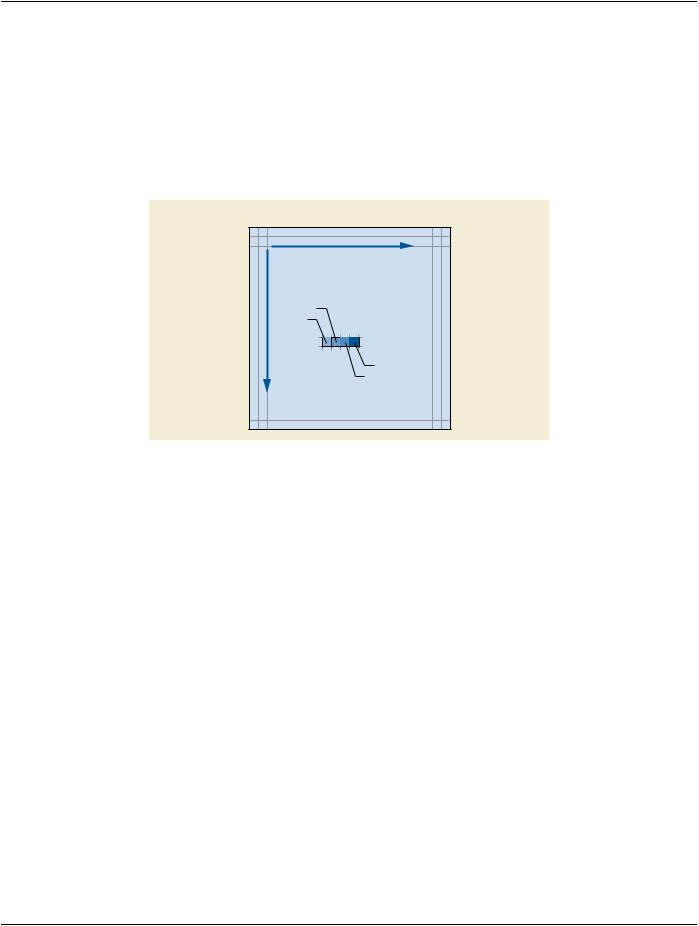
As specified in PS3.3, Image Pixel Data is stored within the Value of the Pixel Data Element (7FE0,0010). The order in which Pixel Data for an image plane is encoded is from left to right and top to bottom, a row at a time (see Figure D-1).
Image Plane
Pixel i
Pixel i-1
Pixel i+2
Pixel i+1
Figure D-1. An Image Pixel Plane
An individual pixel may consist of one or more Pixel Sample Values (e.g., color or multi-planar images). Each Pixel Sample Value can be expressed as either a binary 2's complement integer or a binary unsigned integer, as specified by the Pixel Representation DataElement(0028,0103).ThenumberofbitsineachPixelSampleValueisspecifiedbyBitsStored(0028,0101).For2'scomplement integer Pixel Samples the sign bit is the most significant bit of the Pixel Sample Value.
A Pixel Cell is the container for a Pixel Sample Value and optionally additional bits. These additional bits are used to place Pixels on certain boundaries (byte, word, etc.). A Pixel Cell exists for every individual Pixel Sample Value in the Pixel Data. The size of the Pixel Cells is specified by Bits Allocated (0028,0100) and is greater than or equal to the Bits Stored (0028,0101). The placement of the Pixel Sample Values within the Pixel Cells is specified by High Bit (0028,0102).
Any restrictions on the characteristics of a Pixel Cell and the Pixel Sample Value contained therein are specific to the Information Object Definition (e.g., Image Object) containing the Pixel Data Element (see PS3.3).
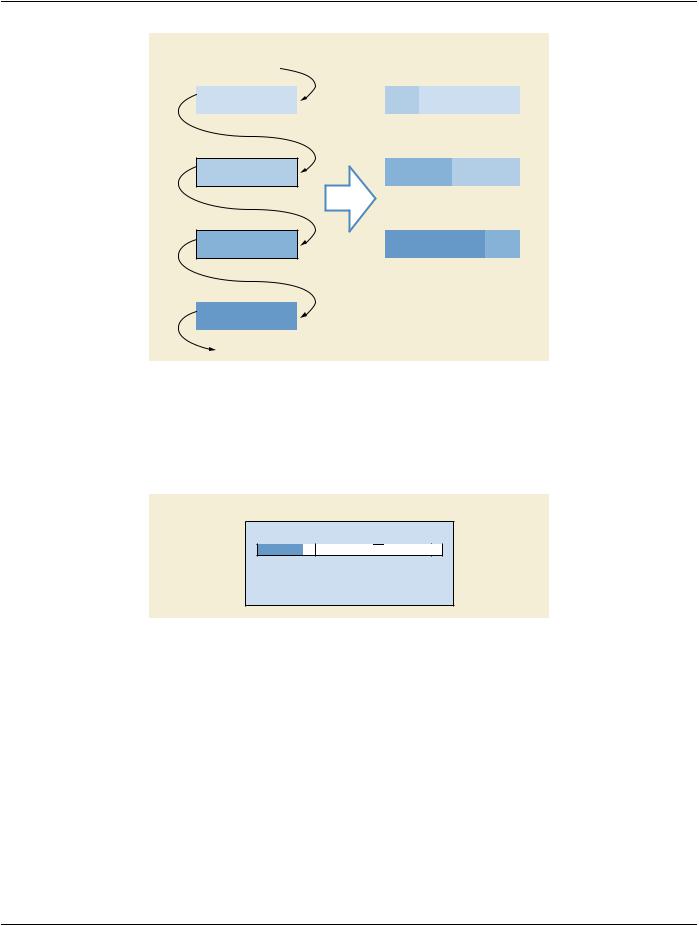
The Pixel Data Element, as specified by the DICOM Default Transfer Syntax in Section 10.1, has a Value Representation of OW (Other Word). The Pixel Data in DICOM, as it was in ACR-NEMA 2.0, is packed, except that Bits Allocated is always either 1, or a multiple of 8 (see Figure D-2). One way to visualize this packed encoding is to imagine encoding the Pixel Cells as a concatenated stream of bits from the least significant bit of the first Pixel Cell up through the most significant bit of the last Pixel Cell. Within this stream, the most significant bit of any Pixel Cell is followed by the least significant bit of the next Pixel Cell. The Pixel Data can then be broken up into a stream of physical 16-bit words, each of which is subject to the byte ordering constraints of the Transfer Syntax.
Allother(non-default)DICOMTransferSyntaxesmakeuseofexplicitVRencoding.FortheseTransferSyntaxes,allPixelDatawhere Bits Allocated is less than or equal to 8 may be encoded with an explicit VR of OB (see Annex A). As in the OW case, Pixel Cells are packed together, but in this case the Pixel Data is broken up into a stream of physical 8-bit words.
Note
For Pixel Data encoded with an explicit VR of OB, the encoding of the Pixel Data is unaffected by byte ordering.
- Standard -
Page 118 |
DICOM PS3.5 2020a - Data Structures and Encoding |
|
||||
|
Concatenated Pixel Cells |
Concatenated Pixel Cells |
|
|||
|
|
|
|
After Splitting Into 16 bit Words |
||
|
|
|
|
for Transfer |
|
|
|
|
|
|
|
|
|
|
|
Pixel Cell i-1 |
|
|
Pixel Cell i-1 |
|
|
MSb |
LSb |
|
LSb |
MSb |
LSb |
|
Pixel Cell i |
MSb |
LSb |
|
Pixel Cell i+1 |
MSb |
LSb |
15 |
1 |
|
|
|
|
Pixel Cell i+1 |
Pixel Cell i |
|
LSb |
MSb |
|
15 |
1 |
|
|
|
|
Pixel Cell i+2 |
|
|
MSb |
LSb |
MSb |
|
15 |
1 |
|
|
|
|
|
|
Pixel Cell i+2 |
|
|
MSb |
LSb |
|
MSb = Most Significant Bit |
|
LSb = Least Significant Bit |
||
Figure D-2. Encoding (Packing) of Arbitrary Pixel Data with a VR of OW
With the exception of single bit images, Pixel Cells begin and end on byte or word boundaries and such that the Pixel Sample Value contained within also fits 'neatly' within a cell.
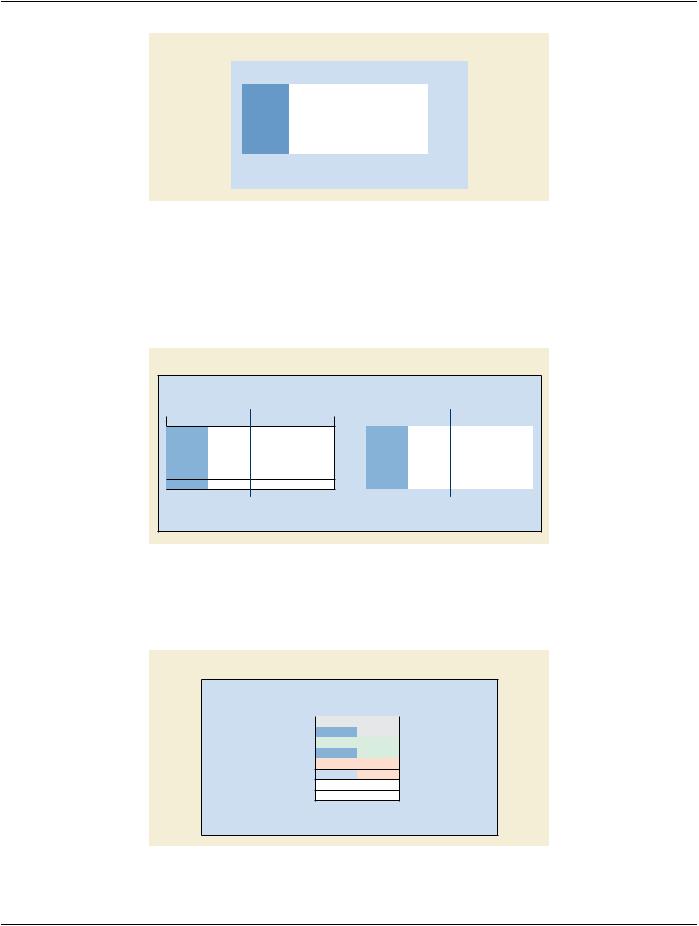
Figure D-3 is an example of Pixel Data encoding using the Value representation of OW for the purposes of clarification. The Example is a valid example for a CT Image Information Object.
Example: CT Pixel Cell
 Pixel Sample
15  14
14 13
13 12
12 11 10
11 10 9
9  8
8  7
7  6
6  5
5  4
4  3
3  2
2  1 0
1 0
Bits Allocated = 16
Bits Stored = 12
High Bit = 11
Figure D-3. Example Pixel Cells
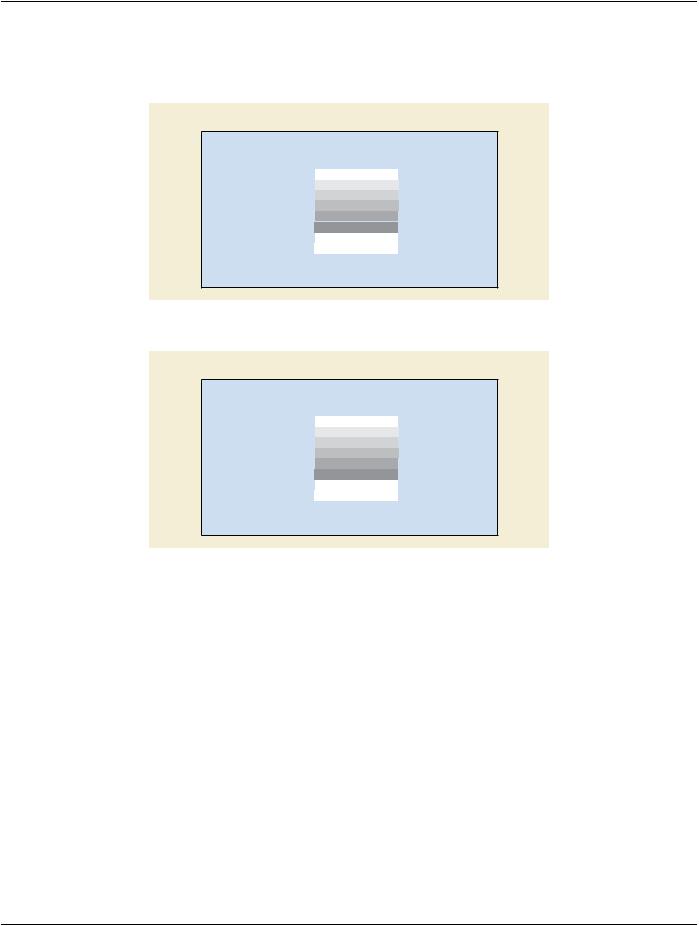
Figure D-4 shows Pixel Data constructed of these example Pixel Cells as they are packed into a stream of 16-bit words.
- Standard -
DICOM PS3.5 2020a - Data Structures and Encoding |
Page 119 |
Example: CT Pixel Data Value
|
15 14 13 12 |
|
11 10 |
9 |
8 |
7 |
6 |
5 |
4 |
3 |
2 |
1 |
0 |
|
|
|
|
||||||||||||
|
|
|
|
|
|
|
|
|
|
|
Word 0 |
|||
|
|
|
MSb |
|
|
Pixel Sample 1 |
|
|
|
LSb |
||||
|
|
|
MSb |
|
|
Pixel Sample 2 |
|
|
|
LSb |
Word 1 |
|||
|
|
|
MSb |
|
|
Pixel Sample 3 |
|
|
|
LSb |
Word 2 |
|||
|
|
|
|
|
|
|
|
... |
|
|
|
|
|
|
|
|
|
|
|
|
|
|
... |
|
|
|
|
|
|
|
|
|
|
|
|
|
|
|
|
|
|
|
|
|
|
MSb = Most Significant Bit |
|
|
|
|
|
|
|
|
|
|
|||
|
LSb = Least Significant Bit |
|
|
|
|
|
|
|
|
|
|
|||
|
|
|
|
|
|
|
|
|
|
|
|
|
|
|
Figure D-4. Example Pixel Cells Packed into 16-bit Words (VR = OW)
Byte ordering becomes a consideration when we represent the Pixel Data physically, in memory, a file, or on a network.
In the memory of a byte-addressable Big Endian machine, the highest order byte (bits 8 - 15) in each 16-bit word has a binary address of x...x0. While in a byte-addressable Little Endian machine, the lowest order byte (bits 0 - 7) in each 16-bit word has a binary address of x...x0. Figure D-5 pictures our example Pixel Data streams as they would be addressed in the memory of both a Big Endian and a Little Endian machine.
Example: CT Pixel Data Value in Memory
Big Endian Machine
MSB |
LSB |
15 14 13 12 11 10 9 8 7 6 5 4 3 2 1 0
byte address 0 |
byte address 1 |
byte address 2 |
byte address 3 |
byte address 4 |
byte address 5 |
|
... |
|
... |
|
Little Endian Machine |
|
|
|
|
||||||
|
MSB |
|
|
|
|
|
LSB |
|
|
|
|
|
15 14 13 12 11 10 |
9 |
8 |
7 |
6 |
5 |
4 |
3 |
2 |
1 |
0 |
Word 0 |
byte address 1 |
|
|
byte address 0 |
|
||||||
Word 1 |
byte address 3 |
|
|
byte address 2 |
|
||||||
Word 2 |
byte address 5 |
|
|
byte address 4 |
|
||||||
|
|
|
|
|
|
|
|
... |
|
|
|
|
|
|
|
|
|
|
|
... |
|
|
|
|
|
|
|
|
|
|
|
|
|
|
|
MSB = Most Significant Byte
LSB = Least Significant Byte
Figure D-5. Example Pixel Cells Byte Ordered in Memory (VR = OW)
Byte ordering is also specified as part of the negotiated Transfer Syntax used in the exchange of a DICOM message. Sixteen bit words are transmitted across the network (a byte at a time) least significant byte first in the case of a Little Endian Transfer Syntax (see Figure D-6).
Example: CT Pixel Data Value Byte Stream (VR = OW)
Little Endian Transfer Syntax
|
7 |
6 |
5 |
4 |
3 |
2 |
1 |
0 |
byte 0 |
Pixel 1 |
|
|
|
LSb |
|||
byte 1 |
|
|
|
|
MSb |
|
|
|
byte 2 |
Pixel 2 |
|
|
|
LSb |
|||
byte 3 |
|
|
|
|
MSb |
|
|
|
byte 4 |
Pixel 3 |
|
|
|
LSb |
|||
byte 5  MSb
MSb
...
...
MSb = Most Significant Bit
LSb = Least Significant Bit
Figure D-6. Sample Pixel Data Byte Streams (VR = OW)
- Standard -
Page 120 |
DICOM PS3.5 2020a - Data Structures and Encoding |
As a last pair of examples, for Pixel Data having the Value Representation OW and the following attributes: 8 bits allocated, 8 bits stored, and a high bit of 7; the resulting byte streams pictured in Figure D-7 are as they would be transmitted across a network and/or stored on media. For Pixel Data having the same attributes, but having the explicit Value Representation OB; the resulting byte streams are unaffected by byte ordering and are pictured in Figure D-8.
8 Bit Pixel Data Byte Stream (VR = OW; 8 bits allocated, high bit of 7)
Little Endian Transfer Syntax
|
7 |
6 |
5 |
4 |
3 |
2 |
1 |
0 |
|
byte 0 |
|
MSb |
|
Pixel 1 |
|
|
LSb |
||
byte 1 |
|
MSb |
|
Pixel 2 |
|
|
LSb |
||
byte 2 |
|
MSb |
|
Pixel 3 |
|
|
LSb |
||
byte 3 |
|
MSb |
|
Pixel 4 |
|
|
LSb |
||
byte 4 |
|
MSb |
|
Pixel 5 |
|
|
LSb |
||
byte 5 |
|
MSb |
|
Pixel 6 |
|
|
LSb |
||
|
|
|
|
|
|
... |
|
|
|
|
|
|
|
|
|
... |
|
|
|
|
MSb = Most Significant Bit |
||||||||
|
LSb = Least Significant Bit |
||||||||
Figure D-7. Sample Pixel Data Byte Streams for 8-bits Allocated and 8-bits Stored (VR = OW)
8 Bit Pixel Data Byte Stream (VR = OB; 8 bits allocated, high bit of 7)
Little Endian Transfer Syntax
|
7 |
6 |
5 |
4 |
3 |
2 |
1 |
0 |
|
byte 0 |
|
MSb |
|
Pixel 1 |
|
|
LSb |
||
byte 1 |
|
MSb |
|
Pixel 2 |
|
|
LSb |
||
byte 2 |
|
MSb |
|
Pixel 3 |
|
|
LSb |
||
byte 3 |
|
MSb |
|
Pixel 4 |
|
|
LSb |
||
byte 4 |
|
MSb |
|
Pixel 5 |
|
|
LSb |
||
byte 5 |
|
MSb |
|
Pixel 6 |
|
|
LSb |
||
|
|
|
|
|
|
... |
|
|
|
|
|
|
|
|
|
... |
|
|
|
|
MSb = Most Significant Bit |
||||||||
|
LSb = Least Significant Bit |
||||||||
Figure D-8. Sample Pixel Data Byte Streams for 8-bits Allocated and 8-bits Stored (Explicit VR = OB)
D.2 Various Additional Examples of Pixel and Overlay Data Cells
The following examples further illustrate the use of the data elements for Bits Allocated (0028,0100), Bits Stored (0028,0101) and High Bit (0028,0102) in the encoding of Pixel and Overlay Data. All examples show sample Pixel Cells before being encoded in byte streams (and before being affected by a particular Transfer Syntax).
- Standard -