Материал: part02
DICOM PS3.2 2020a - Conformance |
Page 181 |
D.4.3.2 Additional Protocols
When host names rather than IP addresses are used in the configuration properties to specify presentation addresses for remote AEs, the application is dependent on the name resolution mechanism of the underlying operating system.
D.4.3.3 IPv4 and IPv6 Support
This product supports both IPv4 and IPv6. It does not utilize any of the optional configuration identification or security features of IPv6.
D.4.4 Configuration
All configuration is performed through the use of Java properties file(s) stored in pre-defined locations that are specific to the under- lying operating system. Refer to the Release Notes for specific details.
D.4.4.1 AE Title/Presentation Address Mapping
The Calling AE Title of the local application is configurable in the preferences file, and is shared by all of the AEs. The mapping of thelogicalnamebywhichremoteAEsaredescribedintheuserinterfacetoCalledAETitlesaswellaspresentationaddress(hostname or IP address and port number) is configurable in the preferences file.
D.4.4.2 Parameters
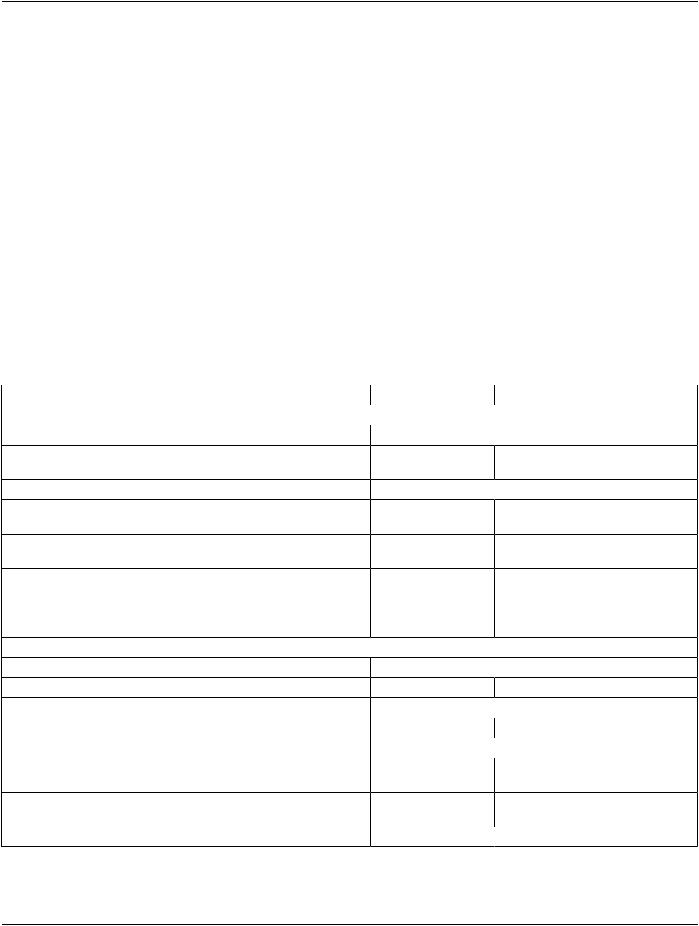
Table D.4.4-1. Configuration Parameters Table
Parameter |
Configurable |
General Parameters |
|
PDU Size |
No |
Time-out waiting for acceptance or rejection Response to an |
No |
Association Open Request. (Application Level timeout) |
|
General DIMSE level time-out values |
No |
Time-outwaitingforresponsetoTCP/IPconnect()request.(Low-level |
No |
timeout) |
|
Time-out waiting for acceptance of a TCP/IP message over the |
No |
network. (Low-level timeout) |
|
Time-out for waiting for data between TCP/IP packets. (Low-level |
No |
timeout) |
|
Any changes to default TCP/IP settings, such as configurable stack |
No |
parameters. |
|
AE Specific Parameters (all AEs) |
|
Size constraint in maximum object size |
No |
Maximum PDU size the AE can receive (see note 1) |
No |
Maximum PDU size the AE can send |
No |
AE specific DIMSE level time-out values |
No |
Number of simultaneous Associations by Service and/or SOP Class |
No |
SOP Class support |
No |
Transfer Syntax support |
No |
Other parameters that are configurable |
No |
Default Value
 16kB
16kB
None
 None
None
None
None
None
None
 None
None
Unlimited
 Unlimited
None
 Unlimited
All supported SOP Classes always
proposed and accepted
All supported Transfer Syntaxes always proposed and accepted
 None
None
- Standard -
Page 182 |
DICOM PS3.2 2020a - Conformance |
Note
ThoughtheapplicationcansupportunlimitedPDUsizes,itwillneverofferaMaximumReceivedPDULengthofzero(unlimited) since this triggers a bug in some older systems.
D.5 Media Interchange
D.5.1 Implementation Model
D.5.1.1 Application Data Flow
Local |
MEDIA - FSR |
|
User requests |
Application |
Storage |
File Load |
Entity |
Medium |
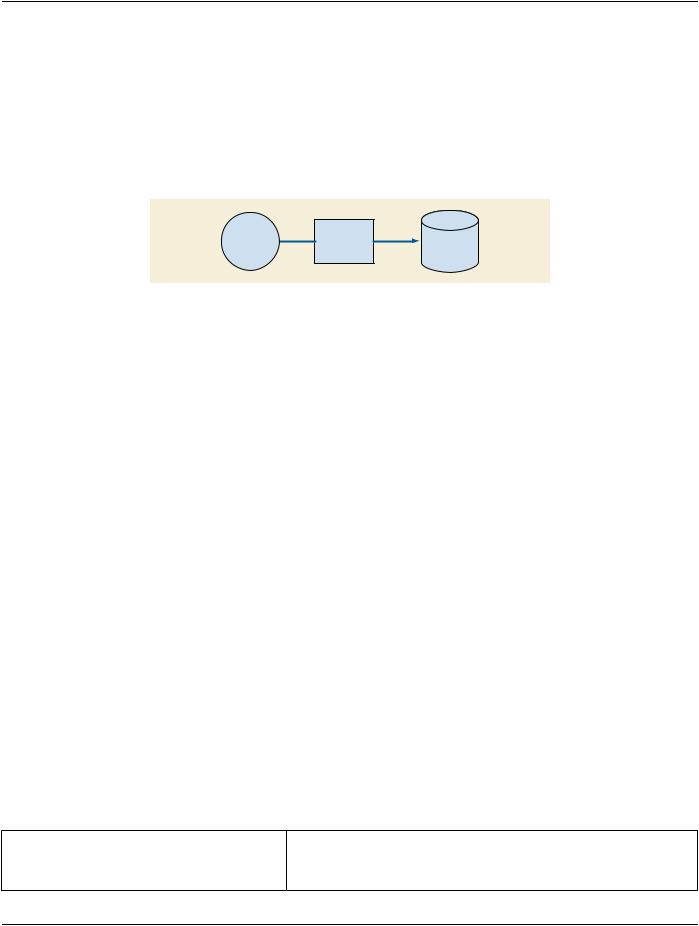
Figure D.5.1-1. Implementation Model
The application is a single pure Java application that provides a user interface, network support and media support as a File Set Reader.
Conceptually it may be modeled as the following single AE:
•MEDIA-FSR, which loads a user-selected PS3.10 compliant file, which may be a DICOMDIR or an image or spectroscopy object, eitherfromthelocalfilesystemorfromPS3.12compliantmediaaccordingtooneoftheGeneralPurposeMediaApplicationProfiles of PS3.11 (CD-R or DVD-RAM)
Ineffect,theapplicationismedia-neutral,sincetheuserisrequiredtobrowseandlocatetheDICOMDIRfile.Furthermore,anyDICOM image or spectroscopy object encoded in one of the standard uncompressed Transfer Syntaxes may be loaded, even in the absence of a PS3.10 compliant meta-information header, in which case a "best guess" at the Transfer Syntax will be made.
Compressed Transfer Syntaxes are not supported, which limits the Media Application Profiles supported.
D.5.1.2 Functional Definitions of AEs
D.5.1.2.1 MEDIA-FSR
MEDIA-FSR is activated through the user interface to select directories, images and spectra for display, import into the local database or network transmission.
D.5.1.3 Sequencing of Real-World Activities
All FSR activities are sequentially initiated in the user interface, and another activity may not be initiated until the prior activity has completed.
D.5.2 AE Specifications
D.5.2.1 MEDIA-FSR
MEDIA-FSR provides standard conformance to the Media Storage Service Class.
Table D.5.2-1. Application Profiles, Activities, and Roles for MEDIA-FSR
Application Profiles Supported |
Real World Activity |
Role |
STD-GEN-CD |
Load directory or file |
FSR |
STD-GEN-DVD-RAM |
Load directory or file |
FSR |
- Standard -

DICOM PS3.2 2020a - Conformance |
Page 183 |
Note
The application is media neutral and dependent on the underlying hardware. Any (non-secure) General Purpose Profile can be supported.
D.5.2.1.1 File Meta Information for the Application Entity
Not applicable, since MEDIA-FSR is not an FSC or FSU.
D.5.2.1.2 Real World Activities
D.5.2.1.2.1 Activity - Load Directory or File
MEDIA-FSR is activated through the user interface when a user selects the File load operation.
If the loaded file is a DICOMDIR, a browser will be displayed, from which instances may be selected and in turn loaded for display, imported into the local database or sent to a remote AE over the network.
If the file is an image or spectroscopy instance, it will be loaded and displayed.
D.5.2.1.2.1.1 Application Profile Specific Conformance
There are no extensions or specializations.
D.5.3 Augmented and Private Profiles
D.5.3.1 Augmented Profiles
None.
D.5.3.2 Private Profiles
None.
D.5.4 Media Configuration
None.
D.6 Support of Character Sets
D.6.1 Overview
The application supports all extended character sets defined in the DICOM 2002 standard, including single-byte and multi-byte character sets as well as code extension techniques using ISO 2022 escapes.
Support extends to correctly decoding and displaying the correct symbol for all names and strings found in the DICOMDIR, in storage instances from media and received over the network, and in the local database.
No specific support for sorting of strings other than in the default character set is provided in the browsers.
D.6.2 Character Sets
In addition to the default character repertoire, the Defined Terms for Specific Character Set in Table D.6.2-1 are supported:
Table D.6.2-1. Supported Specific Character Set Defined Terms
Character Set Description |
Defined Term |
Latin alphabet No. 1 |
ISO_IR 100 |
Latin alphabet No. 2 |
ISO_IR 101 |
- Standard -

Page 184 |
DICOM PS3.2 2020a - Conformance |
|
Character Set Description |
Defined Term |
|
Latin alphabet No. 3 |
|
ISO_IR 109 |
Latin alphabet No. 4 |
|
ISO_IR 110 |
Cyrillic |
|
ISO_IR 144 |
Arabic |
|
ISO_IR 127 |
Greek |
|
ISO_IR 126 |
Hebrew |
|
ISO_IR 138 |
Latin alphabet No. 5 |
|
ISO_IR 148 |
Japanese |
|
ISO_IR 13 |
Thai |
|
ISO_IR 166 |
Default repertoire |
|
ISO 2022 IR 6 |
Latin alphabet No. 1 |
|
ISO 2022 IR 100 |
Latin alphabet No. 2 |
|
ISO 2022 IR 101 |
Latin alphabet No. 3 |
|
ISO 2022 IR 109 |
Latin alphabet No. 4 |
|
ISO 2022 IR 110 |
Cyrillic |
|
ISO 2022 IR 144 |
Arabic |
|
ISO 2022 IR 127 |
Greek |
|
ISO 2022 IR 126 |
Hebrew |
|
ISO 2022 IR 138 |
Latin alphabet No. 5 |
|
ISO 2022 IR 148 |
Japanese |
|
ISO 2022 IR 13 |
Thai |
|
ISO 2022 IR 166 |
Japanese |
|
ISO 2022 IR 87 |
Japanese |
|
ISO 2022 IR 159 |
Korean |
|
ISO 2022 IR 149 |
D.6.3 Character Set Configuration
Whether or not characters are displayed correctly depends on the presence of font support in the underlying operating system. Typ- ically, as described in the Release Notes, it may be necessary for the user to add one of the "all Unicode" fonts to their system con- figuration in order to correctly display characters that would not typically be used in the default locale.
D.7 Security
D.7.1 Security Profiles
None supported.
D.7.2 Association Level Security
None supported.
Any Calling AE Titles and/or IP addresses may open an Association.
D.7.3 Application Level Security
None supported.
- Standard -

DICOM PS3.2 2020a - Conformance |
Page 185 |
D.8 Annexes
D.8.1 IOD Contents
D.8.1.1 Created SOP Instances
None.
D.8.1.2 Usage of Attributes From Received IODs
No SOP Class specific fields are required.
The local database, remote query and directory browsers make use of the conventional identification attributes to distinguish patients, studies, series and instances. In particular, if two patients have the same value for Patient ID, they will be treated as the same in the browser and the local database.
D.8.1.3 Attribute Mapping
Not applicable.
D.8.1.4 Coerced/Modified Fields
No coercion is performed.
D.8.2 Data Dictionary of Private Attributes
No private attributes are defined.
D.8.3 Coded Terminology and Templates
ThevalueforCodeMeaningwillbedisplayedforallcodesequences.Nolocallexiconisprovidedtolookupalternativecodemeanings.
D.8.4 Grayscale Image Consistency
The high resolution display monitor attached to the product can be calibrated according to the Grayscale Standard Display Function (GSDF). The Service/Installation Tool is used together with a luminance meter to measure the Characteristic Curve of the display systemandthecurrentambientlight.SeetheproductServiceManualfordetailsonthecalibrationprocedureandsupportedcalibration hardware. The result of the calibration procedure is a Monitor Correction LUT that will be active within the display subsystem after a system reboot.
D.8.5 Standard Extended/Specialized/Private SOP Classes
None
D.8.6 Private Transfer Syntaxes
None.
- Standard -