Материал: part02

Page 186 |
DICOM PS3.2 2020a - Conformance |
- Standard -

DICOM PS3.2 2020a - Conformance |
Page 187 |
E Conformance Statement Example Print
Server (Informative)
Disclaimer:
ThisdocumentisasampleDICOMConformanceStatementforafictionalPrintServer(SCP)ManagementSystem,calledEXAMPLE-
PRINT-SERVER-MANAGEMENT (also called Print Server) produced by a fictional vendor called EXAMPLE-IMAGING-PRODUCTS.
As stated in the annex title, this document is truly informative, and not normative. A conformance statement of an actual product might implement additional services and options as appropriate for its specific purpose. In addition, an actual product might implement the servicesdescribedinadifferentmannerand,forexample,withdifferentcharacteristicsand/orsequencingofactivities.Inotherwords, this conformance statement example does not intend to standardize a particular manner that a product might implement DICOM functionality.
E.0 Cover Page
Company Name: EXAMPLE-PrintingPRODUCTS.
Product Name: EXAMPLE-PRINT-SERVER
Version: 1.0-rev. A.1
Internal document number: 4226-xxx-yyy-zzz rev 1
Date: YYYYMMDD
E.1 Conformance Statement Overview
This fictional product EXAMPLE-PRINT-SERVER-MANAGEMENT implements the necessary DICOM services to facilitate the Print (SCP)ImagingManagementinthehealthcaredepartments,managingPrintimagingoveranetworkonMedicalLaserImagingSystems. It enables the capabilities to capture images at any networked DICOM modality and then print them anywhere they're needed in the medical facility.
Furthermore, before sending the images to be printed the EXAMPLE-PRINT-SERVER-MANAGEMENT will apply image processing, using presentation parameters and LUT to improve the image presentation quality and consistency. Moreover, it will manage the printing presentation format and the Printer queue and Configuration.
Table E.1-1 provides an overview of the network services supported by EXAMPLE-PRINT-SERVER-MANAGEMENT.
Table E.1-1. Network Services
SOP Classes |
User of Service (SCU) |
Provider of Service (SCP) |
Print Management |
|
|
Grayscale Print Management Meta |
No |
Yes |
Presentation LUT |
No |
Yes |
Printer Configuration |
No |
Yes |
Print Job |
No |
Yes |
Basic Annotation |
No |
Yes |
E.2 Table of Contents
A table of contents shall be provided to assist readers in easily finding the needed information.
- Standard -
Page 188 |
DICOM PS3.2 2020a - Conformance |
E.3 Introduction
E.3.1 Revision History
Table E.3.1-1. Revision History
Document Version |
Date |
|
Author |
Description |
1.1 |
October 30,2003 |
WG 6 |
|
For Final Text |
1.2 |
August 30, 2007 |
WG 6 |
|
Revised Introduction |
E.3.2 Audience, Remarks, Terms and Definitions, Basics of DICOM Communication, Abbrevi- ations, References
See example text in Section A.3.
E.3.3 Additional Remarks for This Example
ThisdocumentisasampleDICOMConformanceStatementcreatedforDICOMPS3.2.Itistobeusedsolelyasanexampletoillustrate how to create a DICOM Conformance Statement for a print server system supporting DICOM Print Services. The subject of the doc- ument, EXAMPLE-PRINT-SERVER-MANAGEMENT, is a fictional product.
E.4 Networking
E.4.1 Implementation Model
E.4.1.1 Application Data Flow
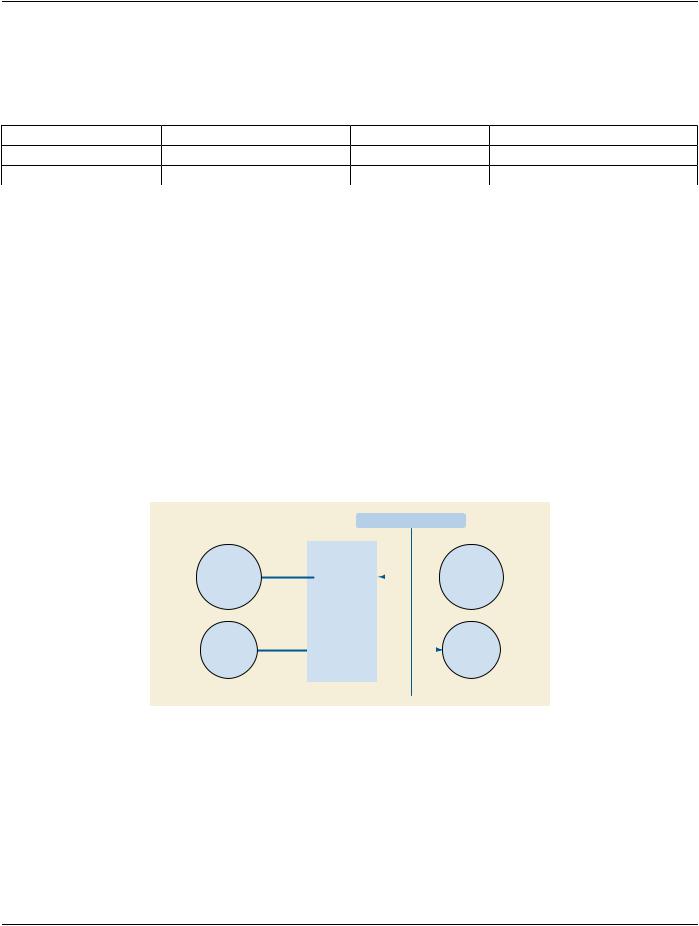
This implementation model uses the DICOM Basic Print Management Meta SOP Class to receive studies for the Medical Imager. Multiple associations to Print SCUs are supported.
|
DICOM Standard Interface |
|||
Receives |
|
|
|
Print Composer |
|
|
|
||
Images and |
|
|
|
|
Presentation Data |
|
|
|
(SCU) Send |
and Prepare |
|
|
|
Images & Print |
Images for |
|
|
Management |
|
Printing |
|
|
Information |
|
Management |
|
|
||
|
|
|
|
|
|
Server |
|
|
|
|
Application |
|
|
Remote AE |
Connectivity |
|
|
|
|
|
|
|
Receives |
|
Verification |
|
|
|
Connectivity |
|
|
|
|
Verification |
|
|
|
|
|
Figure E.4.1-1. Application Data Flow Diagram
The Print Server is receiving the Images with the Presentation and Annotation information, it Apply it on the images and creates a print-jobwithintheprintqueue,containingoneormorefilmpagescomposedfromimagesselectedbytheclientPrintSCU.Furthermore, it also manages the Printer Status and Configuration.
- Standard -

DICOM PS3.2 2020a - Conformance |
Page 189 |
E4.1.2 Functional Definition of AEs
E.4.1.2.1 Functional Definition of Print Server (SCP) Application Entity
ThePrintServerSystemacquirestheimageswiththedemographicsandpresentationinformationfromtheconnectedPrintComposer (SCU)thatisGroupedwithaWorkstationoranArchivedevice.Studiesaretemporarilystoredondisk.Theimagesarethenprocessed and formatted and finally queued as a print job on the Printer queue. If the Printer is operating normally, then the film sheets described in the print-job will be printed. Changes in the Printer operation status will be detected (e.g., film Magazine empty) and reported back to the Print SCU. If the Printer is not operating normally, then the print-job will be set to an error state and can be restarted by the user via the job control interface.
The Print Server Management includes:
•DICOM Association and Negotiation Management
•Image Buffering
•Image Processing (Windowing level, P-LUT, GSDF, Annotation, etc)
•Image Formatting (Film sheet format)
•Printing
•Print Job Status Tracking
•Print Status Tracking
•Printer Configuration Tracking
The Printer Status and Configuration can be requested at any time by the Print SCU, while the Print Server will update the Print SCU asynchronously whenever the Printer status get changed. Furthermore, the Print Server provides in addition a Service operation of checking the networking connectivity to it's Print SCU using the Verification SOP Class.
- Standard -
Page 190 |
DICOM PS3.2 2020a - Conformance |
E.4.1.3 Sequencing of Real-World Activities
|
||
Composer |
|
Server |
|
|
|
** DICOM Printer Status N-GET
1.DICOM Film Session N-CREATE
2.DICOM Presentation LUT N-CREATE
3.DICOM Film Box N-CREATE
4.Create Image Boxes & Annotation Boxes
5.DICOM Image Box N-SET
6.DICOM Annotation Box N-SET
7.DICOM Film Session N-ACTION
(or) 8. DICOM Film Box N-ACTION
9. Create Print Job
10. DICOM Film Session N-DELETE
* DICOM Print Job N-GET
* DICOM Print Job N-EVENT-REPORT
** DICOM Printer Status N-GET
** DICOM Printer Configuration N-GET
** DICOM Printer Status N-EVENT-REPORT
Figure E.4.1-2. Print Server Management Sequence
Note
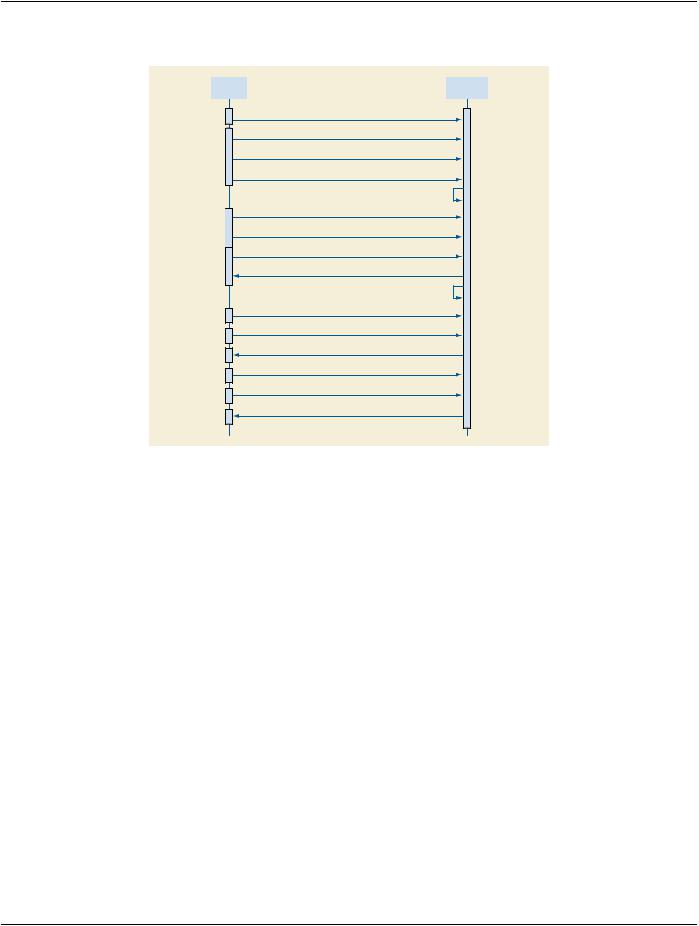
1.The Print Job N-GET and N-EVENT-REPORT are Asynchronous messages that may occur at any time after the Print Job was created.
2.The Printer Status & Configuration N-GET and the N-EVENT-REPORT are Asynchronous messages that may occur at any time it is needed during the Print sequence.
The Print Server Management workflow activities in the sequence order as described in Figure E.4.1-2 apply: 1.DICOM Film Session N-CREATE
2.DICOM Presentation LUT N-CREATE 3.DICOM Film Box N-CREATE 4.Create Image Boxes & Annotation Boxes 5.DICOM Image Box N-SET
6.DICOM Annotation Box N-SET
7.DICOM Film Session N-ACTION, A print job is created for each Film Session N-action. 8.DICOM Film Box N-ACTION, A print job is created for each Film Box N-action. 9.Create Print Job
10.DICOM Film Session N-DELETE.
- Standard -