Материал: m012900e
52 • Fieldbus controller 750-842 Hardware
3.2.2.5Configuration and programming interface
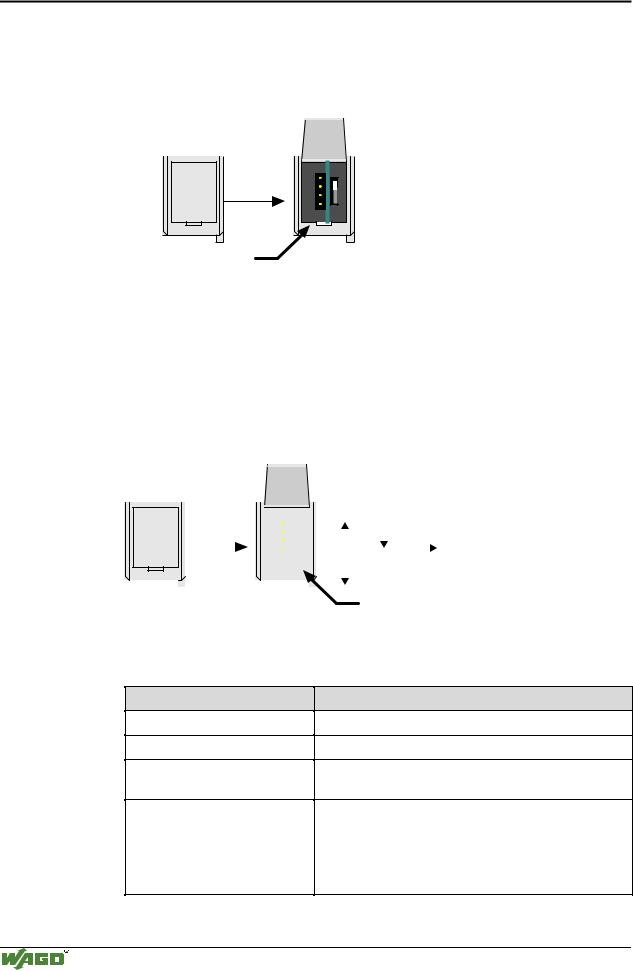
The configuration and programming interface is located behind the cover flap. This is used to communicate with WAGO-I/O-CHECK and WAGO-I/O-PRO 32 as well as for firmware downloading.
open flap
Configuration and programming interface
Fig. 3-21: Configuration interface |
g01xx06e |
The communication cable (750-920) is connected to the 4 pole male header.
3.2.2.6Operating mode switch
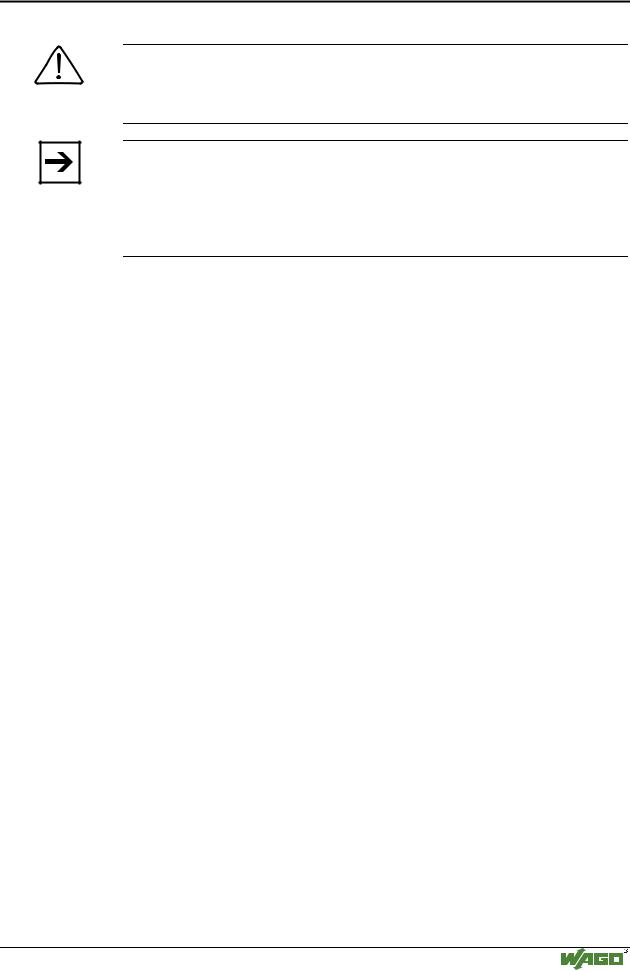
The operating mode switch is located behind the cover flap.
|
|
|
open |
|
|
|
|
|
|
|
|
|
|
|
||
|
|
|
|
|
|
|
|
|
|
|
|
|
|
|||
|
|
|
flap |
|
|
|
|
|
|
|
Run |
Stop |
Reset |
|||
|
|
|
|
|
|
|
|
|
|
|||||||
|
|
|
|
|
|
|
|
|
|
|||||||
|
|
|
|
|
|
|
|
|
||||||||
|
|
|
|
|
|
|
|
|
|
|
|
|
|
|
|
|
|
|
|
|
|
|
|
|
|
|
|
|
|
|
|
|
(pushing down) |
|
|
|
|
|
|
|
|
|
|
|
|
|
Update firmware |
|||
|
|
|
|
|
|
|
|
|
|
|
|
|
|
|||
|
|
|
|
|
|
|
|
|
|
|
|
|
|
|||
|
|
|
|
|
|
|
|
|
|
|
|
|
mode switch |
|||
|
|
|
|
|
|
|
|
|
|
|
|
|
||||
|
|
|
|
|
|
|
|
|
|
|
|
|
||||
|
|
|
|
|
|
|
|
|
|
|
|
|
||||
Fig. 3-22: Operating mode switch |
|
|
|
|
g01xx10e |
|||||||||||
The switch is a push/slide switch with 3 settings and a hold-to-run function.
Operating mode switch
From middle to top position
From top to middle position
Lower position, bootstrap
Push down
(i.e. with a screwdriver)
Function
Activate program processing (RUN)
Stop program processing (STOP)
For original loading of firmware, not necessary for user
Hardware reset
All outputs and flags are reset; variables are set to 0 or to FALSE or to an initial value.
The hardware reset can be performed with STOP as well as RUN in any position of the operating mode switch!
Modular I/O System
ETHERNET TCP/IP
Fieldbus controller 750-842 • 53
Hardware
An operating mode is internally changed at the end of a PLC cycle.
Attention
If outputs are set when switching from RUN to STOP mode, they remain set! Switching off the outputs on the software side i.e. by the initiators are ineffective because the program is no longer processed.
Note
With "GET_STOP_VALUE" (library "System.lib") WAGO-I/O-PRO 32 provides a function which recognizes the last cycle prior to a program stop giving the user the possibility to program the behavior of the controller in case of a STOP. With the aid of this function the controller outputs can be switched to a safe condition.
3.2.2.7Hardware address (MAC-ID)
Each WAGO ETHERNET TCP/IP fieldbus controller is provided from the factory with a unique and internationally unambiguous physical ETHERNET address, also referred to as MAC-ID (Media Access Control Identity). This is located on the rear of the controller and on a self-adhesive tear-off label on the controller side. The address has a fixed length of 6 Bytes (48 Bit) and contains the address type, the manufacturer’s ID, and the serial number.
Modular I/O System
ETHERNET TCP/IP

54 • Fieldbus controller 750-842 Operating system
3.2.3Operating system
3.2.3.1Start-up
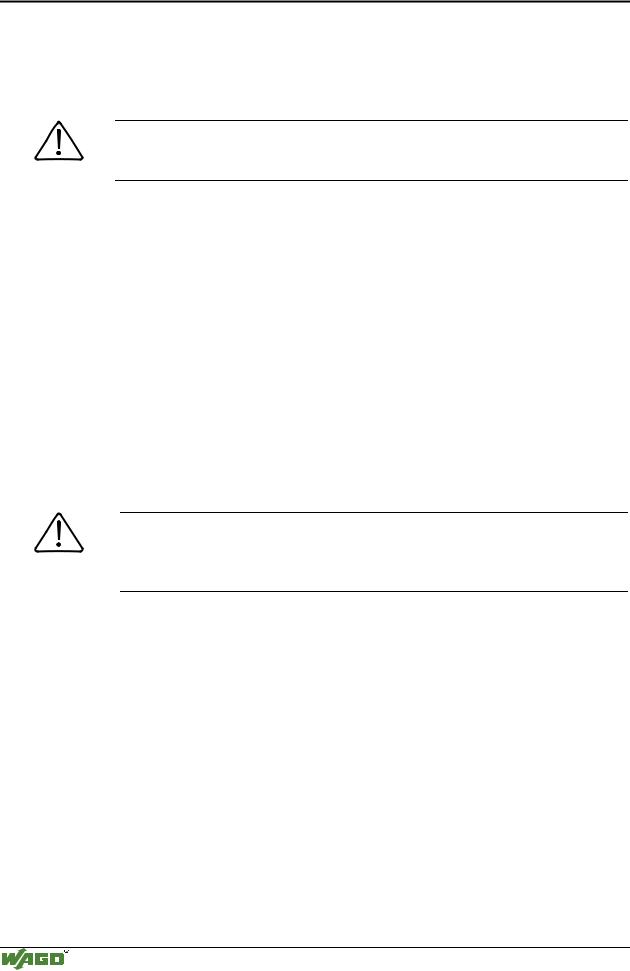
The controller starts-up after switching on the supply voltage or after a hardware reset. The PLC program in the flash memory is transferred to the RAM.
This is followed by the initialization of the system. The controller determines the I/O modules and the present configuration. The variables are set to 0 or to FALSE or to an initial value given by the PLC program. The flags retain their status . The "I/O" LED blinks red during this phase.
Following a fault free start-up the controller changes over to the "RUN" mode. The "I/O" LED lights up green.
There is not a PLC program in the flash memory when delivered. The controller start-up as described, without initialiing the system. Then it behaves as a coupler
3.2.3.2PLC cycle
The PLC cycle starts following a fault free start-up when the operating mode switch is in the top position or by a start command from the WAGO-I/O-PRO 32. The input and output data of the fieldbus and the I/O modules as well as the times are read. Subsequently, the PLC program in the RAM is processed followed by the output data of the fieldbus and the I/O
modules in the process image. Operating system functions, amongst others, for diagnostics and communications are performed and the times calculated at the end of the PLC cycle. The cycle starts again with the reading of the input and output data and the times.
The change of the operating mode (STOP/RUN) is made at the end of a PLC cycle.
The cycle time is the time from the start of the PLC program to the next start. If a loop is programmed within a PLC program, the PLC running time and thus the PLC cycle are extended correspondingly.
The inputs, outputs and times are not updated during the processing of the PLC program. This calculation occurs in a defined manner only at the end of the PLC program. For this reason it is not possible to wait for an event from the process or the elapse of a time within a loop.
Modular I/O System
ETHERNET TCP/IP
Fieldbus controller 750-842 • 55
Operating system
Switching on the supply voltage
Is a PLC
program in the Flash No
memory ?
“I/O” LED
is blinking Yes orange
PLC program transfer from the flash memory to RAM
Determination of the I/O modules and the configuration
Initialization of the system
“I/O” LED is blinking
red No Test o.k.?
 Yes
Yes
STOP
Operating mode
 RUN
RUN
PLC cycle
Reading inputs, outputs and times
PLC program in the RAM is processed
“I/O” LED
is shining green
Writing outputs
Operating system functions, updating times
STOP
Operating mode
RUN
Fig. 3-23: Controller operating system
Determination of the I/O modules and the configuration
Variables are set to 0 or FALSE or to their initial value,
flags remain in the same status.
Stop |
No |
Test o.k.? |
|
Yes
operating mode switch is in the top position or start command in WAGO-IO-PRO 32:
Online/Start or Online/Stop
Fieldbus data,
data of I/O modules
Fieldbus start behaviour as a coupler
Fieldbus data,
data of I/O modules
operating mode switch is in the top position or  start command in WAGO-IO-PRO 32:
Online/Start or Online/Stop
g012941e
Modular I/O System
ETHERNET TCP/IP
56 • Fieldbus controller 750-842 Process image
3.2.4Process image
The powered up controller recognizes all I/O modules connected in the node, which are waiting for or transmitting data (data width/bit width > 0). In nodes analog and digital I/O modules can be intermixed.
Note
For the number of input and output bits or bytes of the individual switched on I/O modules please refer to the corresponding description of the I/O modules.
The controller generates an internal local process image from the data width and the type of I/O module as well as the position of the I/O modules in the node. This is divided into an input and an output area.
The data of the digital I/O modules are bit orientated, i.e. the data exchange is made bit by bit. The analog I/O modules are representative for all I/O modules which are byte orientated, in which the data exchange is also made byte by byte. These I/O modules also include, for example, counter modules, I/O modules for angle and path measurement as well as communication modules.
The data of the I/O modules is separated for the local input and output process image in the sequence of their position after the controller in the individual process image.
First, all the byte-oriented bus modules are filed in the process image, then the bit-oriented bus modules. The bits of the digital modules are grouped into bytes. Once the number of digital I/O’s exceeds 8 bit, the coupler automatically starts another byte.
Note
If a node is changed, this may result in a new process image structure. In this case the process data addresses also changes. In the event of adding modules, the process data of all previous modules has to be taken into account.
The process image for the physical bus module data is identical with that of the WAGO ETHERNET TCP/IP fieldbus coupler. The controller uses a memory space of 256 words (word 0 ... 255) for the phyical input and output data. The controller is assigned an additional memory space for imaging the PFC variables defined according to IEC 61131-3. This extended memory space (word 256 ... 511 each) is used to map the PFC variables behind the physical process image.
The division of the memory spaces and the access of the PLC functionality (CPU) to the process data is identical with all WAGO fieldbus controllers. Access is via an application related IEC 61131-3 program and independent on the fieldbus system.
In contrast to the above, access from the fieldbus side is fieldbus specific.
For the ETHERNET TCP/IP fieldbus controller, a MODBUS/TCP master can access the data via implemented MODBUS functions. Here, decimal and/or hexadecimal MODBUS addresses are used.
Modular I/O System
ETHERNET TCP/IP