Материал: Розробка системи сенсорного терміналу для видачі розкладу студентам
. Matthew MacDonald, «Pro WPF in C# 2008: Windows Presentation Foundation in .NET 3.5», y. 2008, p. 1040;
. Джо Майо, «C# Builder. Быстрый старт», год 2005, стр. 371;
. Чарльз Петцольд, «Программирование для Microsoft Windows на C#», год 2002, стр. 564+612.
. Jay Hilyard, Stephen Teilhet, «C# 3.0 Cookbook, Third Edition, with Examples», y. 2008, p. 886;
7. Jesse Liberty, Donald Xie, «Programming C# 3.0, Fifth Edition. Examples», y. 2008, p. 607;
. Кристиан Нейгел, Билл Ивьен, «C# 2005 и платформа .NET 3.0 для профессионалов», год 2008, стр. 1790;
. Сара Морган, Билл Райан, «Разработка распределенных приложений на платформе Microsoft .Net Framework», год 2008, стр. 608;
. Date C.J., «SQL and Relational Theory», y. 2011, p. 446;
. Rachel Clements, Jon Reade, «What's New in SQL Server 2012», y. 2012, p. 238;
. Jay Natarajan, Scott Shaw, «Pro T-SQL 2012 Programmer's Guide, 3rd Edition», y. 2013, p. 679;
. Knight B., Knight D., Davis M., Snyder W., «Microsoft SQL Server 2012 Integration Services», y. 2013, p. 600;
14. Microsoft, «Administreting MS SQL Server 2012», y. 2012, p. 825;
. Leonard Lobel, Andrew Brust, «Programming Microsoft SQL Server 2012», y. 2012, p. 814;
16. Жидецький В. Ц. Охорона праці користувачів комп’ютерів./ Жидецький В. Ц. - Львів : Афіша, 2000. - 176 с.
17. Бондаренко Є. А. Безпека життєдіяльності : навч. посіб. / Є. А. Бондаренко., А. В. Сердюк - Вінниця : ВДТУ, 2013. - 160 с.
18. Бондаренко Є. А. Охорона праці в робочій професії користувача ЕОМ : навч. посіб./ Є. А. Бондаренко. - Вінниця : ВДТУ, 2003. - 115 с.
19. Бондаренко Є. А. Пожежна безпека : навч. посіб./ Є. А. Бондаренко. - Вінниця : ВНТУ, 2008. - 109 с.
20. Використання
нормативних актів про охорону праці користувачів ЕОМ: довідник./ Є. А.
Бондаренко - Вінниця : ВДНТУ, 2003. - 100 с.
ДОДАТКИ
Додаток А
AdminInfo;System;System.Collections.Generic;System.DirectoryServices.AccountManagement;System.Globalization;System.IO;System.Linq;System.Security.Principal;System.Text;System.Threading;System.Timers;System.Windows;System.Windows.Controls;System.Windows.Data;System.Windows.Documents;System.Windows.Input;System.Windows.Media;System.Windows.Media.Imaging;System.Windows.Navigation;System.Windows.Shapes;System.Xml.Serialization;Administration
{partial class MainWindow : Window
{static Dictionary<int, string> weekNum = new Dictionary<int, string>();keyboard;Admin _Admin;MainWindow()
{();
_Admin = new Admin();(weekNum.Count == 0)
{.Add(0, "--");.Add(1, "Перший");.Add(2, "Другий");
}timerHandler = new Thread(new ThreadStart(() =>
{();
}));.IsBackground = true;.Start();
}void ButtonAdminClick(object sender, RoutedEventArgs e)
{();
}void CreateKeyboard()
{(keyboard == null)
{= new KeyboardControl();.EventDropKeyboard += new DropKeyboard(keyboard_EventDropKeyboard);.EventBackspace += new Backspace(keyboard_EventBackspace);.EventCursorePosition += new ChangeCursorePosition(keyboard_EventCursorePosition);.EventSymbol += new Symbol(keyboard_EventSymbol);.EventDelete += new DeleteData(keyboard_EventDelete);.Width = gridKeyboard.Width;.Children.Add(keyboard);
}if (keyboard != null && keyboard.HidenState)
{.Children.Remove(keyboard);= new KeyboardControl();.EventDropKeyboard += new DropKeyboard(keyboard_EventDropKeyboard);.EventBackspace += new Backspace(keyboard_EventBackspace);.EventCursorePosition += new ChangeCursorePosition(keyboard_EventCursorePosition);.EventSymbol += new Symbol(keyboard_EventSymbol);.EventDelete += new DeleteData(keyboard_EventDelete);.Width = gridKeyboard.Width;.Children.Add(keyboard);
}
}void keyboard_EventDelete()
{(passwordTextBox.Password.Length > 0)
{.Clear();
}
}void keyboard_EventSymbol(string symbol)
{.Password += symbol;
}void keyboard_EventCursorePosition(int numberPosition)
{(passwordTextBox.Password.Length > 0)
{
}
}void keyboard_EventBackspace()
{(passwordTextBox.Password.Length > 0)
{index = passwordTextBox.Password.Length - 1;.Password = passwordTextBox.Password.Remove(index);
}
}void keyboard_EventDropKeyboard()
{(passwordTextBox.Password.Length > 0)
{(_Admin.Password == passwordTextBox.Password)
{.Clear();admWnd = new AdministrationWindow();.Show();
}
{.Show("Login error");
}
}
}void ButtonUserClick(object sender, RoutedEventArgs e)
{stdWnd = new StudentWindow();.Show();
}void CustomTimer()
{cult = new CultureInfo("uk-UA");(true)
{.Dispatcher.Invoke(new Action(() =>
{.Content = String.Format("{0:d/M/yyyy HH:mm:ss}", DateTime.Now);// .ToString("{0:d/M/yyyy HH:mm:ss}", cult);
}));.Sleep(1000);
}
}void buttonDEL_Click(object sender, RoutedEventArgs e)
{.Clear();
}void buttonBack_Click(object sender, RoutedEventArgs e)
{
}void Button_Click(object sender, RoutedEventArgs e)
{.Password += ((Button)sender).Content;
}void loginTextBox_MouseDown(object sender, MouseButtonEventArgs e)
{
}void passwordTextBox_GotFocus(object sender, RoutedEventArgs e)
{
}void loginTextBox_GotFocus(object sender, RoutedEventArgs e)
{
}void Window_Loaded_1(object sender, RoutedEventArgs e)
{();
}void SerializationAdmin()
{xml = new XmlSerializer(typeof(Admin));(var fStream = new FileStream("Admin.xml", FileMode.Create, FileAccess.Write, FileShare.None))
{.Serialize(fStream, _Admin);
}
}void DeserializationAdmin()
{xml = new XmlSerializer(typeof(Admin));(var fStream = new FileStream("Admin.xml", FileMode.Open, FileAccess.Read, FileShare.None))
{
_Admin = (Admin)xml.Deserialize(fStream);
}
}void Window_Closing_1(object sender, System.ComponentModel.CancelEventArgs e)
{();
}void Button_Click_1(object sender, RoutedEventArgs e)
{();
}
}
}
Додаток Б
System;System.Collections.Generic;System.Collections.ObjectModel;System.ComponentModel;System.Linq;System.Text;System.Windows;System.Windows.Controls;System.Windows.Data;System.Windows.Documents;System.Windows.Input;System.Windows.Media;System.Windows.Media.Imaging;System.Windows.Shapes;Administration
{partial class AdministrationWindow : Window
{_dataManager = SQLDataManager.GetInstance;List<Shedule> myList = new List<Shedule>();string[] teachers = null;int _LessonNum = 1;AdministrationWindow()
{();
_dataManager.EventChangedGroups += new MyEventHandler(GetInstance_EventChangedGroups);
_dataManager.EventChangeLessons += new MyEventHandler(GetInstance_EventChangeLessons);
_dataManager.EventChangeInstitute += new MyEventHandler(GetInstance_EventChangeInstitute);
_dataManager.EventChangeSpeciality += new MyEventHandler(GetInstance_EventChangeSpeciality);();
}void GetInstance_EventChangeSpeciality()
{();
}void GetInstance_EventChangeInstitute()
{();
}void GetInstance_EventChangeLessons()
{(ComboBoxGroup.SelectedItem != null)
{(ComboBoxGroup.SelectedItem.ToString());
}
}void SetGrid(string groupName)
{= _dataManager.GetShedule(groupName);view = CollectionViewSource.GetDefaultView(myList);.GroupDescriptions.Add(new PropertyGroupDescription("DayName"));.ItemsSource = view;
}void GetInstance_EventChangedGroups()
{();
}void ComboBoxInstitute_SelectionChanged(object sender, SelectionChangedEventArgs e)
{();
}void ComboBoxSpeciality_SelectionChanged(object sender, SelectionChangedEventArgs e)
{();(ComboBoxSpeciality.SelectedItem != null)
{.IsEnabled = true;.IsEnabled = true;.IsEnabled = true;
}
{
{.IsEnabled = false;.IsEnabled = false;.IsEnabled = false;
}
}
}void ComboBoxGroup_SelectionChanged(object sender, SelectionChangedEventArgs e)
{(ComboBoxGroup.SelectedItem != null)
{.IsEnabled = true;.IsEnabled = true;
}
{.IsEnabled = false;.IsEnabled = false;
}groupName = string.Empty;{ groupName = ComboBoxGroup.SelectedItem.ToString(); } catch{}(groupName);str = String.Empty;{ str = ComboBoxSpeciality.SelectedItem.ToString(); }{ }.ItemsSource = _dataManager.GetDaysList();.SelectedIndex = 0;.ItemsSource = _dataManager.GetSubjectsList(str);.SelectedIndex = 0;.ItemsSource = _dataManager.GetClassesList();.SelectedIndex = 0;.ItemsSource = MainWindow.weekNum.Values;.SelectedIndex = 0;.Content = _LessonNum;.ItemsSource = new string[] { "Лекційне", "Практичне", "Лабораторне" };.SelectedIndex = 0;
}void SetComboInstitutes()
{.ItemsSource = _dataManager.GetInstituteList();.SelectedIndex = 0;
}void SetComboSpecialities()
{.ItemsSource = _dataManager.GetSpecialityList(ComboBoxInstitute.SelectedItem.ToString());.SelectedIndex = 0;
}void SetComboGroups()
{specialityName = string.Empty;(ComboBoxSpeciality.SelectedItem != null) specialityName = ComboBoxSpeciality.SelectedItem.ToString();.ItemsSource = _dataManager.GetGroupList(specialityName);.SelectedIndex = 0;
}void buttonAddGroup_Click(object sender, RoutedEventArgs e)
{(ComboBoxInstitute.SelectedItem != null && ComboBoxSpeciality != null)
{addGroup = new AddGroup(ComboBoxInstitute.SelectedItem.ToString(), ComboBoxSpeciality.SelectedItem.ToString());.Show();
}
}void buttonDeleteGroup_Click(object sender, RoutedEventArgs e)
{(ComboBoxGroup.SelectedItem != null)
{
_dataManager.DropGroup(ComboBoxGroup.SelectedItem.ToString());();
}
}
void buttonEditSubject_Click(object sender, RoutedEventArgs e)
{(ComboBoxSpeciality.Items.Count > 0)
{editSub = new EditSubject(ComboBoxSpeciality.SelectedItem.ToString());.Show();
}
}void buttonEditTeachers_Click(object sender, RoutedEventArgs e)
{(ComboBoxSpeciality.Items.Count > 0)
{editTeacher = new EditTeachers(ComboBoxSpeciality.SelectedItem.ToString());.Show();
}
}void buttonCancel_Click(object sender, RoutedEventArgs e)
{
_dataManager.EventChangedGroups -= new MyEventHandler(GetInstance_EventChangedGroups);
_dataManager.EventChangeLessons -= new MyEventHandler(GetInstance_EventChangeLessons);();
}void buttonEditClasses_Click(object sender, RoutedEventArgs e)
{editClasses = new EditClasses();
}void gridContent_SelectionChanged(object sender, SelectionChangedEventArgs e)
{
}void buttonDeleteLesson_Click(object sender, RoutedEventArgs e)
{(gridContent.SelectedItem != null)
{item = (Shedule)gridContent.SelectedItem;week = 0;(KeyValuePair<int, string> pair in MainWindow.weekNum)
{(pair.Value == item.WeekNum) week = pair.Key;
}
_dataManager.DropLesson(ComboBoxGroup.SelectedItem.ToString(), item.DayName, item.LessonNum, week);
}
}void comboBoxSubject_SelectionChanged(object sender, SelectionChangedEventArgs e)
{str = String.Empty;{ str = comboBoxSubject.SelectedItem.ToString(); }{ }.ItemsSource = _dataManager.GetTeachersList(str);.SelectedIndex = 0;
}void buttonAdd_Click(object sender, RoutedEventArgs e)
{
{(ComboBoxGroup.SelectedItem != null)
{numOFWeek = 0;(KeyValuePair<int, string> pair in MainWindow.weekNum)
{(pair.Value == comboBoxWeek.SelectedItem.ToString()) numOFWeek = pair.Key;
}(_dataManager.AddNewLesson(ComboBoxGroup.SelectedItem.ToString(), comboBoxDay.SelectedItem.ToString(), comboBoxSubject.SelectedItem.ToString(),, comboBoxTeacher.SelectedItem.ToString(), Convert.ToInt32(comboBoxClass.SelectedItem), Convert.ToInt32(labelLessonNum.Content),.SelectedItem.ToString()) == false) MessageBox.Show("Невдалось додати урок. Можливо в цей час для групи вже встановлено інший урок");
}
}
{.Show("Неможливо додати урок до розкладу");
}
}void buttonNumInc_Click(object sender, RoutedEventArgs e)
{.Content = ++_LessonNum;
}void buttonNumDec_Click(object sender, RoutedEventArgs e)
{(_LessonNum>1) labelLessonNum.Content = --_LessonNum;
}
void buttonEditSpeciality_Click(object sender, RoutedEventArgs e)
{(ComboBoxInstitute.SelectedItem != null)
{speciality = new AddTeacherWindow(ComboBoxInstitute.SelectedItem.ToString());.Show();
}
}void Button_Click_1(object sender, RoutedEventArgs e)
{editWindow = new EditInstityteWindow();.Show();
} }}
Додаток В
System;System.Collections.Generic;System.Collections.ObjectModel;System.ComponentModel;System.Linq;System.Text;System.Threading;System.Windows;System.Windows.Controls;System.Windows.Data;System.Windows.Documents;System.Windows.Input;System.Windows.Media;System.Windows.Media.Imaging;System.Windows.Shapes;Administration
{partial class StudentWindow : Window
{_dataManager = SQLDataManager.GetInstance;List<Shedule> myList = new List<Shedule>();string[] teachers = null;StudentWindow()
{();();
}void GetInstance_EventChangeLessons()
{(ComboBoxGroup.SelectedItem.ToString());
}void SetGrid(string groupName)
{= _dataManager.GetShedule(groupName);view = CollectionViewSource.GetDefaultView(myList);.GroupDescriptions.Add(new PropertyGroupDescription("DayName"));.ItemsSource = view;
}void GetInstance_EventChangedGroups()
{();
}void ComboBoxInstitute_SelectionChanged(object sender, SelectionChangedEventArgs e)
{();
}void ComboBoxSpeciality_SelectionChanged(object sender, SelectionChangedEventArgs e)
{();
}void ComboBoxGroup_SelectionChanged(object sender, SelectionChangedEventArgs e)
{(ComboBoxGroup.SelectedItem != null)
{.IsEnabled = true;
}
{.IsEnabled = false;
}groupName = string.Empty;{ groupName = ComboBoxGroup.SelectedItem.ToString(); }{}(groupName);
}void SetComboInstitutes()
{.ItemsSource = _dataManager.GetInstituteList();.SelectedIndex = 0;
}void SetComboSpecialities()
{.ItemsSource = _dataManager.GetSpecialityList(ComboBoxInstitute.SelectedItem.ToString());.SelectedIndex = 0;
}void SetComboGroups()
{specialityName = string.Empty;(ComboBoxSpeciality.SelectedItem != null) specialityName = ComboBoxSpeciality.SelectedItem.ToString();.ItemsSource = _dataManager.GetGroupList(specialityName);.SelectedIndex = 0;
}void buttonCancel_Click(object sender, RoutedEventArgs e)
{();
}void buttonPrint_Click(object sender, RoutedEventArgs e)
{(ComboBoxGroup.SelectedItem != null)
{printing = new PrintSheduleWindow();<Shedule> list;<Shedule> grid = new List<Shedule>();(var data in gridContent.Items).Add((Shedule)data);(grid.Count > 0)
{(grid.Count > 40)
{= new List<Shedule>();(int index = 0; index < 40; index++)
{.Add((Shedule)grid[0]);.RemoveAt(0);
}
}
{= new List<Shedule>();(var data in grid).Add((Shedule)data);.Clear();
}.Show();.Print(list, new string[] { ComboBoxInstitute.SelectedItem.ToString(), ComboBoxSpeciality.SelectedItem.ToString(), ComboBoxGroup.SelectedItem.ToString() });.Hide();
}
}
}
}
}
Додаток Г
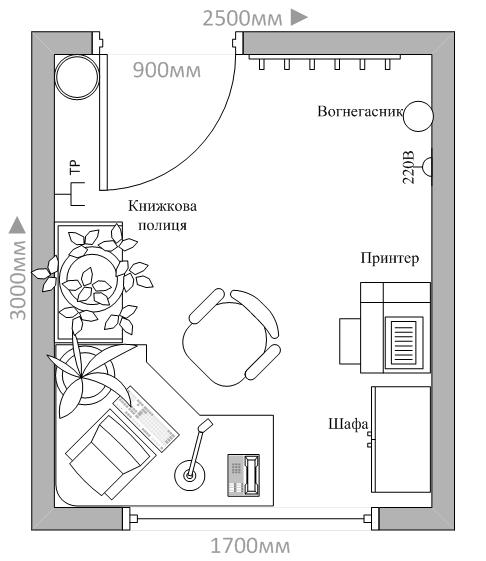
АНОТАЦІЯ
Високий рівень рішення поставленої задачі досягнутий за рахунок використання принципів об’єктно-орієнтованого програмування в середовищі Visual C# із використанням Windows WPF.
У даній роботі розроблено базу даних, призначену для зберігання та обробки інформації. Розроблено алгоритм роботи програмного забезпечення для видачі інформації про розклад.
Дана розробка є доцільною для
впровадження та використання в освітньо-навчальній сфері.
In bachelor work software is developed for the system of sensory terminal for the reflection of information about a time-table students.high level of decision of the put task is attained due to the use of principles of the object-oriented programming in the environment of Visual C# with the use of Windows WPF.database, intended for storage and treatment of information, is developed in this work. The algorithm of work of software is developed for delivery of information about a time-table.development is expedient for introduction and use in to educationally sphere.