Материал: part02
|
|
DICOM PS3.2 2020a - Conformance |
Page 111 |
|
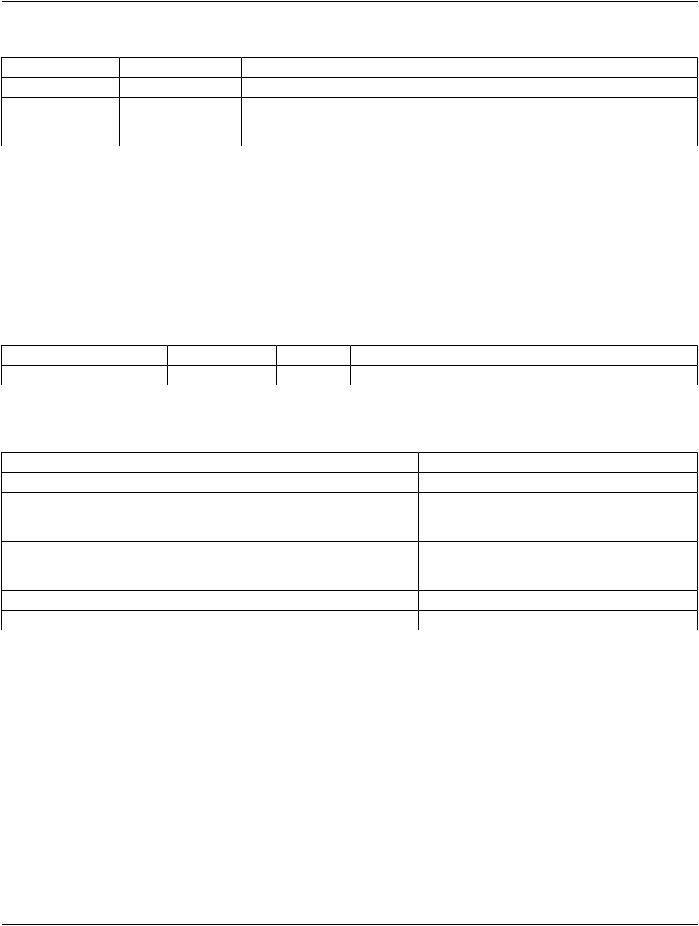
Table B.4.2-42. Printer SOP Class N-DELETE Response Status Handling Behavior |
|
|||
Service Status |
Further Meaning |
Error Code |
Behavior |
|
Success |
Success |
0000 |
The SCP has completed the operation successfully. |
|
* |
* |
Any other status code. |
TheAssociationisabortedusingA-ABORTandtheprint-job |
|
|
|
|
is marked as failed. The status meaning is logged and |
|
|
|
|
reported to the user. |
|
B.4.2.3.3.1.6 SOP Specific Conformance for the Presentation LUT SOP Class
Hardcopy AE supports the following DIMSE operations for the Presentation LUT SOP Class:
•N-CREATE
Details of the supported attributes and status handling behavior are described in the following subsections.
B.4.2.3.3.1.6.1 Presentation LUT SOP Class Operations (N-CREATE)
The attributes supplied in an N-CREATE Request are listed in the Table below:
Table B.4.2-43. Presentation LUT SOP Class N-CREATE Request Attributes
Attribute Name |
Tag |
VR |
Value |
Presence of Value |
Source |
||
Presentation LUT Shape |
(2050,0020) |
CS |
IDENTITY |
|
ALWAYS |
Auto |
|
The behavior of Hardcopy AE when encountering status codes in a N-CREATE response is summarized in the Table below: |
|||||||
Table B.4.2-44. Presentation LUT SOP Class N-CREATE Response Status Handling Behavior |
|||||||
Service Status |
Further Meaning |
Error Code |
|
Behavior |
|
||
Success |
Success |
|
0000 |
|
The SCP has completed the operation successfully. |
||
Warning |
Requested Min Density or MaxB605H |
|
The N-CREATE operation is considered successful |
||||
|
Density outside of printer's |
|
|
but the status meaning is logged. |
|||
|
operating range |
|
|
|
|
|
|
* |
* |
|
Any other status code.The Association is aborted using A-ABORT and the |
||||
|
|
|
|
|
print-job is marked as failed. The status meaning is |
||
|
|
|
|
|
logged and reported to the user. |
|
|
Service Status |
Further Meaning |
Error Code |
Behavior |
|
|||
Success |
Success |
|
0000 |
|
The SCP has completed the operation successfully. |
||
B.4.2.3.3.1.7 SOP Specific Conformance for the Film Box SOP Class
Hardcopy AE supports the following DIMSE operations for the Presentation LUT SOP Class:
•N-CREATE
•N-ACTION
Details of the supported attributes and status handling behavior are described in the following subsections.
B.4.2.3.3.1.7.1 Film Box SOP Class Operations (N-CREATE)
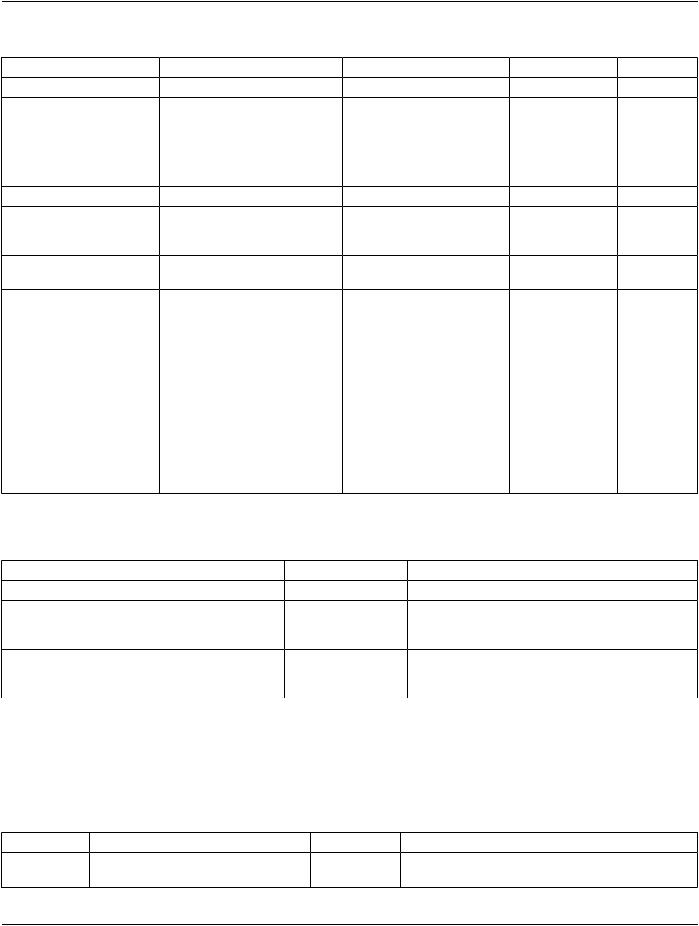
The attributes supplied in an N-CREATE Request are listed in the Table below:
- Standard -
Page 112 DICOM PS3.2 2020a - Conformance
Table B.4.2-45. Film Box SOP Class N-CREATE Request Attributes
Attribute Name |
Tag |
VR |
Value |
Presence of Value Source |
|
Image Display Format |
(2010,0010) |
CS |
STANDARD\1,1 |
ALWAYS |
Auto |
Referenced Film Session |
(2010,0500) |
SQ |
|
ALWAYS |
Auto |
Sequence |
|
|
|
|
|
>ReferencedSOPClassUID |
(0008,1150) |
UI |
1.2.840.10008.5.1.1.1 |
ALWAYS |
Auto |
>Referenced SOP Instance |
(0008,1155) |
UI |
From created Film Session |
ALWAYS |
Auto |
UID |
|
|
SOP Instance |
|
|
Film Orientation |
(2010,0040) |
CS |
PORTRAIT or LANDSCAPE ALWAYS |
User |
|
Film Size ID |
(2010,0050) |
CS |
14INX17IN, 14INX14IN, |
ALWAYS |
User |
|
|
|
11INX14IN, 11INX11IN, |
|
|
|
|
|
85INX11IN, 8INX10IN |
|
|
Magnification Type |
(2010,0060) |
CS |
REPLICATE, BILINEAR, |
ALWAYS |
User |
|
|
|
CUBIC or NONE |
|
|
Border Density |
(2010,0100) |
CS |
BLACK or WHITE |
ALWAYS |
User |
Max Density |
(2010,0130) |
US |
0 .. 310 |
ALWAYS |
Auto |
Min Density |
(2010,0120) |
US |
0 .. 50 |
ALWAYS |
Auto |
Illumination |
(2010,015E) |
US |
0 .. 5000 |
ALWAYS |
User |
Reflective Ambient Light |
(2010,0160) |
US |
0 .. 100 |
ALWAYS |
User |
ReferencedPresentationLUT |
(2050,0500) |
SQ |
Only sent if Presentation LUTANAP |
Auto |
|
Sequence |
|
|
SOP Class has been |
|
|
|
|
|
negotiated. |
|
|
>ReferencedSOPClassUID |
(0008,1150) |
UI |
1.2.840.10008.5.1.1.23 |
ALWAYS |
Auto |
>Referenced SOP Instance |
(0008,1155) |
UI |
FromcreatedPresentationLUTALWAYS |
Auto |
|
UID |
|
|
SOP Instance |
|
|
The behavior of Hardcopy AE when encountering status codes in a N-CREATE response is summarized in the Table below:
Table B.4.2-46. Film Box SOP Class N-CREATE Response Status Handling Behavior
Service Status |
Further Meaning |
Error Code |
Behavior |
Success |
Success |
0000 |
The SCP has completed the operation successfully. |
Warning |
Requested Min Density or MaxB605H |
TheN-CREATEoperationisconsideredsuccessfulbut |
|
|
Density outside of printer's |
|
the status meaning is logged. |
|
operating range |
|
|
* |
* |
Anyotherstatuscode.The Association is aborted using A-ABORT and the |
|
|
|
|
print-job is marked as failed. The status meaning is |
|
|
|
logged and reported to the user. |
B.4.2.3.3.1.7.2 Film Box SOP Class Operations (N-ACTION)
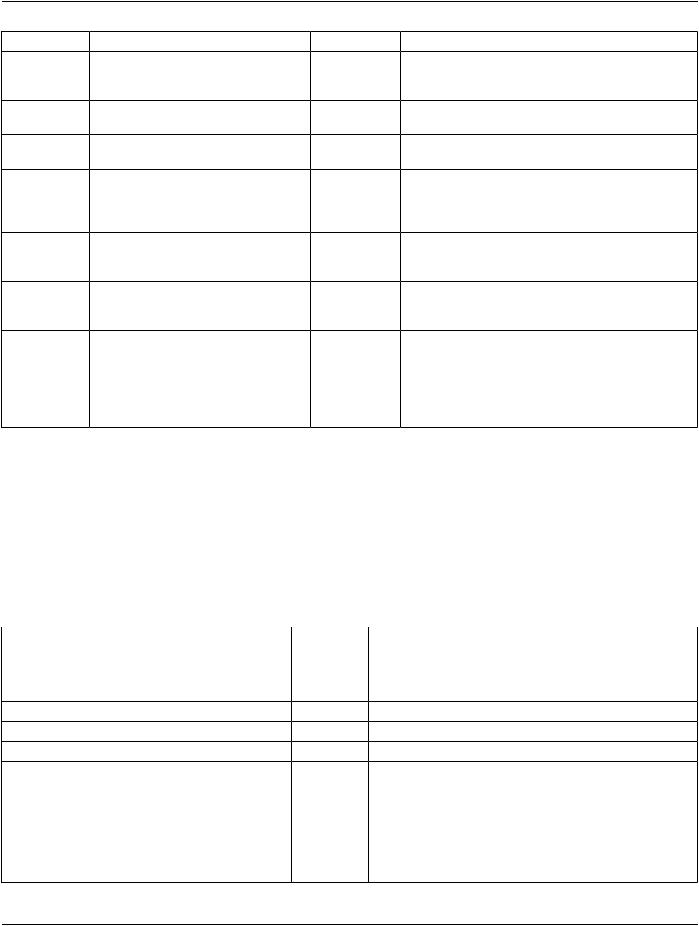
An N-ACTION Request is issued to instruct the Print SCP to print the contents of the Film Box. The Action Reply argument in an N- ACTION response is not evaluated.
The behavior of Hardcopy AE when encountering status codes in a N-ACTION response is summarized in the Table below:
Table B.4.2-47. Film Box SOP Class N-ACTION Response Status Handling Behavior
Service Status |
Further Meaning |
Error Code |
Behavior |
|
Success |
Success |
|
0000 |
TheSCPhascompletedtheoperationsuccessfully.The |
|
|
|
|
film has been accepted for printing. |
- Standard -
|
|
DICOM PS3.2 2020a - Conformance |
Page 113 |
||
Service Status |
Further Meaning |
Error Code |
Behavior |
|
|
Warning |
Film Box SOP Instance hierarchy does B603H |
The Association is aborted using A-ABORT and the |
|||
|
not contain Image Box SOP Instances |
|
print-job is marked as failed. The status meaning is |
||
|
(empty page) |
|
logged and reported to the user. |
|
|
Warning |
Image size is larger than Image Box size.B604H |
The N-ACTION operation is considered successful but |
|||
|
The image has been demagnified. |
|
the status meaning is logged. |
|
|
Warning |
Image size is larger than Image Box size.B609H |
The N-ACTION operation is considered successful but |
|||
|
The image has been cropped to fit. |
|
the status meaning is logged. |
|
|
Warning |
ImagesizeorCombinedPrintImageSizeB60AH |
The N-ACTION operation is considered successful but |
|||
|
is larger than Image Box size. The image |
the status meaning is logged. |
|
||
|
or combined Print Image has been |
|
|
|
|
|
decimated to fit. |
|
|
|
|
Failure |
UnabletocreatePrint JobSOPInstance;C602 |
The Association is aborted using A-ABORT and the |
|||
|
print queue is full. |
|
print-job is marked as failed. The status meaning is |
||
|
|
|
|
logged and reported to the user. |
|
Failure |
Image size is larger than Image Box size.C603 |
The Association is aborted using A-ABORT and the |
|||
|
|
|
|
print-job is marked as failed. The status meaning is |
|
|
|
|
|
logged and reported to the user. |
|
Failure |
Combined Print Image Size is larger thanC613 |
The Association is aborted using A-ABORT and the |
|||
|
Image Box size. |
|
print-job is marked as failed. The status meaning is |
||
|
|
|
|
logged and reported to the user. |
|
* |
* |
|
AnyotherstatusThe Association is aborted using A-ABORT and the |
||
|
|
|
code. |
print-job is marked as failed. The status meaning is |
|
|
|
|
|
logged and reported to the user. |
|
B.4.2.3.3.1.8 SOP Specific Conformance for the Image Box SOP Class
Hardcopy AE supports the following DIMSE operations for the Image Box SOP Class:
•N-SET
Details of the supported attributes and status handling behavior are described in the following subsections.
B.4.2.3.3.1.8.1 Image Box SOP Class Operations (N-SET)
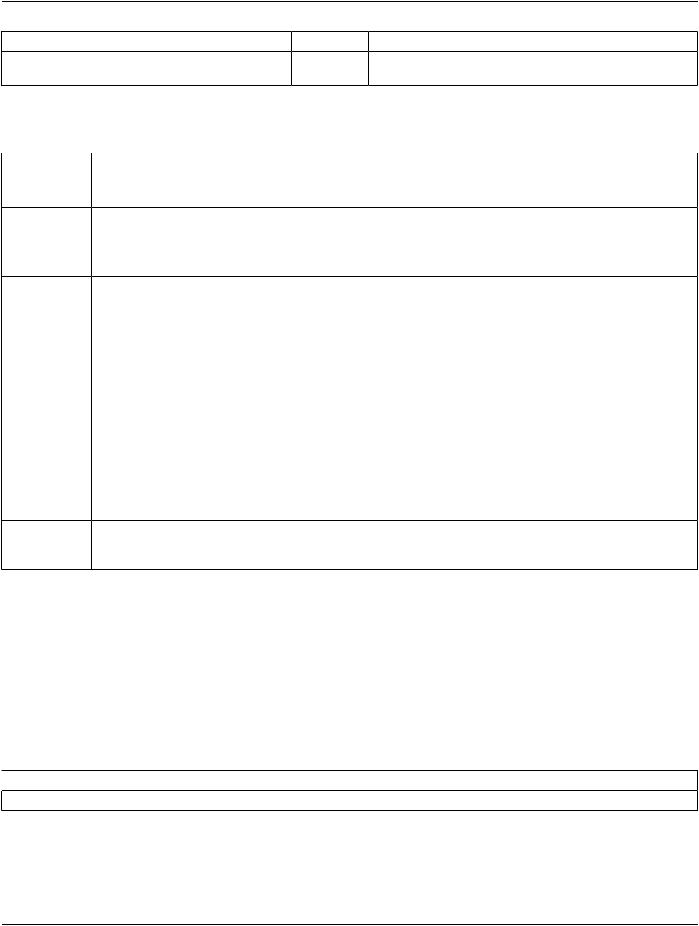
The attributes supplied in an N-SET Request are listed in the Table below:
Table B.4.2-48. Image Box SOP Class N-SET Request Attributes
Attribute Name |
Tag |
VR |
Value |
Presence of Value |
Source |
Image Position |
(2020,0010) |
US |
1 |
ALWAYS |
Auto |
Basic Grayscale Image |
(2020,0110) |
SQ |
|
ALWAYS |
Auto |
Sequence |
|
|
|
|
|
>Samples Per Pixel |
(0028,0002) |
US |
1 |
ALWAYS |
Auto |
>Photometric Interpretation |
(0028,0004) |
CS |
MONOCHROME2 ALWAYS |
Auto |
|
>Rows |
(0028,0010) |
US |
DependsonfilmsizeALWAYS |
Auto |
|
>Columns |
(0028,0011) |
US |
DependsonfilmsizeALWAYS |
Auto |
|
>Pixel Aspect Ratio |
(0028,0034) |
IS |
1\1 |
ALWAYS |
Auto |
>Bits Allocated |
(0028,0100) |
US |
8 |
ALWAYS |
Auto |
>Bits Stored |
(0028,0101) |
US |
8 |
ALWAYS |
Auto |
>High Bit |
(0028,0102) |
US |
7 |
ALWAYS |
Auto |
>Pixel Representation |
(0028,0103) |
US |
0 |
ALWAYS |
Auto |
- Standard -
Page 114 |
|
DICOM PS3.2 2020a - Conformance |
|
|
||
Attribute Name |
Tag |
VR |
Value |
Presence of Value |
Source |
|
>Pixel Data |
|
(7FE0,0010) |
OB |
Pixels of rendered ALWAYS |
Auto |
|
|
|
|
|
film sheet |
|
|
The behavior of Hardcopy AE when encountering status codes in a N-SET response is summarized in the Table below: |
||||||
Table B.4.2-49. Image Box SOP Class N-SET Response Status Handling Behavior |
||||||
Service Status |
Further Meaning |
Error Code |
Behavior |
|
||
Success |
Success |
|
0000 |
The SCP has completed the operation successfully. |
||
|
|
|
|
Image successfully stored in Image Box. |
||
Warning |
Image size is larger than Image Box size.B604H |
The N-SET operation is considered successful but the |
||||
|
The image has been demagnified. |
|
status meaning is logged. |
|
||
Warning |
Requested Min Density or Max DensityB605H |
The N-SET operation is considered successful but the |
||||
|
outside of printer's operating range. |
|
status meaning is logged. |
|
||
Warning |
Image size is larger than Image Box size.B609H |
The N-SET operation is considered successful but the |
||||
|
The image has been cropped to fit. |
|
status meaning is logged. |
|
||
Warning |
ImagesizeorCombinedPrintImageSizeB60AH |
The N-SET operation is considered successful but the |
||||
|
is larger than Image Box size. The image |
status meaning is logged. |
|
|||
|
or combined Print Image has been |
|
|
|
|
|
|
decimated to fit. |
|
|
|
|
|
Failure |
Image size is larger than Image Box size.C603 |
The Association is aborted using A-ABORT and the |
||||
|
|
|
|
print-job is marked as failed. The status meaning is |
||
|
|
|
|
logged and reported to the user. |
|
|
Failure |
Insufficient memory in printer to store theC605 |
The Association is aborted using A-ABORT and the |
||||
|
image. |
|
|
print-job is marked as failed. The status meaning is |
||
|
|
|
|
logged and reported to the user. |
|
|
Failure |
Combined Print Image Size is larger thanC613 |
The Association is aborted using A-ABORT and the |
||||
|
Image Box size. |
|
print-job is marked as failed. The status meaning is |
|||
|
|
|
|
logged and reported to the user. |
|
|
* |
* |
|
Any other statusThe Association is aborted using A-ABORT and the |
|||
|
|
|
code. |
print-job is marked as failed. The status meaning is |
||
|
|
|
|
logged and reported to the user. |
|
|
B.4.2.3.4 Association Acceptance Policy
The Hardcopy Application Entity does not accept Associations.
B.4.3 Network Interfaces
B.4.3.1 Physical Network Interface
EXAMPLE-INTEGRATED-MODALITY supports a single network interface. One of the following physical network interfaces will be available depending on installed hardware options:
Table B.4.3-1. Supported Physical Network Interfaces
 Ethernet 100baseT
Ethernet 10baseT
B.4.3.2 Additional Protocols
EXAMPLE-INTEGRATED-MODLALITY conforms to the System Management Profiles listed in the Table below. All requested trans- actions for the listed profiles and actors are supported. Support for optional transactions are listed in the Table below:
- Standard -
DICOM PS3.2 2020a - Conformance Page 115
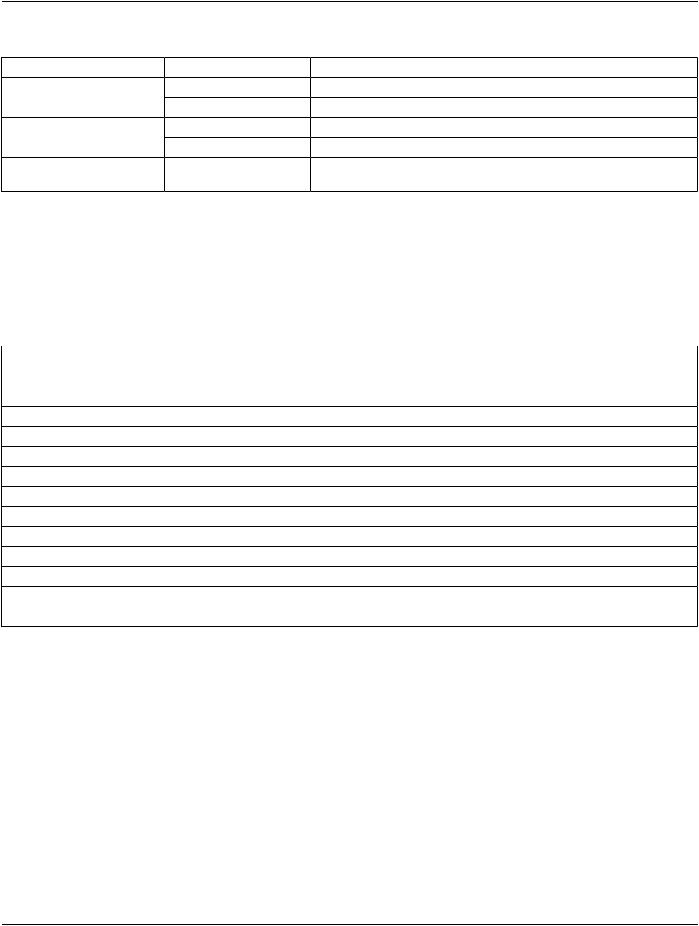
Table B.4.3-2. Supported System Management Profiles
Profile Name |
Actor |
Protocols Used |
Optional Transactions Security Support |
NetworkAddressManagementDHCP Client |
DHCP |
N/A |
|
|
DNS Client |
DNS |
N/A |
Time Synchronization |
NTP Client |
NTP |
Find NTP Server |
|
DHCP Client |
DHCP |
N/A |
DICOM Application |
LDAP Client |
LDAP |
Client Update LDAP ServerSee Section B.7 |
Configuration Management |
|
|
|
B.4.3.2.1 DHCP
DHCP can be used to obtain TCP/IP network configuration information. The network parameters obtainable via DHCP are shown in the Table below. The Default Value column of the table shows the default used if the DHCP server does not provide a value. Values for network parameters set in the Service/Installation tool take precedence over values obtained from the DHCP server. Support for DHCP can be configured via the Service/Installation Tool. The Service/Installation tool can be used to configure the machine name. If DHCP is not in use, TCP/IP network configuration information can be manually configured via the Service/Installation Tool.
|
Table B.4.3-3. Supported DHCP Parameters |
DHCP Parameter |
Default Value |
IP Address |
None |
Hostname |
Requested machine name |
List of NTP servers |
Empty list |
List of DNS servers |
Empty list |
Routers |
Empty list |
Static routes |
None |
Domain name |
None |
Subnet mask |
Derived from IP Address (see service manual) |
Broadcast address |
Derived from IP Address (see service manual) |
Default router |
None |
Time offset |
Site configurable (from Timezone) |
MTU |
Network Hardware Dependent |
Auto-IP permission |
No permission |
If the DHCP server refuses to renew a lease on the assigned IP address all active DICOM Associations will be aborted.
B.4.3.2.2 DNS
DNS can be used for address resolution. If DHCP is not in use or the DHCP server does not return any DNS server addresses, the identity of a DNS server can be configured via the Service/Installation Tool. If a DNS server is not in use, local mapping between hostname and IP address can be manually configured via the Service/Installation Tool.
B.4.3.2.3 NTP
The NTP client implements the optional Find NTP Server Transaction. The NTP client will issue an NTP broadcast to identify any localNTPservers.IfnolocalserverscanfoundviaNTPbroadcast,theNTPServersidentifiedbyDHCPwillbeusedastimereferences. Additionally, one or more NTP Servers can be configured via the Service/Installation Tool. If no NTP Servers are identified then the local clock will be used as a time reference and a warning written to the system log files.
- Standard -