Материал: part02
DICOM PS3.2 2020a - Conformance |
Page 121 |
B.4.4.2 Parameters
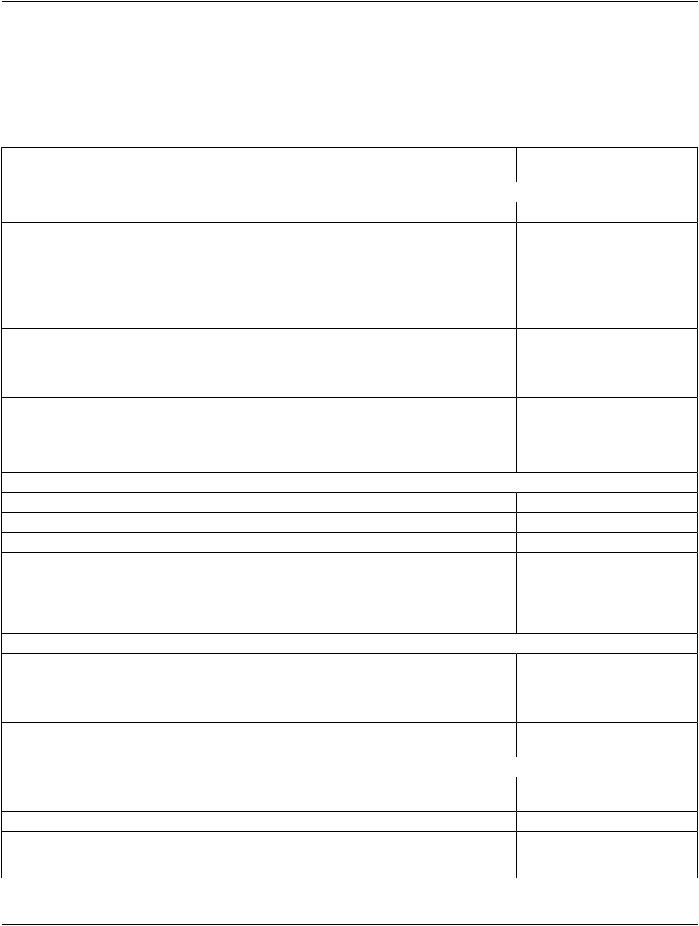
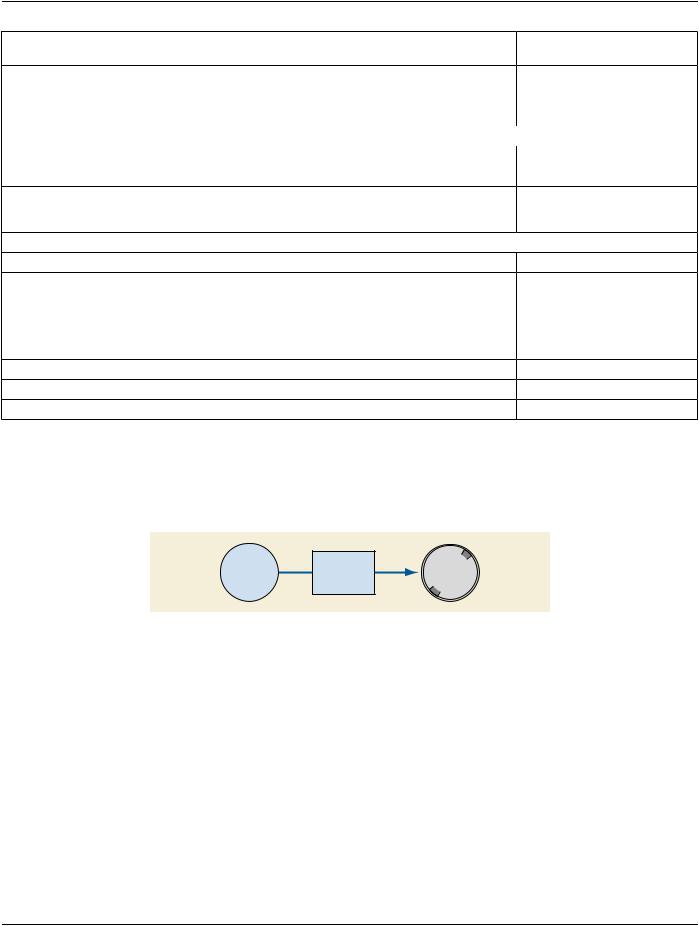
A large number of parameters related to acquisition and general operation can be configured using the Service/Installation Tool. The Table below only shows those configuration parameters relevant to DICOM communication. See the EXAMPLEINTEGRATED- MODALITY Service Manual for details on general configuration capabilities.
Table B.4.4-10. Configuration Parameters Table
Parameter |
Configurable |
Default Value |
|
(Yes/No) |
|
General Parameters |
|
|
Max PDU Receive Size |
Yes |
65536 Bytes(64 kB) |
Max PDU Send Size(larger PDUs will never be sent, even if the receiver |
No |
65536 Bytes(64 kB) |
supportsalargerMaxPDUReceiveSize.Ifthereceiversupportsasmaller |
|
|
Max PDU Receive Size then the Max PDU Send Size will be reduced |
|
|
accordingly for the duration of the Association. Max PDU Receive Size |
|
|
information is exchanged during DICOM Association Negotiation in the |
|
|
Maximum Length Sub-Item of the A-ASSOCIATION-RQ and |
|
|
A-ASSOCIATE-AC) |
|
|
Time-out waiting for a acceptance or rejection response to an Association |
Yes |
15 s |
Request (Application Level Timeout) |
|
|
Time-out waiting for a response to an Association release request |
Yes |
30 s |
(Application Level Timeout) |
|
|
Time-out waiting for completion of a TCP/IP connect request (Low-level |
Yes |
15 s |
timeout) |
|
|
Time-out awaiting a Response to a DIMSE Request (Low-Level Timeout) |
Yes |
360 s |
Time-outforwaitingfordatabetweenTCP/IP-packets(LowLevelTimeout) |
Yes |
30 s |
Storage Parameters |
|
|
Storage SCU time-out waiting for a response to a C-STORE-RQ |
Yes |
120 s |
Number of times a failed send job may be retried |
Yes |
0(Failedsendjobsarenotretried) |
Delay between retrying failed send jobs |
Yes |
60 s |
Maximum number of simultaneously initiated Associations by the Storage |
Yes |
1 |
AE |
|
|
SupportedTransferSyntaxes(separatelyconfigurableforeachremoteAE) |
Yes |
Implicit VR Little Endian |
|
|
Explicit VR Little Endian |
Storage Commitment Parameters |
|
|
TimeoutwaitingforaStorageCommitmentNotification(maximumduration |
Yes |
24 hours |
of applicability for a Storage Commitment Transaction UID). |
|
|
MaximumnumberofsimultaneouslyacceptedAssociationsbytheStorage |
Yes |
5 |
AE |
|
|
Delay association release after sending a Storage Commitment Request |
Yes |
120 s |
(wait for a Storage Commitment Notification over the same association). |
|
|
Modality Worklist Parameters |
|
|
Modality Worklist SCU time-out waiting for the final response to a |
Yes |
600 s |
C-FIND-RQ |
|
|
Maximum number of Worklist Items |
Yes |
100 |
Supported Transfer Syntaxes for Modality Worklist |
Yes |
Implicit VR Little Endian |
|
|
Explicit VR Little Endian |
- Standard -
Page 122 |
DICOM PS3.2 2020a - Conformance |
|
|
Parameter |
|
Configurable |
Default Value |
|
|
(Yes/No) |
|
Delay between automatic Worklist Updates |
|
Yes |
10 mins |
Query Worklist for specific Scheduled Station AE Title |
Yes |
EXINTMOD_WFL |
|
Query Worklist for specific Modality Value |
|
Yes |
RF |
|
MPPS Parameters |
|
|
MPPS SCU time-out waiting for a response to a N-CREATE-RQ |
Yes |
60 s |
|
MPPS SCU time-out waiting for a response to a N-SET-RQ |
Yes |
30 s |
|
Supported Transfer Syntaxes for MPPS |
|
Yes |
Implicit VR Little Endian |
|
|
|
Explicit VR Little Endian |
|
Print Parameters |
|
|
Print SCU time-out waiting for a response to a N-CREATE-RQ |
Yes |
60 s |
|
Print SCU time-out waiting for a response to a N-SET-RQ |
Yes |
30 s |
|
Print SCU time-out waiting for a response to a N-ACTION-RQ |
Yes |
360s |
|
Supported Transfer Syntaxes (separately configurable for each remote |
Yes |
Implicit VR Little Endian |
|
printer) |
|
|
Explicit VR Little Endian |
|
|
|
|
Number of times a failed print-job may be retried |
Yes |
0(Failedsendjobsarenotretried) |
|
Delay between retrying failed print-jobs |
|
Yes |
60 s |
Printer correction LUT (separately configurable for each remote printer) |
Yes |
Identity LUT |
|
B.5 Media Interchange
B.5.1 Implementation Model
B.5.1.1 Application Data Flow
Export |
Offline - Media |
CD-R |
|
Application |
Storage |
||
to CD-R |
|||
Entity |
Medium |
||
|
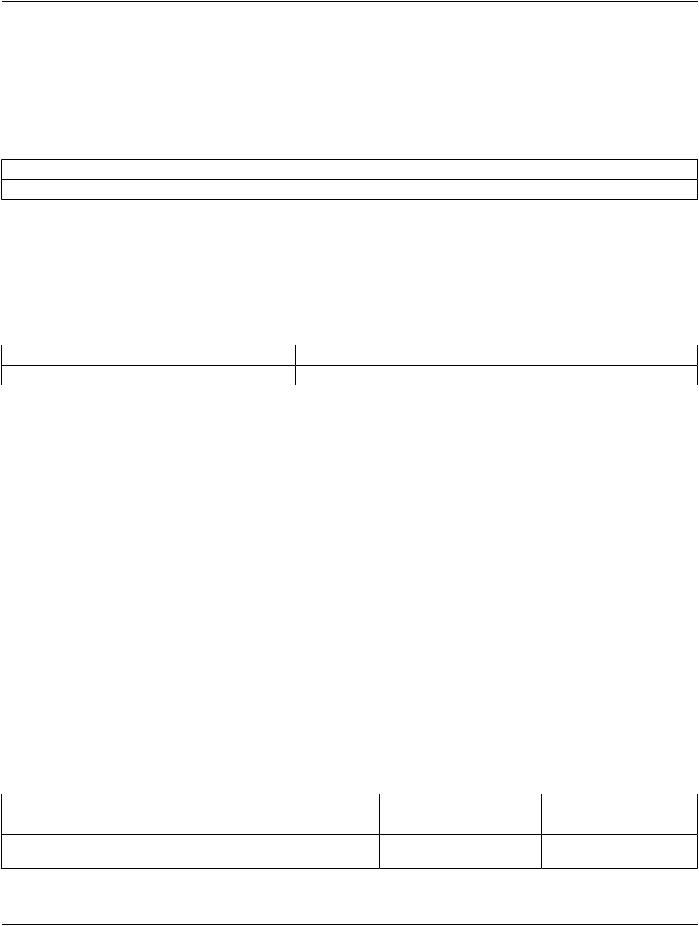
Figure B.5.1-1. Application Data Flow Diagram for Media Storage
The Offline-Media Application Entity exports images and Presentation States to a CD-R Storage medium. It is associated with the local real-world activity "Export to CD-R". "Export to CD-R" is performed upon user request for selected patients, studies, series or instances (images or presentation states).
B.5.1.2 Functional Definition of AEs
B.5.1.2.1 Functional Definition of Offline-Media Application Entity
Activation of the "Export to CD-R" icon or menu entry will pass the currently selected patients, studies, series or instances (images or presentation states) to the Offline-Media Application Entity. The SOP Instances associated with the selection will be collected into one or more export jobs. The contents of each export job will be written to a single CD-R media.
B.5.1.3 Sequencing of Real-World Activities
At least one image or presentation state must exist and be selected before the Offline-Media Application Entity can be invoked. The operator can insert a new CD-R media at any time before or after invocation of the Offline-Media Application Entity. The Offline-Media
- Standard -
DICOM PS3.2 2020a - Conformance |
Page 123 |
Application Entity will wait indefinitely for a media to be inserted before starting to write to the CD-R device. If no CD-R media is available the export job can be canceled from the job queue.
B.5.1.4 File Meta Information Options
The implementation information written to the File Meta Header in each file is:
Table B.5.1-1. DICOM Implementation Class and Version for Media Storage
Implementation Class UID |
1.xxxxxxx.yyy.etc.ad.inf.usw |
Implementation Version Name |
EXINTMOD_01 |
B.5.2 AE Specifications
B.5.2.1 Offline-Media Application Entity Specification
The Offline-Media Application Entity provides standard conformance to the Media Storage Service Class. The Application Profiles and roles are listed below:
Table B.5.2-1. Application Profiles, Activities and Roles for Offline-Media
Application Profiles Supported |
Real World Activity |
Role |
STD-GEN-CD |
Export to CD-R |
FSC |
B.5.2.1.1 File Meta Information for the Application Entity
The Source Application Entity Title included in the File Meta Header is configurable (see Section B.5.4).
B.5.2.1.2 Real-World Activities
B.5.2.1.2.1 Activity - Export to CD-R
The Offline-Media Application Entity acts as an FSC when requested to export SOP Instances from the local database to a CD-R medium.
A dialogue will be presented allowing the user to modify the suggested media label and provides control over the available media capacity. If the contents of the current selection do not fit on a single media an automatic separation into multiple export jobs will be suggested that can be adapted by the user.
The user will be prompted to insert an empty CD-R for each export job. The contents of the export job will be written together with a corresponding DICOMDIR to a single-session CDR. Writing in multi-session mode is not supported. The user can cancel an export job in the job queue.
B.5.2.1.2.1.1 Media Storage Application Profiles
The Offline-Media Application Entity support the STD-GEN-CD Application Profile.
B.5.2.1.2.1.1.1 Options
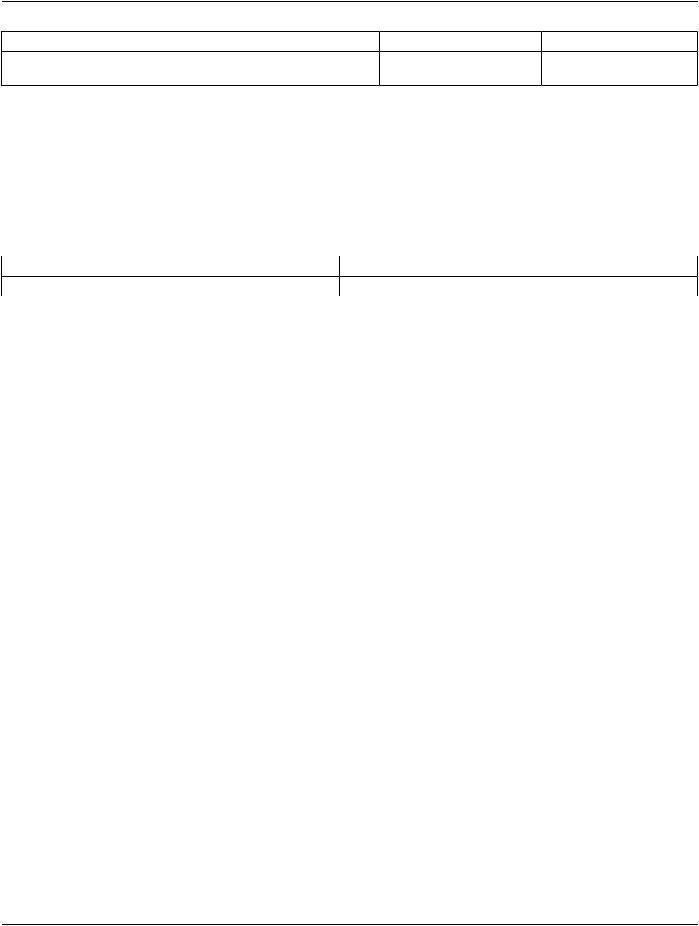
The Offline-Media Application Entity supports the SOP Classes and Transfer Syntaxes listed in the Table below:
Table B.5.2-2. IODs, SOP Classes and Transfer Syntaxes for OfflineMedia
Information Object Definition |
SOP Class UID |
Transfer Syntax |
Transfer Syntax UID |
Media Storage Directory Storage |
1.2.840.10008.1.3.10 |
Explicit VR Little Endian |
1.2.840.10008.1.2.1 |
X-Ray Radio Fluoroscopic Image |
1.2.840.10008.5.1.4.1.1.12.2Explicit VR Little Endian |
1.2.840.10008.1.2.1 |
|
Storage |
|
|
|
- Standard -
Page 124 |
DICOM PS3.2 2020a - Conformance |
|
|
Information Object Definition |
SOP Class UID |
Transfer Syntax |
Transfer Syntax UID |
Grayscale Softcopy Presentation State1.2.840.10008.5.1.4.1.1.11.1Explicit VR Little Endian |
1.2.840.10008.1.2.1 |
||
Storage |
|
|
|
B.5.3 Augmented and Private Application Profiles
EXAMPLE-INTEGRATED-MODALITY does not support any augmented for private application profiles.
B.5.4 Media Configuration
All local applications use the AE Titles configured via the Service/Installation Tool. The Application Entity Titles configurable for Media Services are listed in the Table below:
|
Table B.5.4-1. AE Title Configuration Table |
Application Entity |
Default AE Title |
Offline-Media |
EXINTMOD_MEDIA |
B.6 Support of Character Sets
All EXAMPLE-INTEGRATED-MODALITY DICOM applications support the
ISO_IR 100 (ISO 8859-1:1987 Latin Alphabet No. 1 supplementary set)
ISO_IR 144 (ISO 8859-5:1988 Latin/Cyrillic Alphabet supplementary set)
If the EXAMPLE-INTEGRATED-MODALITY is configured for Cyrillic character set support, ISO_IR 144 will be used automatically.
B.7 Security
EXAMPLE-INTEGRATED-MODALITY does not support any specific security measures.
ItisassumedthatEXAMPLE-INTEGRATED-MODALITYisusedwithinasecuredenvironment.Itisassumedthatasecuredenvironment includes at a minimum:
a.Firewall or router protections to ensure that only approved external hosts have network access to EXAMPLEINTEGRATED- MODALITY.
b.Firewall or router protections to ensure that EXAMPLEINTEGRATED-MODALITY only has network access to approved external hosts and services.
c.Any communication with external hosts and services outside the locally secured environment use appropriate secure network channels (e.g., such as a Virtual Private Network (VPN) )
Other network security procedures such as automated intrusion detection may be appropriate in some environments. Additional se- curity features may be established by the local security policy and are beyond the scope of this conformance statement.
B.8 Annexes
B.8.1 IOD Contents
B.8.1.1 Created SOP Instances
Examples of X-Ray Radiofluoroscopic images and Grayscale Softcopy Presentation States created by EXAMPLE-INTEGRATED- MODALITY can be downloaded from:
http://www.example-imaging-products.nocom/example-integrated-modality/example-images
- Standard -
DICOM PS3.2 2020a - Conformance Page 125
Table B.8.1-1 specifies the attributes of an X-Ray Radiofluoroscopic Image transmitted by the EXAMPLE-INTEGRATED-MODALITY storage application.
Table B.8.1-2 specifies the attributes of a Grayscale Softcopy Presentation State transmitted by the EXAMPLEINTEGRATED-MOD- ALITY storage application.
The following tables use a number of abbreviations. The abbreviations used in the "Presence of …" column are:
VNAP Value Not Always Present (attribute sent zero length if no value is present)
ANAP Attribute Not Always Present
ALWAYSAlways Present
EMPTYAttribute is sent without a value
The abbreviations used in the "Source" column:
MWL the attribute value source Modality Worklist
USER the attribute value source is from User input
AUTO the attribute value is generated automatically
MPPS the attribute value is the same as that use for Modality Performed Procedure Step
CONFIGthe attribute value source is a configurable parameter
Note
All dates and times are encoded in the local configured calendar and time. Date, Time and Time zone are configured using the Service/Installation Tool.
B.8.1.1.1 X-Ray Radiofluoroscopic Image IOD
Table B.8.1-1. IOD of Created Rf SOP Instances
IE |
Module |
Reference |
Presence of Module |
Patient |
Patient |
Table B.8.1-3 |
ALWAYS |
Study |
General Study |
Table B.8.1-4 |
ALWAYS |
|
Patient Study |
Table B.8.1-5 |
ALWAYS |
Series |
General Series |
Table B.8.1-6 |
ALWAYS |
Equipment General Equipment |
Table B.8.1-7 |
ALWAYS |
|
Image |
General Image |
Table B.8.1-8 |
ALWAYS |
|
Image Pixel |
Table B.8.1-10 |
ALWAYS |
|
Cine |
Table B.8.1-11 |
Only if Multi-frame |
|
Multi-Frame |
Table B.8.1-12 |
Only if Multi-frame |
|
Frame Pointers |
Table B.8.1-13 |
Only if Multi-frame |
|
Mask |
Table B.8.1-14 |
ALWAYS |
|
X-Ray Image |
Table B.8.1-15 |
ALWAYS |
|
X-Ray Acquisition |
Table B.8.1-16 |
ALWAYS |
|
Modality LUT |
Table B.8.1-17 |
Only if Pixel Intensity Relationship |
|
|
|
(0028,1040) is LOG |
|
VOI LUT |
Table B.8.1-18 |
ALWAYS |
|
SOP Common |
Table B.8.1-19 |
ALWAYS |
- Standard -