Материал: part02
Page 106 |
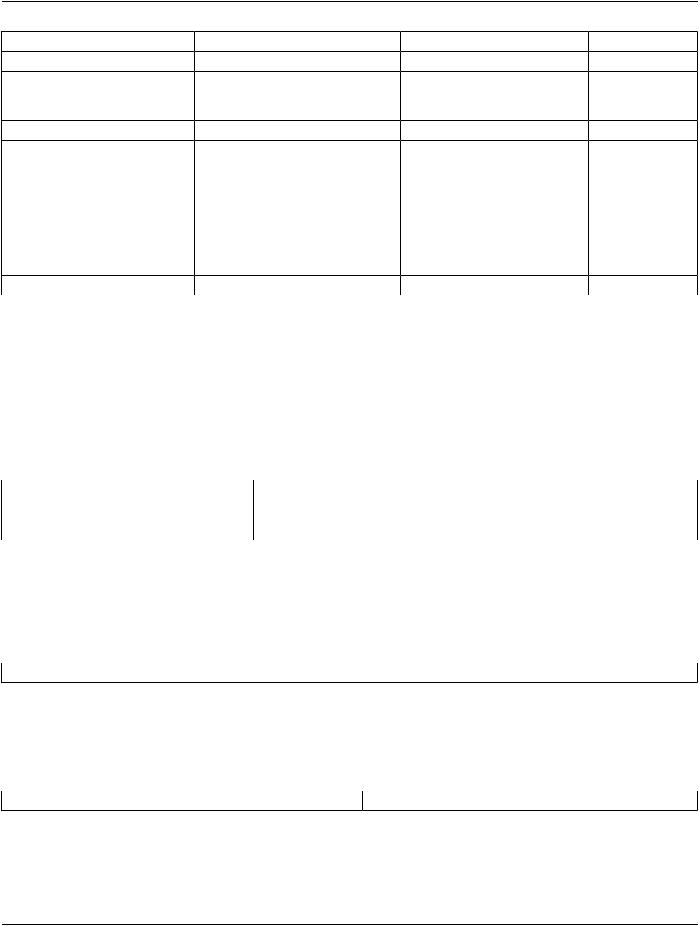
DICOM PS3.2 2020a - Conformance |
|
||
Attribute Name |
Tag |
VR |
N-CREATE |
N-SET |
> Series Instance UID |
(0020,000E) |
UI |
x |
x |
> Referenced Standalone SOP |
(0040,0220) |
SQ |
Zero length (SOP classes not |
Zero length (SOP |
Instance Seq. |
|
|
supported) |
classes not |
|
|
|
|
supported) |
Total Time of Fluoroscopy |
(0040,0300) |
US |
Zero length |
Total time |
Total Number of Exposures |
(0040,0301) |
US |
Zero length |
Number of |
|
|
|
|
exposures |
Entrance Dose |
(0040,0302) |
US |
Zero length |
Entrance dose |
Exposed Area |
(0040,0303) |
US |
Zero length |
Exposed area |
Film Consumption Sequence |
(0040,0321) |
SQ |
Zero length |
Zero or more items |
> Medium Type |
(2000,0030) |
CS |
|
x |
> Film Size ID |
(2010,0050) |
CS |
|
x |
> Number of Films |
(2100,0170) |
IS |
|
x |
B.4.2.2.4 Association Acceptance Policy
The Workflow Application Entity does not accept Associations.
B.4.2.3 Hardcopy Application Entity Specification
B.4.2.3.1 SOP Classes
EXAMPLE-INTEGRATED-MODALITY provides Standard Conformance to the following SOP Classes:
Table B.4.2-29. SOP Classes for AE Hardcopy
SOP Class Name |
SOP Class UID |
SCU |
SCP |
Basic Grayscale Print Management Meta |
1.2.840.10008.5.1.1.9 |
Yes |
No |
Presentation LUT |
1.2.840.10008.5.1.1.23 |
Yes |
No |
B.4.2.3.2 Association Policies
B.4.2.3.2.1 General
The DICOM standard application context name for DICOM is always proposed:
Table B.4.2-30. DICOM Application Context for AE Hardcopy
Application Context Name |
1.2.840.10008.3.1.1.1 |
B.4.2.3.2.2 Number of Associations |
|
EXAMPLE-INTEGRATED-MODALITY initiates one Association at a time for each configured hardcopy device. Multiple hardcopy devices can be configured.
Table B.4.2-31. Number of Associations Initiated for AE Hardcopy
Maximum number of simultaneous Associations |
(number of configured hardcopy devices) |
B.4.2.3.2.3 Asynchronous Nature |
|
EXAMPLE-INTEGRATED-MODALITYdoesnotsupportasynchronouscommunication(multipleoutstandingtransactionsoverasingle
Association).
- Standard -
DICOM PS3.2 2020a - Conformance Page 107
Table B.4.2-32. Asynchronous Nature as a SCU for AE Hardcopy
Maximum number of outstanding asynchronous transactions |
1 |
B.4.2.3.2.4 Implementation Identifying Information |
|
The implementation information for this Application Entity is: |
|
Table B.4.2-33. DICOM Implementation Class and Version for AE Hardcopy |
|
Implementation Class UID |
1.xxxxxxx.yyy.etc.ad.inf.usw |
Implementation Version Name |
EXINTMOD_01 |
B.4.2.3.3 Association Initiation Policy
B.4.2.3.3.1 Activity - Film Images
B.4.2.3.3.1.1 Description and Sequencing of Activities
Ausercomposesimagesontofilmsheetsandrequeststhemtobesenttoaspecifichardcopydevice.Theusercanselectthedesired film format and number of copies. Each print-job is forwarded to the job queue and processed individually.
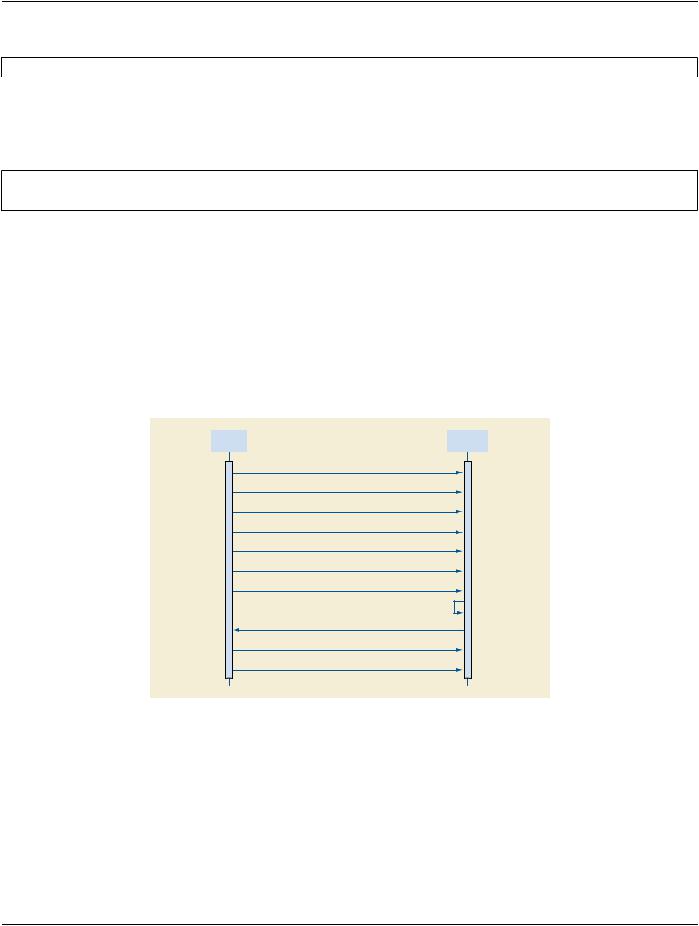
The Hardcopy AE is invoked by the job control interface that is responsible for processing network tasks. The job consists of data describing the images and graphics to be printed as well as the requested layout and other parameters. The film sheet is internally processed, converted to a STANDARD/1,1 page and then the page image is sent. If no association to the printer can be established, the print-job is switched to a failed state and the user informed.
Hardcopy |
|
Printer |
AE |
|
|
|
|
|
|
|
|
1.Open Association
2.N-GET (Printer)
3.N-CREATE (Film Session)
4.N-CREATE (Presentation LUT)
5.N-CREATE (Film Box)
6.N-SET (Image Box)
7.N-ACTION (Film Box)
8. Print Film Sheet(s)
9.N-EVENT-REPORT (Printer)
10.N-DELETE (Film Session)
11.Close Association
Figure B.4.2-5. Sequencing of Activity - Film Images
A typical sequence of DIMSE messages sent over an association between Hardcopy AE and a Printer is illustrated in Figure B.4.2- 5:
1.Hardcopy AE opens an association with the Printer
2.N-GET on the Printer SOP Class is used to obtain current printer status information. If the Printer reports a status of FAILURE, the print-job is switched to a failed state and the user informed.
3.N-CREATE on the Film Session SOP Class creates a Film Session.
- Standard -
Page 108 |
DICOM PS3.2 2020a - Conformance |
4.N-CREATE on the Presentation LUT SOP Class creates a Presentation LUT (if supported by the printer).
5.N-CREATE on the Film Box SOP Class creates a Film Box linked to the Film Session. A single Image Box will be created as the result of this operation (Hardcopy AE only uses the format STANDARD\1,1)
6.N-SET on the Image Box SOP Class transfers the contents of the film sheet to the printer. If the printer does not support the Presentation LUT SOP Class, the image data will be passed through a printer-specific correction LUT before being sent.
7.N-ACTION on the Film Box SOP Class instructs the printer to print the Film Box
8.The printer prints the requested number of film sheets
9.The Printer asynchronously reports its status via N-EVENT-REPORT notification (Printer SOP Class). The printer can send this message at any time. Hardcopy AE does not require the N-EVENT-REPORT to be sent. Hardcopy AE is capable of receiving an N-EVENT-REPORT notification at any time during an association. If the Printer reports a status of FAILURE, the print-job is switched to a failed state and the user informed.
10.N-DELETE on the Film Session SOP Class deletes the complete Film Session SOP Instance hierarchy.
11.Hardcopy AE closes the association with the Printer
Status of the print-job is reported through the job control interface. Only one job will be active at a time for each separate hardcopy device. If any Response from the remote Application contains a status other than Success or Warning, the Association is aborted and the related Job is switched to a failed state. It can be restarted any time by user interaction or, if configured, by automated retry.
B.4.2.3.3.1.2 Proposed Presentation Contexts
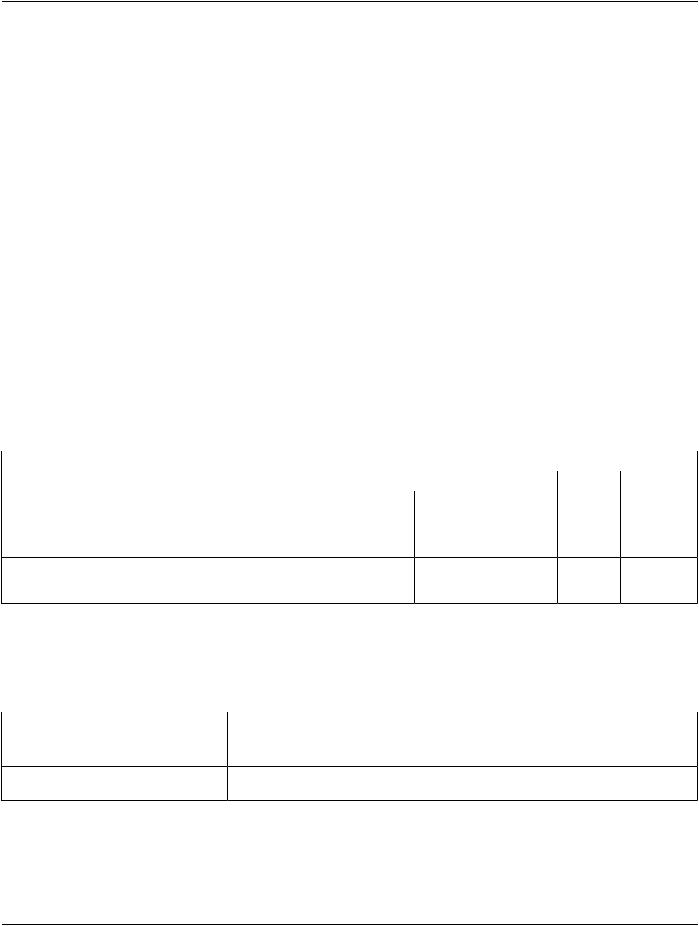
EXAMPLE-INTEGRATED-MODALITY is capable of proposing the Presentation Contexts shown in the Table below:
Table B.4.2-34. Proposed Presentation Contexts for Activity Film Images
|
|
Presentation Context Table |
|
|
|
Abstract Syntax |
Transfer Syntax |
Role |
Extended |
||
Name |
UID |
Name List |
UID List |
|
Negotiation |
|
|
||||
Basic Grayscale Print1.2.840.10008.5.1.1.9Implicit VR Little Endian |
1.2.840.10008.1.2 |
SCU |
None |
||
Management Meta |
|
Explicit VR Little Endian |
1.2.840.10008.1.2.1 |
|
|
|
|
|
|
||
Presentation LUT |
1.2.840.10008.5.1.1.23Implicit VR Little Endian |
1.2.840.10008.1.2 |
SCU |
None |
|
|
|
Explicit VR Little Endian |
1.2.840.10008.1.2.1 |
|
|
B.4.2.3.3.1.3 Common SOP Specific Conformance for All Print SOP Classes
The general behavior of Hardcopy AE during communication failure is summarized in the Table below. This behavior is common for all SOP Classes supported by Hardcopy AE.
Table B.4.2-35. Hardcopy Communication Failure Behavior
Exception |
Behavior |
Timeout |
The Association is aborted using A-ABORT and the print-job is marked as failed. The |
|
reason is logged and the job failure is reported to the user via the job control application. |
AssociationabortedbytheSCPornetworkThe print-job is marked as failed. The reason is logged and the job failure is reported to layers the user via the job control application.
B.4.2.3.3.1.4 SOP Specific Conformance for the Printer SOP Class
Hardcopy AE supports the following DIMSE operations and notifications for the Printer SOP Class:
•N-GET
- Standard -
DICOM PS3.2 2020a - Conformance |
Page 109 |
•N-EVENT-REPORT
Details of the supported attributes and status handling behavior are described in the following subsections.
B.4.2.3.3.1.4.1 Printer SOP Class Operations (N-GET)
HardcopyAEusesthePrinterSOPClassN-GEToperationtoobtaininformationaboutthecurrentprinterstatus.Theattributesobtained via N-GET are listed in the Table below:
Table B.4.2-36. Printer SOP Class N-GET Request Attributes
Attribute Name |
Tag |
VR |
Value |
Presence of Value |
Source |
Printer Status |
(2110,0010) |
CS |
Provided by Printer |
ALWAYS |
Printer |
Printer Status Info |
(2110,0020) |
CS |
Provided by Printer |
ALWAYS |
Printer |
The Printer Status information is evaluated as follows:
1.If Printer status (2110,0010) is NORMAL, the print-job continues to be printed.
2.If Printer status (2110,0010) is FAILURE, the print-job is marked as failed. The contents of Printer Status Info (2110,0020) is logged and reported to the user via the job control application.
3.If Printer status (2110,0010) is WARNING, the print-job continues to be printed. The contents of Printer Status Info (2110,0020) is logged and reported to the user via the job control application.
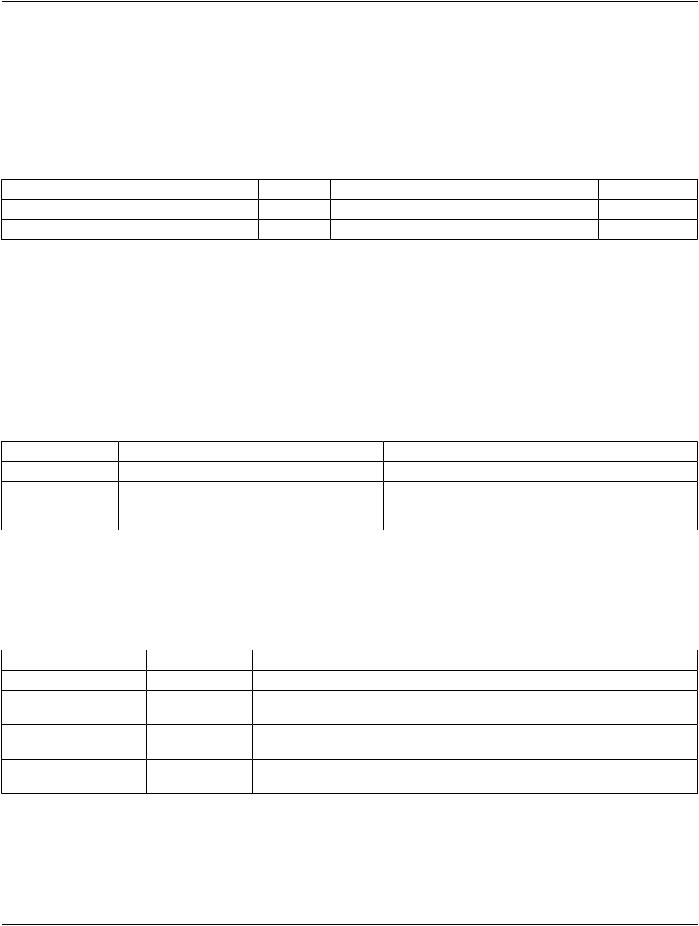
The behavior of Hardcopy AE when encountering status codes in a N-GET response is summarized in the Table below:
Table B.4.2-37. Printer SOP Class N-GET Response Status Handling Behavior
Service Status |
Further Meaning |
Error Code |
Behavior |
Success |
Success |
0000 |
The request to get printer status information was success. |
* |
* |
Any other status code. |
TheAssociationisabortedusingA-ABORTandtheprint-job |
|
|
|
is marked as failed. The status meaning is logged and |
|
|
|
reported to the user. |
B.4.2.3.3.1.4.2 Printer SOP Class Notifications (N-EVENT-REPORT)
Hardcopy AE is capable of receiving an N-EVENT-REPORT request at any time during an association.
The behavior of Hardcopy AE when receiving Event Types within the N-EVENT-REPORT is summarized in the Table below:
Table B.4.2-38. Printer SOP Class N-EVENT-REPORT Behavior
Event Type Name |
Event Type ID |
Behavior |
Normal |
1 |
The print-job continues to be printed. |
Warning |
2 |
Theprint-jobcontinuestobeprinted.ThecontentsofPrinterStatusInfo(2110,0020) |
|
|
is logged and reported to the user via the job-control application. |
Failure |
3 |
The print-job is marked as failed. The contents of Printer Status Info (2110,0020) is |
|
|
logged and reported to the user via the job-control application. |
* |
* |
An invalid Event Type ID will cause a status code of 0113H to be returned in a |
|
|
N-EVENT-REPORT response. |
The reasons for returning specific status codes in a N-EVENT-REPORT response are summarized in the Table below:
- Standard -
Page 110 DICOM PS3.2 2020a - Conformance
Table B.4.2-39. Printer SOP Class N-EVENT-REPORT Response Status Reasons
Service Status |
Further Meaning |
Error Code |
Reasons |
Success |
Success |
0000 |
The notification event has been successfully received. |
Failure |
No Such Event Type |
0113H |
An invalid Event Type ID was supplied in the |
|
|
|
N-EVENT-REPORT request. |
Failure |
Processing Failure |
0110H |
An internal error occurred during processing of the |
|
|
|
N-EVENT-REPORT. A short description of the error will be |
|
|
|
returned in Error Comment (0000,0902). |
B.4.2.3.3.1.5 SOP Specific Conformance for the Film Session SOP Class
Hardcopy AE supports the following DIMSE operations for the Film Session SOP Class:
•N-CREATE
•N-DELETE
Details of the supported attributes and status handling behavior are described in the following subsections.
B.4.2.3.3.1.5.1 Film Session SOP Class Operations (N-CREATE)
The attributes supplied in an N-CREATE Request are listed in the Table below:
Table B.4.2-40. Film Session SOP Class N-CREATE Request Attributes
Attribute Name |
Tag |
VR |
Value |
Presence of Value |
Source |
Number of Copies |
(2000,0010) |
IS |
1 .. 10 |
ALWAYS |
User |
Medium Type |
(2000,0030) |
CS |
BLUE FILM, CLEAR FILM orALWAYS |
User |
|
|
|
|
PAPER |
|
|
Film Destination |
(2000,0040) |
CS |
MAGAZINEorPROCESSORALWAYS |
User |
|
The behavior of Hardcopy AE when encountering status codes in a N-CREATE response is summarized in the Table below:
Table B.4.2-41. Film Session SOP Class N-CREATE Response Status Handling Behavior
Service Status Further Meaning |
Error Code |
Behavior |
|
Success |
Success |
0000 |
The SCP has completed the operation successfully. |
Warning |
Attribute Value Out of0116H |
The N-CREATE operation is considered successful but the status |
|
|
Range |
|
meaningislogged.AdditionalinformationintheResponseidentifying |
|
|
|
the attributes out of range will be logged (i.e., Elements in the |
|
|
|
Modification List/Attribute List) |
Warning |
Attribute List Error |
0107H |
The N-CREATE operation is considered successful but the status |
|
|
|
meaningislogged.AdditionalinformationintheResponseidentifying |
|
|
|
the attributes will be logged (i.e., Elements in the Attribute Identifier |
|
|
|
List) |
* |
* |
Any other status |
The Association is aborted using A-ABORT and the print-job is |
|
|
code. |
marked as failed. The status meaning is logged and reported to the |
|
|
|
user. |
B.4.2.3.3.1.5.2 Film Session SOP Class Operations (N-DELETE)
The behavior of Hardcopy AE when encountering status codes in a N-DELETE response is summarized in the Table below:
- Standard -