Материал: m013800e

Внимание! Если размещение файла нарушает Ваши авторские права, то обязательно сообщите нам

The PLC is able to control transmission and reception of data by means of the control byte and the status byte.

Initialization of the module:

·set IR in the control byte

·transmit/receive functions are blocked

·output/input buffers are erased

·serial interface module will load its configuration data

Transmitting data:

·TR¹TA: put characters into output byte 0 to 2

·amount of characters is specified in OL0 to OL2

·TR is inverted and read out

·characters are put into output buffer if TR=TA

Receiving data:

·RR¹RA: in input byte 0 to 2 characters are available

·amount of characters is specified in IL0 to IL2

·charactersin IL0 to IL2 are read out

·RA is inverted and read out

·all characters are read when RR=RA

The transmitting and receiving of data can be done simultaneously. The initialization request has prioirity and will stop transmitting and receiving of data immediately.

Message: input buffer full (Bit 3)

Input buffer is full. Data which are received now are lost.

RS232,TTY,RS485 750-650,651,653

7

:$*2Ç, 2Ç6<67(0

Examples:

The module is initialized.

- The initialization bit in the control byte is set.

Output byte 0

Control byte

Output byte 2

Output byte 1

0x00

0000.0100

0x00

0x00

- After the initialization has been executed, the status byte will give back 000.0100.

Input byte 0

Status byte

Input byte 2

Input byte 1


XX

0XXX.X0XX

XX

XX

Module is still being reset

XX

0XXX.X1XX

XX

XX

Initialization completed

Sending of the data string “Hello”:

- The first 3 characters and the buffer length of 3 are transmitted.

Output byte 0


Control byte

‘H’ (0 x 48)


0011.0000

Output byte 2


Output byte 1


‘l’ (0 x 6C)

‘e’ (0 x 65)


- The transmission request bit (TR) is inverted.

Output byte 0


Control byte

‘H’


0011.0001

Output byte 2


Output byte 1


‘l’

‘e’


- As soon as TR=TA, the rest of the data can be sent.

Input byte 0

Status byte

Input byte 2

Input byte 1


XX

0XXX.XXX

XX

XX

The data is still being transferred.


0


XX

0XXX.XXX

XX

XX

Data transfer completed.


1


- The last 2 characters and the buffer length of 2 are transmitted.

Output byte 0


Control byte

‘l’


0010.0001

Output byte 2

Output byte 1

XX

‘o’ (0 x 6F)

- The transmission request bit (TR) is inverted.

Output byte 0


Control byte

‘l’


0010.0000

Output byte 2

Output byte 1

XX

‘o’

RS232,TTY,RS485 750-650,651,653

8

:$*2Ç, 2Ç6<67(0

- As soon as TA = TR, the data has been transferred to the output buffer.

Input byte 0

Status byte

Input byte 2

Input byte 1


XX

0XXX.XXX1

XX

XX

The data is still being transferred.

XX

0XXX.XXX0

XX

XX

Data transfer completed.

Receiving the character chain “WAGO”

- As soon as RA¹RR, the input bytes contain data.


Output byte 0


Control yte


Output byte 2


Output byte 1


XX


0XXX.000X


XX


XX


Input byte 0


Status byte


Input byte 2


Input byte 1


XX


0XXX.0X0X


XX


XX


No received data available.


‘W’ (0 x 57)


0011.0X1X


‘G’ (0 x 47)

‘A’ (0 x 41)


The information is in the input bytes.


- After the 3 characters have been processed, RA is inverted.

Output byte 0

Control byte

Output byte 2

Output byte 1

XX

0XXX.001X

XX

XX

- If RA¹RR, the receiving of additional characters will continue.

Input byte 0

Status byte

Input byte 2

Input byte 1


XX

0XXX.0X1X

XX

XX

No received data available.

‘O’ (0 x 4F)

0001.0X0X

XX

XX

The information is in the input bytes.

- After the characters have been processed, RA is inverted.

Output byte 0

Control byte

Output byte

Output byte

XX

0XXX.000X

XX

XX

Notes:

0 x 23 is a hexadecimal value

0101.1001 is a binary value

An X indicates that this particular value has no importance. XX indicates that the whole value has no importance.

Status Indicators:

The 3 green LEDs have the following function:

Function

Output Status TxD

Non-Function

Input Status RxD

RS232,TTY,RS485 750-650,651,653

9

:$*2Ç, 2Ç6<67(0

Structure of the in and output data for ModBus

The module is a combined input and output module with 2 x 16 bit input and output data.

Outputs:


Word

Description


D0 (bit 0-15)

Output byte0

Control byte

D1(bit16-31)

Output byte2

Output byte1

Inputs:


Word

Description


D0 (bit 0-15)

Input byte0

Status byte

D1(bit16-31)

Input byte2

Input byte1

The RS232 module is also available with a data format of 5 bytes (item-no. 750- 650/000-001).

Outputs:


Word

Description


D0 (bit 0-15)

Control byte

Output byte0

D1(bit16-31)

Output byte1

Output byte2

D2(bit32-47)

Output byte3

Output byte4

Inputs:


Word

Description


D0 (bit 0-15)

Status byte

Input byte0

D1(bit16-31)

Input byte1

Input byte2

D2(bit32-47)

Input byte3

Input byte4

RS232,TTY,RS485 750-650,651,653

14

:$*2Ç, 2Ç6<67(0

Data exchange module

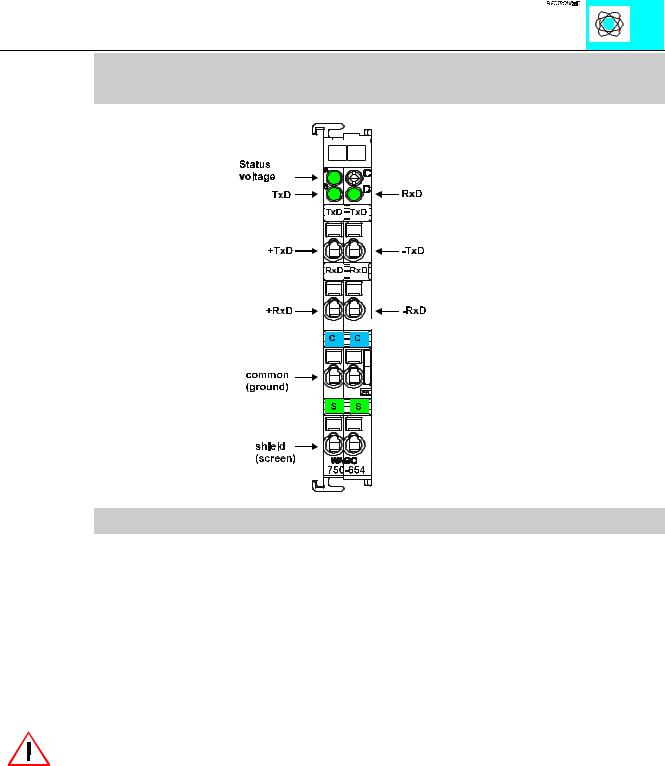
PN 750-654

Technical Description

This technical description is only valid for hardware and software versionx X X X X 2 C 0 0 - - - -. The product series number is printed on the right side of the module.

The operational mode described below is for the factory preset mode.

The following description is preliminary and is applicable to the factory configuration. Many other operational modes are possible (please contact WAGO for the corresponding settings.)

Attention:

Some modules do not provide all power jumper contacts (e.g. 4-channel)! A module which needs all contacts (e.g. 2-channel digital) cannot be connected to the right hand side of modules which do not have 3 power jumper contacts.

The data exchange module is able to run with all :$*2Ç, 2Ç6<67(0 buscouplers (except for the economy type).

Data exchange module 750-654

1

:$*2Ç, 2Ç6<67(0