Материал: part03

Внимание! Если размещение файла нарушает Ваши авторские права, то обязательно сообщите нам

Page 666​

DICOM PS3.3 2020a - Information Object Definitions​

Spatial Format (0018,6012) of 0003H (Spectral). The time dimension for the Region Spatial Format displays horizontally with data​ scrolling toward the left or sweeping toward the right. The reference pixel location is the pixel in the frame where:​

•​the time is the time of frame capture (i.e., the time origin for the frame)​

•​and on the Doppler Baseline (i.e., where the velocity and frequency are zero).​

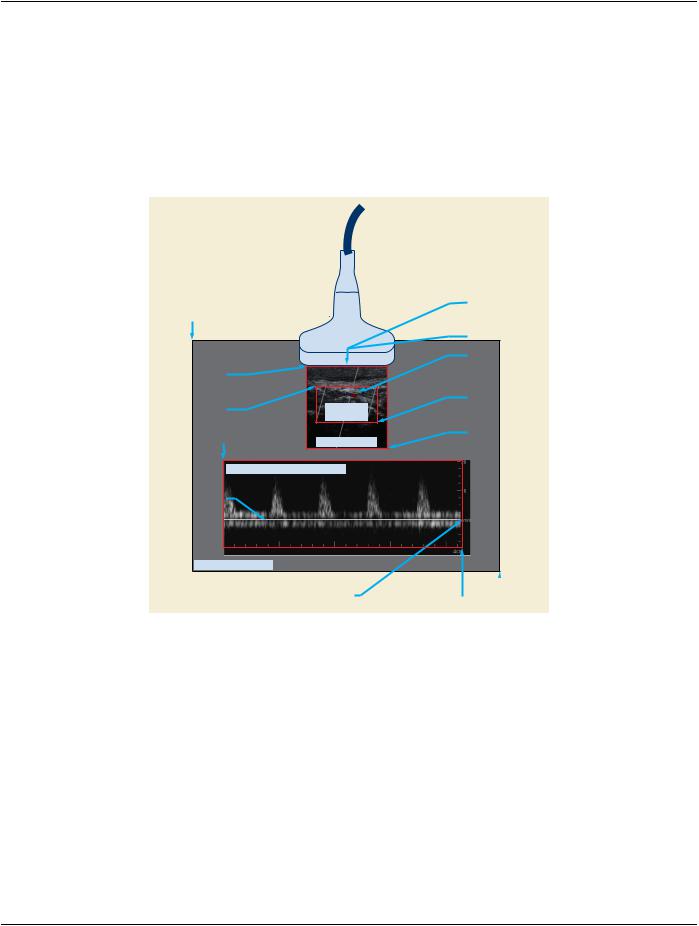
Figure C.8-2 shows an example of reference pixel locations in an image with both a Tissue and a scrolling Spectral (CW or PW​ Doppler) Region. The user adjusts the depth and position of the Doppler sample volume. The system annotates the sample volume​ position on the 2D region and specifies the location in Doppler Sample Volume X Position (0018,6039) and Doppler Sample Volume​ Y Position (0018,603B).​

Screen origin offset (0,0)

2D - Tissue

Reference Pixel x0, y0 = (108, 0)

2D - Color Flow

Transducer Reference Pixel

x0, y0 = (80, -60)

2D - Tissue


Doppler Sample

Region Location Min


Volume Position

x0, y0 = (290,30)


2D - Color Flow


2D - Color Flow


Region Location Max

Region Location Min

2D Color

x1, y1 = (480,180)

x0, y0 = (320,90)

2D - Tissue


Flow Region

Spectral Doppler


Region Location Max

Region Location Min

2D Tissue Region

x1, y1 = (506,252)

x0, y0 = (64,268)


Spectral Region (CW or PW Doppler)


Doppler Baseline


Pixel coordinate system

Spectral Region

Spectral Doppler


Reference Pixel

Region Location Max

(799, 599)

x0, y0 = (642, 162)

x1, y1 = (706,506)


Figure C.8-2. 2D & Doppler Regions with Reference Pixel​

The scrolling Spectral Region reference pixel location specifies the horizontal location at the time of the current image frame. Data​ to the left of this location in the Spectral Region was acquired in the past. Because time increases to the right, the Physical Delta X​ (0018,602C) for this Region is positive. To specify the location of the most recent data the Reference Pixel x0specifies the time of​ acquisition, and the Reference Pixel Physical Value X (0018,6028) specifies the reference time to be zero. The Physical Units X Dir-​ ection (0018,6024) is seconds. For an explanation of how to handle sweeping regions refer to Section C.8.5.5.1.16.7 Treatment of​ Sweeping Regions.​

The Reference Pixel Physical Value Y (0018,602A) value specifies the baseline where velocity or frequency are zero. Typically​ spectral Doppler regions display positive velocity (cm/Sec) or frequency shift (Hz) above the baseline. This indicates flow toward the​ transducerface.Negativevelocityorfrequencyinformationisdisplayedbelowthebaseline.Thisindicatesflowawayfromthetransducer​ face. The Physical Delta Y (0018,602E) value is therefore negative because vertical coordinates increment downward.​

C.8.5.5.1.16.3 M-Mode - Tissue or Color Flow​

M-Mode is tissue or color flow with a Region Spatial Format (0018,6012) of 0002H (M-mode). The vertical reference pixel location is​ the transducer face.​

- Standard -​

DICOM PS3.3 2020a - Information Object Definitions​

Page 667​

The horizontal reference pixel location is the pixel in the frame where:​

•​the time is the time of frame capture (i.e., the time origin for the frame)​

•​and zero depth from the transducer face​

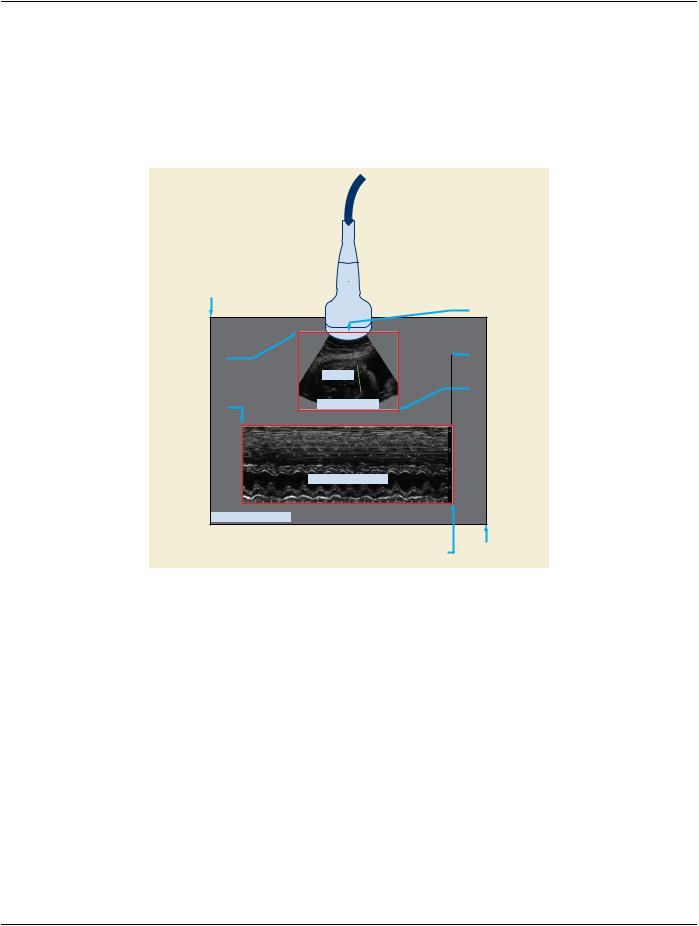
Figure C.8-3 shows an example of reference pixel locations for 2D Tissue and M-Mode Regions within the same image frame. The​ system annotates the sample line position on the 2D tissue region and specifies its position with the TM-Line Position Attributes​ (0018,603D), (0018,603F), (0018,6041) and (0018,6043).​

Screen origin offset


2D - Tissue

(0,0)


Reference Pixel


Transducer

x0, y0 = (135,18)

2D – Tissue


M-Mode - Tissue


Reference Pixel

Region Location Min


x0, y0 = (552,-165)

x0, y0 = (210,23)


TM Line

2D – Tissue


Region Location Max


M-Mode – Tissue


x1, y1 = (473,226)


Region Location Min

2D Tissue Region


x0, y0 = (58,245)


M-Mode Tissue Region


Pixel coordinate system


M-Mode – Tissue

(799, 599)


Region Location Max


x1, y1 = (610,450)


Figure C.8-3. 2D & M-Mode Regions with Reference Pixel Example​

ThephysicallengthoftheTM-LinecorrespondsdirectlytothephysicalheightoftheM-ModeRegion.TheM-Moderegion'sReference​ Pixel y0 can be used to calculate the depth of the M-Mode region and facilitate depth measurements. In this example the M-Mode​ Region Reference Pixel y0 has a negative value corresponding to the distance between the face of the ultrasound probe and the TM-​ Line starting point. Note that the negativeoffset in pixel unitsis determinedusing the pixel height-width scalingof the M-Mode - Tissue​ Region as this could differ from the scaling of the 2D - Tissue Region (as it does in this example).​

C.8.5.5.1.16.4 Waveform - ECG, Phonocardiogram and Pulse Traces​

Waveforms are traces with a Region Spatial Format (0018,6012) value of 0004H (Waveform). The Reference Pixel x0 (0018,6020)​ specifies the time origin as the time of frame capture. There is typically no baseline position for ECG traces; the Reference Pixel y0​ (0018,6022) is arbitrary.​

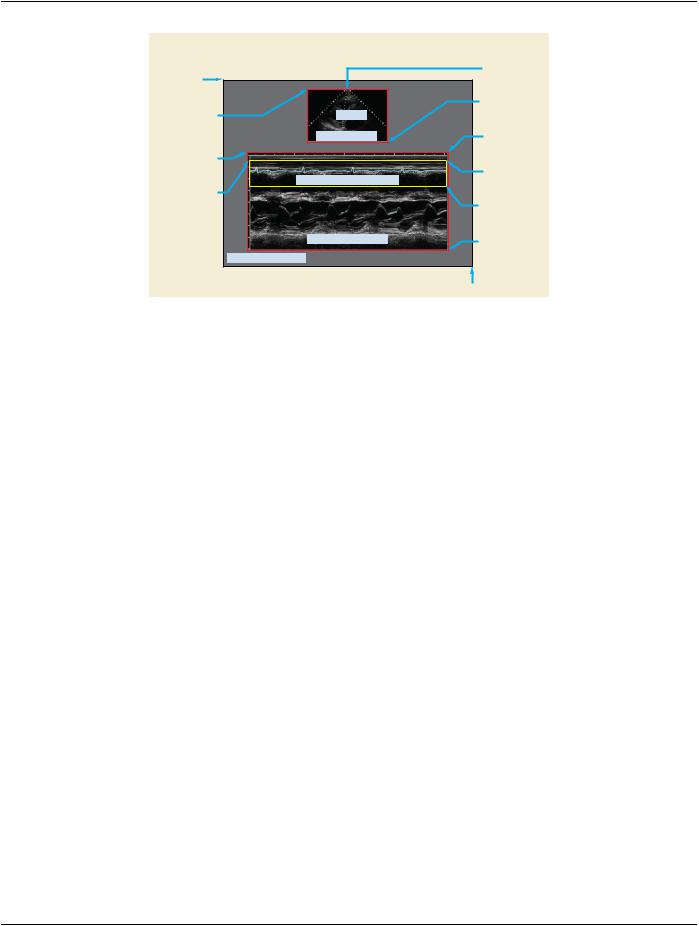
Figure C.8-4 shows an example of reference pixel location for 2D Tissue, M-Mode, and ECG Waveform Regions within the same​ image frame:​

- Standard -​

Page 668​

DICOM PS3.3 2020a - Information Object Definitions​


2D - Tissue


Reference Pixel


Screen origin offset


x0, y0 = (100,0)


(0,0)


2D – Tissue


2D – Tissue


Region Location Max


x1, y1 = (432,168)


Region Location Min


x0, y0 = (232,31)

TM-Line

M-Mode - Tissue


Reference Pixel


M-Mode – Tissue

2D Tissue Region

x0, y0 = (490,0)


Region Location Min


ECG


x0, y0 = (80,192)


Reference Pixel


ECG


x0, y0 = (480,0)


Waveform - ECG Trace Region


Region Location Min

ECG


X0, y0 = (85,207)


Region Location Max


x1, y1 = (565,252)


M-Mode – Tissue


M-Mode Tissue Region

Region Location Max


x1, y1 = (570,435)


Pixel coordinate system


(639, 479)

Figure C.8-4. 2D, M-Mode, & Waveform Regions with Reference Pixel​

C.8.5.5.1.16.5 Waveform - Doppler Mode, Mean and Max Trace​

Doppler Traces have a Region Spatial Format (0018,6012) value of 0004H (Waveform) and a Region Data Type value of 0005H​ (Doppler Mean Trace), 0006H (Doppler Mode Trace) or 0007H (Doppler Max Trace). The Reference Pixel x0 (0018,6020) specifies​ the time origin as the time of frame capture. The Reference Pixel y0 (0018,6022) is the Doppler Baseline position (zero velocity /​ frequency position).​

C.8.5.5.1.16.6 Graphics Spatial Formats​

For regions with Region Spatial Format (0018,6012) value of 0005H (Graphics) the reference pixel location has no meaning.​

C.8.5.5.1.16.7 Treatment of Sweeping Regions​

Time-based display of data may scroll the acquired data from a fixed horizontal location to the left. Alternatively, sweep-based display​ increments the horizontal location of the acquired data, overwriting previously acquired data to the right. When the horizontal location​ corresponding to zero time has completely swept over the older data, writing wraps from the left of the region. Thus, sweep-based​ displays have a time discontinuity. The measurement of time intervals across the discontinuity requires special treatment. The time​ interval between two points across the discontinuity is equal to the region's time width minus the point separation. The sweeping area​ can be treated as a single region. The Reference Pixel x0 should indicate the time origin for the multi-frame image, which will be the​ location of the sweeping region's discontinuity line for the first frame of the multi-frame image. In order to specify that this is actually​ the location of the discontinuity line, the Reference Pixel Physical Value X (0018,6028) must be set to 0 seconds. This indicates that​ this location corresponds to the time at which the first frame was acquired.​

It is useful to be able to calculate the location of the discontinuity line for subsequent frames of a multi-frame image. This is necessary​ if one is to determine whether two points are on opposite sides of the discontinuity line and also to correctly calculate the difference​ in time between such points. The x-axis location of the discontinuity line, x, for a given frame number, y, can be calculated from the​ Reference Pixel x0, x0, the Reference Pixel x1, x1, the time offset for frame y, t, (determined from the Frame Time Vector (0018,1065)​ or Frame Time (0018,1063)) and the Physical Delta X (0018,602C), px, as follows:​

x = x0 + modulus((t / px) / (x1 - x0))​

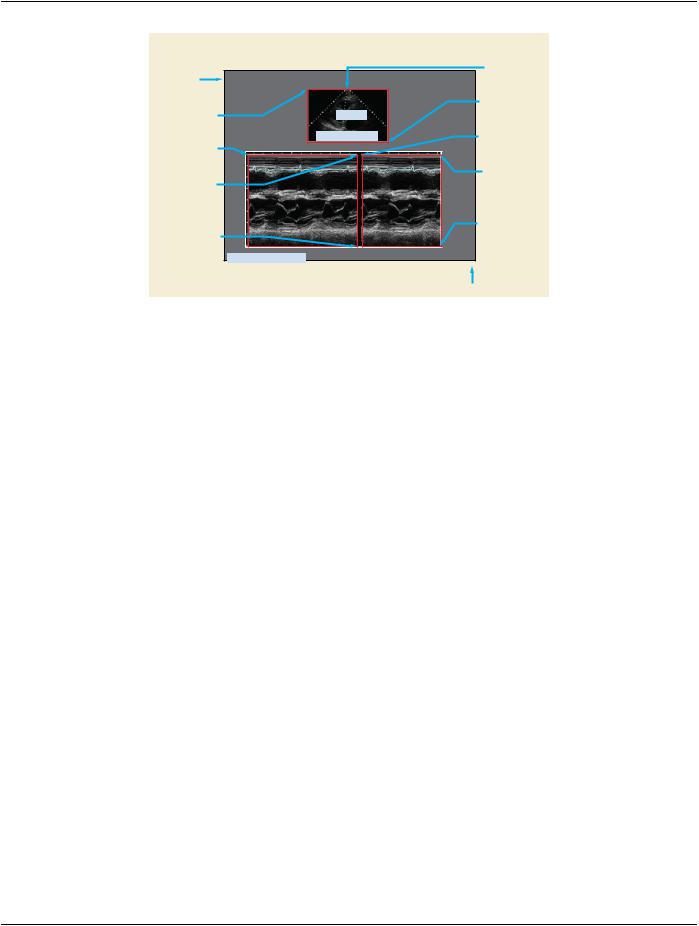
Alternatively, two regions can be used, one on each side of the time discontinuity. Figure C.8-5 shows the use of two regions. Note​ that the two region approach is not valid for multi-frame images, as the same region scaling must apply to all the frames.​

- Standard -​

DICOM PS3.3 2020a - Information Object Definitions​

Page 669​


2D - Tissue


Reference Pixel


Screen origin offset


x0, y0 = (88,0)


(0,0)


2D – Tissue


2D – Tissue


Region Location Max


x1, y1 = (408,162)


Region Location Min


x0, y0 = (232,31)

TM-Line

2nd M-Mode – Tissue


1st M-Mode – Tissue


Region Location Min


2D Tissue Region

x0, y0 = (362,196)


Region Location Min


x0, y0 = (84,196)


2nd M-Mode – Tissue


1st M-Mode – Tissue


Reference Pixel


x0, y0 = (188,0)


Reference Pixel


Ref. Pixel Physical


x0, y0 = (266,0)


Value X, Y = (-2.3,0)


Ref. Pixel Physical


Value X, Y = (0,0)


2nd M-Mode – Tissue


1st M-Mode – Tissue


Region Location Max


x1, y1 = (550,435)


Region Location Max


x1, y1 = (350,435)


Pixel coordinate system


(639, 479)


Figure C.8-5. Sweep Example Using Two Regions​

The two region approach may also be used in Doppler or physiological sweeping regions.​

Time-based display of data may also be a combination of sweeping and scrolling. Sweep-based display is used at the start of acquis-​ ition, incrementing the horizontal location of the acquired data from left to right. After the horizontal location corresponding to zero​ time has completely swept to the right hand limit of the region, writing scrolls to the left from the right hand limit rather than wrapping​ from the left. A single region should be specified when this combination of behavior is used. The x-axis (zero time) location, x, for a​ given frame number, y, can be calculated from the Reference Pixel x0, x0, the Reference Pixel x1, x1, the time offset for frame y, t,​ (determined from the Frame Time Vector (0018,1065) or Frame Time (0018,1063)) and the Physical Delta X, px, as follows:​

X = Min (x0 + (t / px), x1)​

C.8.5.5.1.17 Physical Delta X and Physical Delta Y​

The Physical Delta X (0018,602C) is the physical value increment per positive X pixel increment, which is left to right. The Physical​ Delta Y (0018,602E) is the physical value increment per positive Y pixel increment, which is top to bottom.​

Note​

When displaying Doppler data, ultrasound applications typically display the Doppler strip horizontally, with data sweeping​ (moving time origin) from left (oldest) to right (newest) or scrolling (static time origin) from right to left. The default display of​ positive velocity values normally indicates flow toward the transducer; negative velocity values indicate flow away from the​ transducer.InthiscaseanegativePhysicalDeltaYisrequiredtospecifythatthedirectionofpositivevelocitiesorfrequencies​ is upward.​

C.8.5.5.1.18 Pixel Value Mapping Code Sequence​

The Pixel Value Mapping Code Sequence (0040,9098) provides the real world values for pixel values identified in the Table of Pixel​ Values (0018,6058). The number of Items in the Sequence is given by Number of Table Entries (0018,6056).​

Note​

Pixel Component Physical Units (0018,604C) does not apply to Sequence of Pixel Value Codes and should be set to 0000H​ (none or not applicable).​

C.8.5.6 US Image Module​

Table C.8-18 specifies the Attributes that describe ultrasound images.​

- Standard -​

Page 670​ DICOM PS3.3 2020a - Information Object Definitions​

Table C.8-18. US Image Module Attributes​

Attribute Name​

Tag​

Type​

Attribute Description​

Samples Per Pixel​

(0028,0002)​

1​

Number of samples (planes) in this image.​


See Section C.8.5.6.1.12 for specialization​

Photometric Interpretation​

(0028,0004)​

1​

Specifies the intended interpretation of the pixel data.​


See Section C.8.5.6.1.2 for specialization.​

Bits Allocated​

(0028,0100)​

1​

Number of bits allocated for each pixel sample.​


See Section C.8.5.6.1.13 for specialization.​

Bits Stored​

(0028,0101)​

1​

Number of bits stored for each pixel sample.​


See Section C.8.5.6.1.14 for specialization.​

High Bit​

(0028,0102)​

1​

Most significant bit for pixel sample data.​


See Section C.8.5.6.1.15 for specialization.​

Planar Configuration​

(0028,0006)​

1C​

Indicates whether the pixel data are encoded color-by-plane or​


color-by-pixel.​


Required ifSamplesperPixel(0028,0002) hasavalue greater than​


1.​


See Section C.8.5.6.1.16 for specialization.​

Pixel Representation​

(0028,0103)​

1​

Data representation of pixel samples.​


See Section C.8.5.6.1.3 for specialization.​

Frame Increment Pointer​

(0028,0009)​

1C​

Contains the Data Element Tag of the Attribute that is used as the​


frame increment in Multi-frame pixel data (see Section C.7.6.6).​


Required if Number of Frames is present.​


See Section C.8.5.6.1.4 for specialization.​

Image Type​

(0008,0008)​

2​

Image identification characteristics.​


See Section C.8.5.6.1.1 for specialization.​

Lossy Image Compression​

(0028,2110)​

1C​

Specifies whether an Image has undergone lossy compression (at​


a point in its lifetime).​


Enumerated Values:​


00​Image has NOT been subjected to lossy compression.​


01​Image has been subjected to lossy compression.​


Once this value has been set to 01 it shall not be reset.​


See Section C.7.6.1.1.5​


Required if Lossy Compression has been performed on the Image.​


May be present otherwise.​

Number of Stages​

(0008,2124)​

2C​

Number of Stages in this protocol. Required if image was acquired​


in a Staged protocol.​

Number of Views in Stage​

(0008,212A)​

2C​

Number of views in this Stage. Required if image was acquired in​


a Staged protocol.​

R Wave Time Vector​

(0018,6060)​

3​

The time offset(s) of the reported R Wave peaks, each relative to​


the time of the start of the acquisition of the first frame in msec.​


Multi-valued, with one value per reported R Wave.​

- Standard -​