Материал: part02
Page 216 DICOM PS3.2 2020a - Conformance
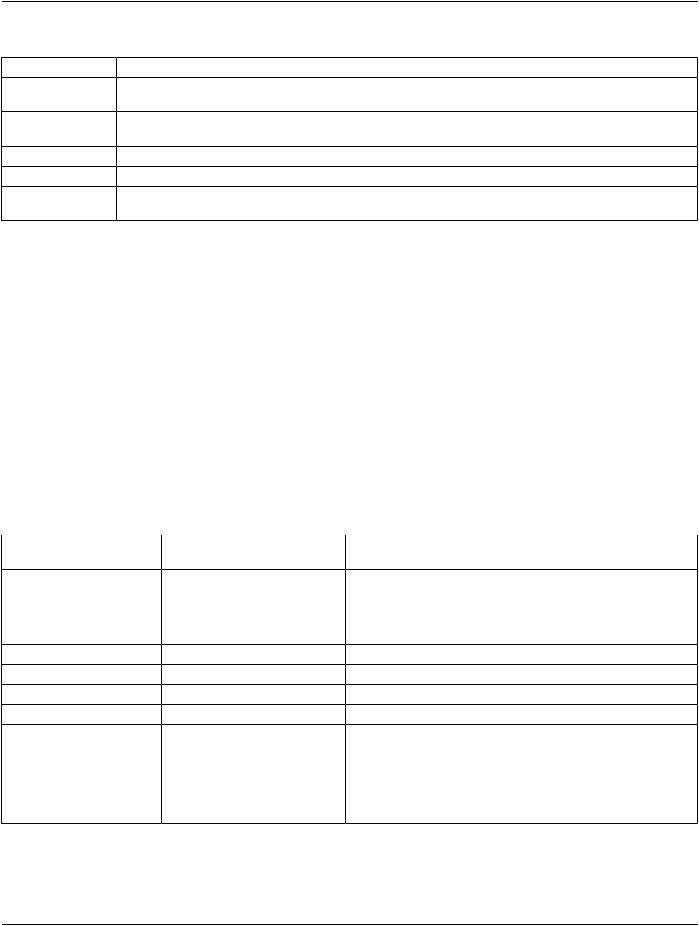
Table E.4.2-39. Presentation LUT SOP Class N-CREATE Response Status Handling Behavior
Service Status |
Further Meaning |
Error Code |
Behavior |
Success |
Success |
0000 |
The SCP has completed successfully the |
|
|
|
creation of the Presentation LUT. |
Warning |
Requested Min Density or Max Density B605H |
The N-CREATE operation is considered |
|
|
outside of printer's operating range |
|
successful but the status meaning is logged. |
Failure |
Invalid LUT Descriptor values |
0106 |
Reject the Presentation LUT |
Failure |
Invalid Presentation LUT Shape value |
0107 |
Reject the Presentation LUT Shape |
Failure |
Send both Presentation LUT and |
0108 |
Reject both the Presentation LUT and |
|
Presentation LUT Shape |
|
Presentation LUT Shape. |
E.4.2.1.4.1.3.5.2 Presentation LUT Box SOP Class Operation for N-Delete
WhenaN-DELETEDIMSEserviceisrequestedwithaspecificPresentationLUTSOPinstance,thePrintServerManagementSystem will not delete the specified Presentation LUT SOP instance as long as there are outstanding references to it. Otherwise, it deletes the specified Presentation LUT SOP instance.
E.4.2.1.4.1.3.5.3 Consistent Presentation of Grayscale Images
The EXAMPLE-PRINT-SERVER-MANAGEMENT supports the DICOM standard (PS3.14) Grayscale Standard Display Function (GSDF) for Consistent Presentation of Displayed and Printed Images. The Image Consistency is achieved through the support of the Presentation LUT (transforming the image pixels value in to the Standard Presentation P-values) and then Transforming the Image pixel values from the standard Presentation (P-value) space to the Optical Density space. Calibrating the Imager Printer Device to adjust the Printer Imager characteristic curve to fit the GSDF curve. The EXAMPLE-PRINT-SERVER-MANAGEMENT Service Manual describes in details the Imager Printer calibration to the DICOM GSDF curve.
E.4.2.1.4.1.3.6 Specific Conformance for Printer Configuration SOP Class
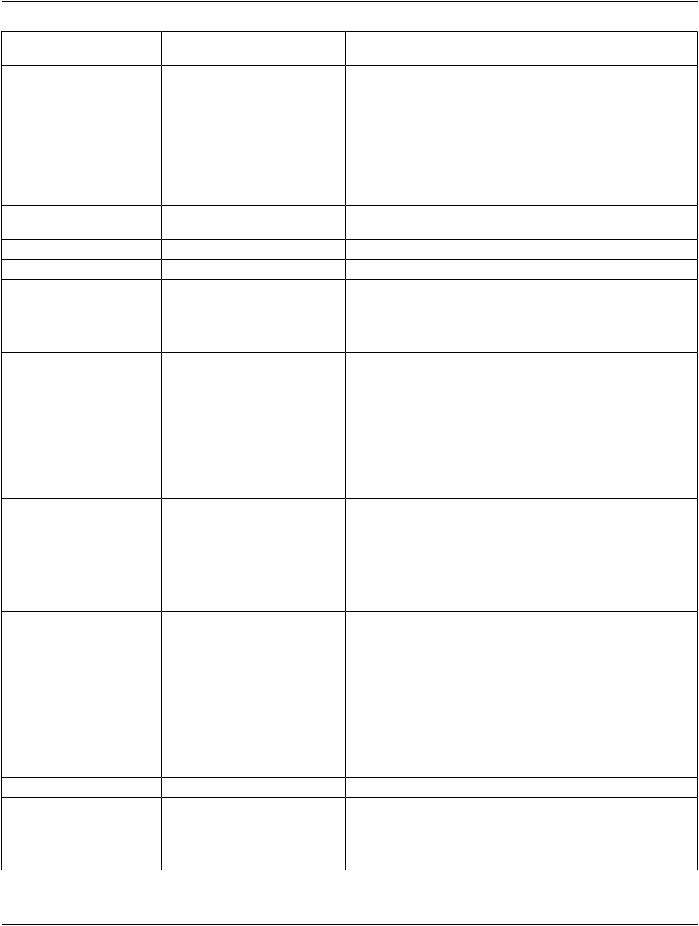
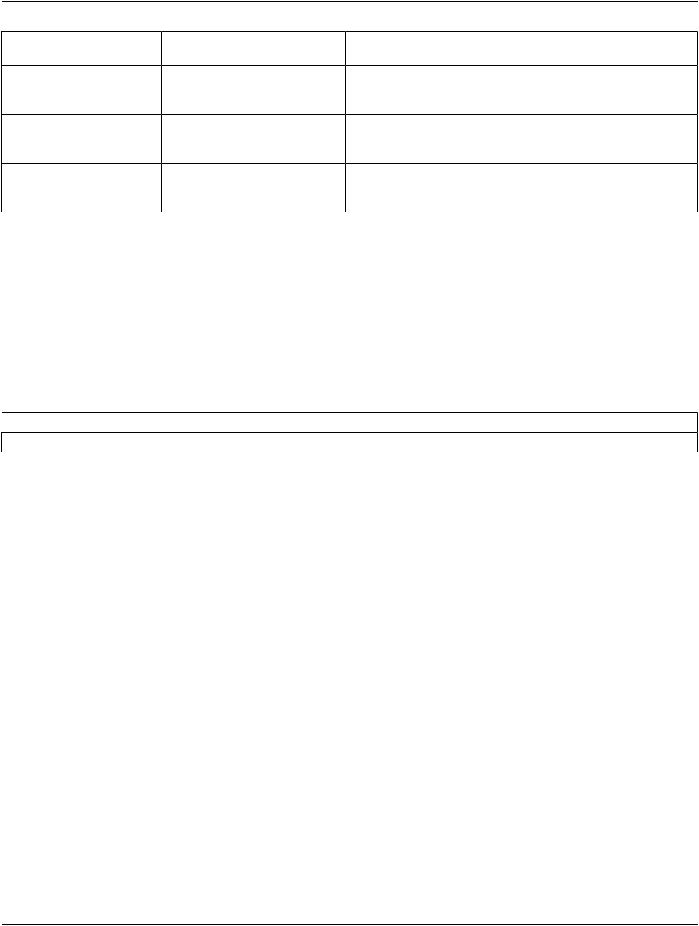
The EXAMPLE-PRINT-SERVER-MANAGEMENT is supporting the Printer Configuration N-GET requested by the Print SCU. The following table describes the Printer Configuration attributes:
Table E.4.2-40. Printer Configuration SOP Class N-GET Response Attributes
Attribute Name |
Tag |
VR |
Value |
Presence of |
Source |
|
|
|
|
Value |
|
Printer Configuration |
(2000,001E) |
SQ |
Sequence of the configurationALWAYS |
Printer |
|
Sequence |
|
|
attributes |
|
|
>SOP Classes Supported |
(0008,115A) |
UI |
SOP Class supported UID. |
ANAP |
Printer |
>MaximumMemoryAllocation |
(2000,0061) |
IS |
See Film (page) sizes |
ANAP |
Printer |
>Memory Bit Depth |
(2000,00A0) |
US |
8 through 16 |
ANAP |
Printer |
>Printing Bit Depth |
(2000,00A1) |
US |
8 or 12 |
ANAP |
Printer |
>Media Installed Sequence |
(2000,00A2) |
SQ |
|
ANAP |
Printer |
>>Item Number |
(0020,0019) |
IS |
|
ANAP |
Printer |
>>Medium Type |
(2000,0030) |
CS |
BLUE FILM, |
ANAP |
Printer |
(See Note 1) |
|
|
CLEAR FILM, |
|
|
|
|
|
PAPER |
|
|
|
|
|
CURRENT |
|
|
- Standard -
|
DICOM PS3.2 2020a - Conformance |
|
Page 217 |
||
Attribute Name |
Tag |
VR |
Value |
Presence of |
Source |
|
|
|
|
Value |
|
>>Film Size ID |
(2010,0050) |
CS |
8INX10IN |
ANAP |
Printer |
(See Note 1) |
|
|
11INX14IN |
|
|
|
|
|
14INX17IN |
|
|
|
|
|
CURRENT |
|
|
>>Min Density |
(2010,0120) |
US |
0..50 |
ANAP |
Printer |
>>Max Density |
(2010,0130) |
US |
0..400 |
ANAP |
Printer |
>Supported Image Display |
(2000,00A8) |
SQ |
|
ANAP |
Printer |
Formats Sequence |
|
|
|
|
|
>>Rows |
(0028,0010) |
US |
1 to Max Film rows |
ANAP |
Printer |
>>Columns |
(0028,0011) |
US |
1 to max Film columns |
ANAP |
Printer |
>>Image Display Format |
(2010,0010) |
ST |
STANDARD\C,R |
ANAP |
Printer |
|
|
|
ROW\R1,R2,R3 |
|
|
|
|
|
COL\C1,C2,C3 |
|
|
>>Film Orientation |
(2010,0040) |
CS |
PORTRAIT |
ANAP |
Printer |
|
|
|
LANDSCAPE |
|
|
>>Film Size ID |
(2010,0050) |
CS |
8INX10IN |
ANAP |
Printer |
(See Note 1) |
|
|
11INX14IN |
|
|
|
|
|
14INX17IN |
|
|
|
|
|
CURRENT |
|
|
>>Printer Resolution ID |
(2010,0052) |
CS |
STANDARD |
ANAP |
Printer |
|
|
|
HIGH |
|
|
>>Printer Pixel Spacing |
(2010,0376) |
DS |
Pair of decimal numbers |
ANAP |
Printer |
>>RequestedImageSizeFlag |
(2020,00A0) |
CS |
YES |
ANAP |
Printer |
|
|
|
NO |
|
|
>DefaultPrinterResolutionID |
(2010,0054) |
CS |
STANDARD |
ANAP |
Printer |
|
|
|
HIGH |
|
|
>Default Magnification Type |
(2010,00A6) |
CS |
REPLICATE |
ANAP |
Printer |
|
|
|
BILINEAR |
|
|
|
|
|
CUBIC |
|
|
|
|
|
NONE |
|
|
>Default Smoothing Type |
(2010,00A8) |
CS |
0-15, the value is laser specific.ANAP |
Printer |
|
>Maximum Collated Films |
(2010,0154) |
IS |
1..100 |
ANAP |
Printer |
>Decimate/Crop Result |
(2020,00A2) |
CS |
DECIMATE |
ANAP |
Printer |
|
|
|
CROP |
|
|
|
|
|
FAIL |
|
|
- Standard -
Page 218 |
DICOM PS3.2 2020a - Conformance |
|
|
||
Attribute Name |
Tag |
VR |
Value |
Presence of |
Source |
|
|
|
|
Value |
|
>Manufacturer |
(0008,0070) |
LO |
Any value up to 16 charactersANAP |
Printer |
|
|
|
|
in length. Chosen by user at |
|
|
|
|
|
time of installation |
|
|
>Manufacturer Model Name |
(0008,1090) |
LO |
Any value up to 16 charactersANAP |
Printer |
|
|
|
|
in length. Chosen by user at |
|
|
|
|
|
time of installation |
|
|
>Printer Name |
(2110,0030) |
LO |
Any value up to 16 charactersANAP |
Printer |
|
|
|
|
in length. Chosen by user at |
|
|
|
|
|
time of installation |
|
|
Note
See the addition value "CURRENT" in Section E.8.5.1
E.4.3 Network Interfaces
E.4.3.1 Physical Network Interface
TheEXAMPLE-PRINT-SERVER-MANAGEMENTsupportsasinglenetworkinterface.Oneofthefollowingphysicalnetworkinterfaces will be available depending on installed hardware options:
Table E.4.3-1. Supported Physical Network Interfaces
 Ethernet 100baseT
Ethernet 10baseT
E.4.3.2 Additional Protocols
DHCP can be used to obtain TCP/IP network configuration information (e.g., own TCP/IP address, net-mask, default gateway, DNS server,etc).SupportforDHCPcanbeconfiguredviatheConfigurationService/InstallationTool..IfDHCPisnotinuse,TCP/IPnetwork configuration information can be manually configured via the Service/Installation Tool.
DNS can be used for address resolution. If DHCP is not in use, the identity of a DNS server can be configured via the Service/Install- ation Tool. If a DNS server is not in use, local mapping between hostname and TCP/IP address can be manually configured via the Service/Installation Tool.
E.4.3.3 IPv4 and IPv6 Support
This product supports both IPv4 and IPv6. It does not utilize any of the optional configuration identification or security features of IPv6.
E.4.4 Configuration
E.4.4.1 AE Title/Presentation Address Mapping
E4.4.1.1 Local AE Titles
All local applications use the AETs and TCP/IP Ports configured via the Service/Installation Tool. The Field Service Engineer can configure the IP Address via the Service/Installation Tool. No Default AE Titles are provided. The AE Titles must be configured during installation. The local AET used by each individual application can be configured independently of the AET used by other local applic- ations. If so configured, all local AEs are capable of using the same AET.
The EXAMPLE-PRINT-SERVER-MANAGEMENT is configured via the Configuration Service/Installation Tool as follows
- Standard -
|
DICOM PS3.2 2020a - Conformance |
Page 219 |
|
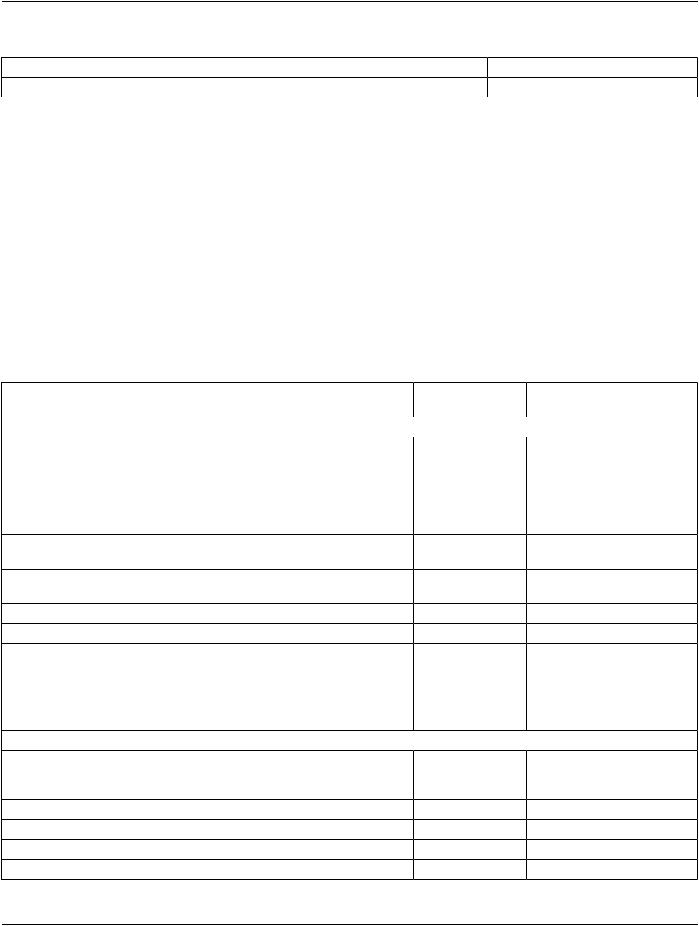
Table E.4.4-1. AE Title Configuration Table |
|
Application Entity |
Default AE Title |
Default TCP/IP Port |
PRINT-SCP |
Must be configured |
104 |
E.4.4.1.2 Remote AE Title/Presentation Address Mapping
TheAET,hostnamesandportnumbersofremoteapplicationsareconfiguredusingtheEXAMPLE-PRINT-SERVER-MANAGEMENT
Service/Installation Tool.
E.4.4.1.2.1 Print Server Management
The EXAMPLE-PRINT-SERVER-MANAGEMENT Service/Installation tool must be used to set the AETs, port-numbers, host-names, Local Network Host Name, Router Address(Gateway), Sub-net Mask, IP-addresses (if no DHCP is used) and other capabilities for the remote Print SCUs. Multiple remote Print SCUs can be defined.
E.4.4.2 Parameters
A large number of parameters related to Print Management, Communications and general operation can be configured using the Service/Installation Tool. The following table shows those configuration parameters relevant to DICOM communication. See the EX- AMPLE-PRINT-SERVER-MANAGEMENT Configuration Service Manual for details on general configuration capabilities.
Table E.4.4-2. Configuration Parameters Table
Parameter |
Configurable |
Default Value |
|
(Yes/No) |
|
General Parameters |
|
|
Max PDU Receive Size |
Yes |
128 KB |
MaxPDUSendSize(IfthereceiversupportsasmallerMaxPDUReceiveSize |
Yes |
128 KB |
then the Max PDU Send Size will be reduced accordingly for the duration of |
|
|
the Association. Max PDU Receive Size information is exchanged during |
|
|
DICOM Association Negotiation in the Maximum Length Sub-Item of the |
|
|
A-ASSOCIATION-RQ and A-ASSOCIATE-AC) |
|
|
Time-out waiting for a acceptance or rejection response to an Association |
Yes |
20 s |
Request (Application level Timeout). |
|
|
Time-outwaitingforaresponsetoanAssociationreleaserequest(Application |
Yes |
30 s |
level Timeout) |
|
|
Time-outwaitingforcompletionofaTCP/IPconnectrequest(Low-leveltimeout) |
Yes |
20 s |
Time-out awaiting a Response to a DIMSE Request (Low level Timeout) |
Yes |
360 s |
Time-out for waiting for data between TCP/IP-packets (Low level Timeout) |
Yes |
30 s |
Maximum number of simultaneous Associations |
Yes |
8 |
Supported Transfer Syntaxes |
Yes |
Implicit VR Little Endian |
|
|
Explicit VR Little Endian |
Print Server Management |
|
|
Default Print parameters: Max density, Min Density, Contrast, Border Density, |
Yes |
Configurable |
Trim, Magnification type, Smoothing factor, Polarity, Number of Copies, |
|
|
Cropping Algorithm, Orientation. |
|
|
Number of times a failed print-job may be retried |
Yes |
3 |
Delay between retrying failed print-jobs |
Yes |
60s |
Printer Bit-depth Configurable: 8 or 12 |
Yes |
12 |
Custom Format |
No |
NA |
- Standard -
Page 220 |
DICOM PS3.2 2020a - Conformance |
|
|
Parameter |
|
Configurable |
Default Value |
|
|
(Yes/No) |
|
Media Type: Transparent (Film), Reflective (Paper) |
Yes |
Transparent |
|
Media size Configurable: |
|
Yes |
14IN X 17IN |
8IN X 10IN |
|
|
|
11IN X 14IN |
|
|
|
14IN X 14IN |
|
|
|
14IN X 17IN |
|
|
|
MaximumnumberofprintablepixelmatrixpersupportedMediasize;seeNote |
No |
8x10 - 2286x2836 |
|
|
|
|
11x14 - 4096x3195 |
|
|
|
14x14 - 4096x4108 |
|
|
|
14x17 - 4096x5120 |
Maximum number of collated films in a film session |
Yes |
12 |
|
Support N-EVENT-REPORT (On/Off for either Printer, Print Job or both). |
Yes |
On |
|
Handling of print jobs when requested Media Type and/or Film Size are not |
Yes |
Print on available media |
|
currently installed. The options are: |
|
|
|
1.Queue the print job until the film matching the requested Media Type |
|
|
|
and/or Film Size is loaded. |
|
|
|
2.Print on the film currently loaded in the printer. |
|
|
|
Print SCP time-out waiting for a SCU confirmation to a Print Status |
Yes |
60 s |
|
N-EVENT-REPORT |
|
|
|
Print SCP time-out waiting for a SCU confirmation to a Print Job |
Yes |
60 s |
|
N-EVENT-REPORT |
|
|
|
Supported Transfer Syntaxes (separately configurable for each remote SCU |
Yes |
Implicit VR Little Endian |
|
printer) |
|
|
Explicit VR Little Endian |
|
|
|
|
Note
Theadjustment(MagnificationorClipping)oftheoriginalimagetothePrintableimagesizeisdescribedinthePrinterService
Manual.
E.5 Media Interchange
The EXAMPLE-PRINT-SERVER-MANAGEMENT does not support Media Storage.
E.6 Support of Character Sets
The EXAMPLE-PRINT-SERVER-MANAGEMENT supports the following Character sets:
ISO_IR 100 (ISO 8859-1:1987 Latin Alphabet No. 1 supplementary set)
ISO_IR 144 (ISO 8859-5:1988 Latin/Cyrillic Alphabet supplementary set)
E.7 Security
The EXAMPLE-PRINT-SERVER-MANAGEMENT does not support any specific security measures.
- Standard -