Материал: part02
Page 206 |
|
DICOM PS3.2 2020a - Conformance |
|
|
|
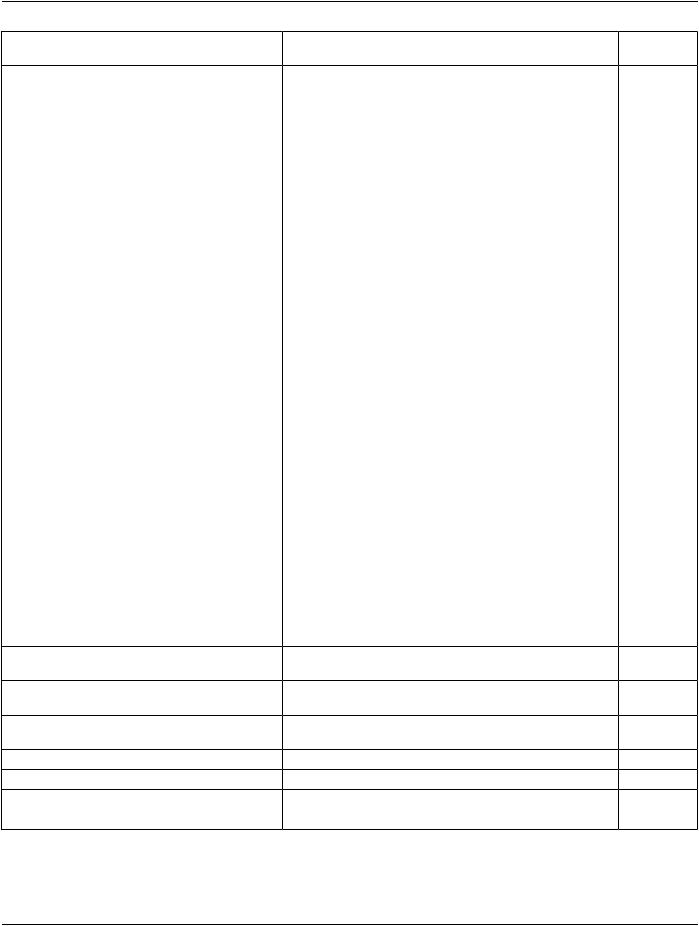
Attribute Name |
Tag |
VR |
Value |
Presence of Source |
|
|
|
|
|
Value |
|
Printer Status Info |
(2110,0020) |
CS |
for NORMAL conditions: |
ALWAYS |
Printer |
|
|
|
•"NORMAL" |
|
|
|
|
|
for WARNING conditions: |
|
|
|
|
|
•"PRINTER INIT" |
|
|
|
|
|
•"SUPPLY LOW" |
|
|
|
|
|
•"NO SUPPLY MGZ" |
|
|
|
|
|
•"BAD SUPPLY MGZ" |
|
|
|
|
|
•"FILM JAM" |
|
|
|
|
|
•"SUPPLY EMPTY" |
|
|
|
|
|
•"COVER OPEN" |
|
|
|
|
|
•"ELEC DOWN" |
|
|
|
|
|
•"PROC INIT" |
|
|
|
|
|
for FAILURE conditions |
|
|
|
|
|
•"CHECK PRINTER" |
|
|
|
|
|
•"ELEC CONFIG ERR" |
|
|
|
|
|
•"ELEC SW ERROR" |
|
|
|
|
|
•"PRINTER OFFLINE" |
|
|
|
|
|
•"PRINTER DOWN" |
|
|
|
|
|
•"CALIBRATION ERR" |
|
|
|
|
|
•"FILM TRANS ERR" |
|
|
|
|
|
•"PROC DOWN" |
|
|
|
|
|
•"UNKNOWN" |
|
|
Printer Name |
(2110,0030) |
LO |
Anyvalueupto16charactersinlength.ChosenANAP |
Printer |
|
|
|
|
by user at time of installation |
|
|
Manufacturer |
(0008,0070) |
LO |
Anyvalueupto16charactersinlength.ChosenANAP |
Printer |
|
|
|
|
by user at time of installation |
|
|
Manufacturer Model |
(0008,1090) |
LO |
Anyvalueupto16charactersinlength.ChosenANAP |
Printer |
|
Name |
|
|
by user at time of installation |
|
|
Device Serial Number |
(0018,1000) |
LO |
number up to 8 ASCII characters |
ANAP |
Printer |
Software Version |
(0018,1020) |
LO |
ID up to 6 ASCII characters |
ANAP |
Printer |
Date Last Calibration |
(0018,1200) |
DA |
Provided by Printer |
NS |
Printer |
Last Calibration |
(0008,1090) |
TM |
Provided by Printer |
NS |
Printer |
The Printer Status information is evaluated as follows:
1.If Printer status (2110,0010) is NORMAL, the print-job continues to be printed.
- Standard -
DICOM PS3.2 2020a - Conformance |
Page 207 |
2.If Printer status (2110,0010) is FAILURE, the print-job is marked as failed. The contents of Printer Status Info (2110,0020) is logged
3.If Printer status (2110,0010) is WARNING, the print-job continues to be printed. The content of Printer Status Info (2110,0020) is logged.
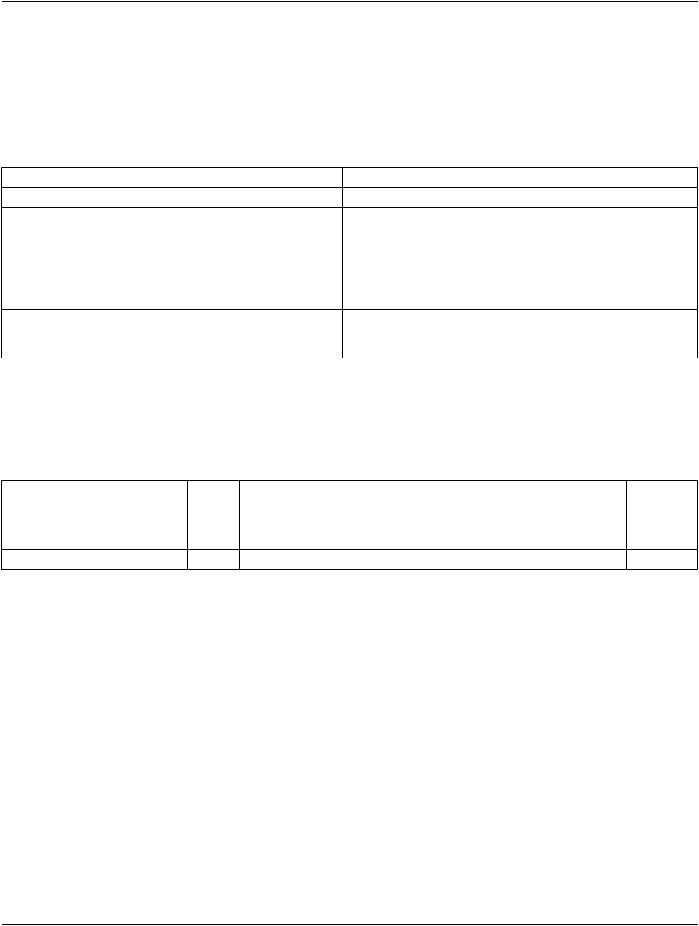
The following status codes may be returned in response to Printer N-GET:
Table E.4.2-29. Printer SOP Class N-GET Response Status Handling Behavior
Service Status |
Further Meaning |
Error Code |
Behavior |
Success |
Success |
0000 |
The request to get printer status information was success. |
Warning |
Warning |
0107 |
Attributes not recognized within the context of this SOP class. For |
|
|
|
example, unsupported attributes were requested. |
|
|
|
A list of offending attribute tags is returned in Attribute List |
|
|
|
(0000,1005). |
|
|
|
A Data Set is still returned with valid attributes/values. |
Error |
Failure |
Any other status |
The Association is aborted using A-ABORT and the print-job is |
|
|
code. |
marked as failed. The status meaning is logged and reported to the |
|
|
|
user. |
E.4.2.1.4.1.3.2.4.2 Specific Conformance for Printer N-EVENT-REPORT Status
EXAMPLE-PRINT-SERVER-MANAGEMENT can be configured to send the Printer status information using the N-EVENT-REPORT DIMSE Service, asynchronously to all associated SCU that support the Printer SOP class. When the printer status is NORMAL, no attribute is sent. When the printer status is either WARNING or FAILURE, the following attributes are sent:
Table E.4.2-30. Printer SOP Class N-EVENT-REPORT Attributes
Attribute Name |
Tag |
VR |
Value |
Presence of |
Source |
|
|
|
|
Value |
|
Printer Name |
(2110,0030) |
LO |
Any value up to 16 characters in length. Chosen by userANAP |
Printer |
|
|
|
|
at time of installation |
|
|
Printer Status |
(2110,0010) |
CS |
NORMALWARNINGFAILURE |
ALWAYS |
Printer |
- Standard -

Page 208 |
|
DICOM PS3.2 2020a - Conformance |
|
|
Attribute Name Tag |
VR |
Value |
Presence of |
Source |
|
|
|
Value |
|
Printer Status Info(2110,0020) |
CS |
If FAILURE: |
ALWAYS |
Printer |
|
|
•ELEC CONFIG ERR |
|
|
|
|
•ELEC SW ERROR |
|
|
|
|
•PRINTER DOWN |
|
|
|
|
•UNKNOWN |
|
|
|
|
If WARNING**: |
|
|
|
|
•PROC INIT |
|
|
|
|
•PROC DOWN |
|
|
|
|
•PRINTER INIT |
|
|
|
|
•CALIBRATION ERR |
|
|
|
|
•PROC OVERFLOW FL |
|
|
|
|
•CHEMICALS EMPTY |
|
|
|
|
•CHECK CHEMISTRY |
|
|
|
|
•PROC OVERFLOW HI |
|
|
|
|
•CHEMICALS LOW |
|
|
|
|
•BAD SUPPLY MGZ |
|
|
|
|
•NO SUPPLY MGZ |
|
|
|
|
•SUPPLY MGZ ERR |
|
|
|
|
•SUPPLY EMPTY |
|
|
|
|
•SUPPLY LOW |
|
|
|
|
•RECEIVER FULL |
|
|
|
|
•NO RECEIVE MGZ |
|
|
|
|
•CALIBRATION ERR |
|
|
|
|
•COVER OPEN |
|
|
|
|
•FILM JAM |
|
|
The EXAMPLE-PRINT-SERVER-MANAGEMENT behavior when sending the N-EVENT-REPORT is summarized in the following table:
Table E.4.2-31. Printer SOP Class N-EVENT-REPORT Behavior
Event Type Name |
Event Type ID |
Behavior |
Normal |
1 |
The print-job continues to be printed. |
Warning |
2 |
Theprint-jobcontinuestobeprinted.ThecontentsofPrinterStatusInfo(2110,0020) |
|
|
is logged and reported to the user via the job-control application. |
- Standard -

|
|
DICOM PS3.2 2020a - Conformance |
Page 209 |
Event Type Name |
Event Type ID |
Behavior |
|
Failure |
3 |
The print-job is marked as failed. The contents of Printer Status Info (2110,0020) is |
|
|
|
logged and reported to the user via the job-control application. |
|
* |
* |
An invalid Event Type ID will cause a status code of 0113H to be returned in a |
|
|
|
N-EVENT-REPORT response. |
|
E.4.2.1.4.1.3.3 Specific Conformance to Basic Annotation Box SOP Class
The EXAMPLE-PRINT-SERVER-MANAGEMENT creates the Basic Annotation Box SOP instance at the time the Basic Film Box SOP instance is created, based on the value of the attribute Annotation Display Format ID (2010,0030) of the Basic Film Box.
The created Basic Annotation Box SOP instance can be updated with the N-SET DIMSE service. The following table describes the attributes that can be updated:
Table E.4.2-32. Basic Annotation Box SOP Class N-SET Request Attributes
Attribute |
Tag |
Valid Range |
Default Value if not sent by |
Response to Invalid |
|
|
|
SCU or invalid value received |
Value |
Annotation
Position
 Text String
(2030,0010) |
0 - Max number of annotation Mandatory, |
Failure (0x0106) |
|
|
strings defined for Annotation |
no default. |
|
|
Format |
|
|
(2030,0020) |
1-64 characters |
Null string |
Warning (0x116) |
The Print Server Management behavior and specific status codes sent for the N-SET of a specific Annotation Box is described in the following table:
Table E.4.2-33. Basic Annotation Box SOP Class N-SET Response Status Handling Behavior
Service Status |
Further Meaning |
Error Code |
Behavior |
Success |
Success |
0000 |
Some attributes may have different values than what was |
|
|
|
requested. The actual values of attributes are returned. |
Warning |
Attribute out of range |
0116 |
The attribute in question is the only attribute returned in |
|
|
|
the responses Data Set. |
Failure |
Invalid attribute value |
0106 |
A Data Set is returned with all the invalid attributes/values. |
Failure |
Processing failure |
0110 |
Can not decode the DIMSE attribute. |
Failure |
No object instance |
0112 |
The given instance UID does not exist. |
Failure |
Missing attributes |
0120 |
Mandatory attributes are missing. |
|
|
|
A list of missing mandatory attribute tags is returned. |
Failure |
Missing attribute value |
0121 |
A mandatory attribute was given, but had no value. |
|
|
|
A Data Set is returned of all attributes/values missing. |
E.4.2.1.4.1.3.4 Specific Conformance to Print Job Box SOP Class
The EXAMPLE-PRINT-SERVER-MANAGEMENT supports the following DIMSE operations and notifications for the Print Job SOP Class:
•N-GET
•N-EVENT-REPORT
Details of the supported attributes and status-handling behavior are described in the following subsections.
- Standard -

Page 210 |
DICOM PS3.2 2020a - Conformance |
E.4.2.1.4.1.3.4.1 Specific Conformance for Print Job N-Event-Report
TheEXAMPLE-PRINT-SERVER-MANAGEMENTcanbeconfiguredtoreportthestatusofthePrintjobusingtheN-EVENT-REPORT DIMSE Service, asynchronously to the associated SCU that created the job and establishes the association to support the Print Job SOP Class. The Print Job N-EVENT-REPORT will provide the following information:
Table E.4.2-34. Print Job SOP Class N-EVENT-REPORT Attributes
Attribute Name |
Tag |
VR |
Value |
Presence of |
Source |
|
|
|
|
Value |
|
Printer Name |
(2110,0030) |
LO |
Any value up to 16 characters in length. Chosen by userANAP |
Printer |
|
|
|
|
at time of installation |
|
|
Film Session Label(2000,0050) |
LO |
Up to 64 characters |
ALWAYS |
Printer |
|
- Standard -