Материал: part02
Page 86 DICOM PS3.2 2020a - Conformance
Table B.1-2 provides an overview of the Media Storage Application Profiles supported by Example-Integrated-Modality.
Table B.1-2. Media Services
Media Storage Application Profile |
Write Files (FSC or FSU) |
Read Files (FSR) |
Compact Disk - Recordable |
|
|
General Purpose CD-R |
Yes |
No |
B.2 Table of Contents
A table of contents shall be provided to assist readers in easily finding the needed information.
B.3 Introduction
B.3.1 Revision History
Table B.3.1. Revision History
Document Version |
Date of Issue |
Author |
Description |
1.1 |
October 30, 2003 |
WG 6 |
Version for Final Text |
1.2 |
August 30, 2007 |
WG 6 |
Revised Introduction |
B.3.2 Audience, Remarks, Terms and Definitions, Basics of DICOM Communication, Abbrevi- ations, References
See example text in Section A.3.
B.3.3 Additional Remarks for This Example
ThisdocumentisasampleDICOMConformanceStatementcreatedforDICOMPS3.2.Itistobeusedsolelyasanexampletoillustrate howtocreateaDICOMConformanceStatementforanacquisitionmodality.Thesubjectofthedocument,EXAMPLE-INTEGRATED- MODALITY, is a fictional product.
- Standard -
DICOM PS3.2 2020a - Conformance |
Page 87 |
B.4 Networking
B.4.1 Implementation Model
B.4.1.1 Application Data Flow
|
DICOM Standard Interface |
||
Send |
|
|
Remote |
Storage |
|
||
|
Applicati n |
||
Images & |
Application |
|
Entity Receives |
|
|||
GSPS |
Entity |
|
Images |
|
|
|
& GSPS |
|
|
|
Remote |
Update |
|
|
Application |
|
|
Entity Provides |
|
Worklist |
|
|
|
|
|
Worklist Items |
|
|
|
|
|
|
Workflow |
|
|
|
Application |
|
|
|
Entity |
|
Remote |
|
|
|
|
|
|
|
Application |
Acquire |
|
|
|
|
|
Entity Receives |
|
Images |
|
|
MPPS |
|
|
|
Create/Update |
|
|
|
Remote |
|
Hardcopy |
|
|
Film |
|
Application |
|
Application |
|
||
Images |
|
Entity Prints |
|
|
|||
Entity |
|
||
|
|
Film Sheets |
|
|
|
|
|
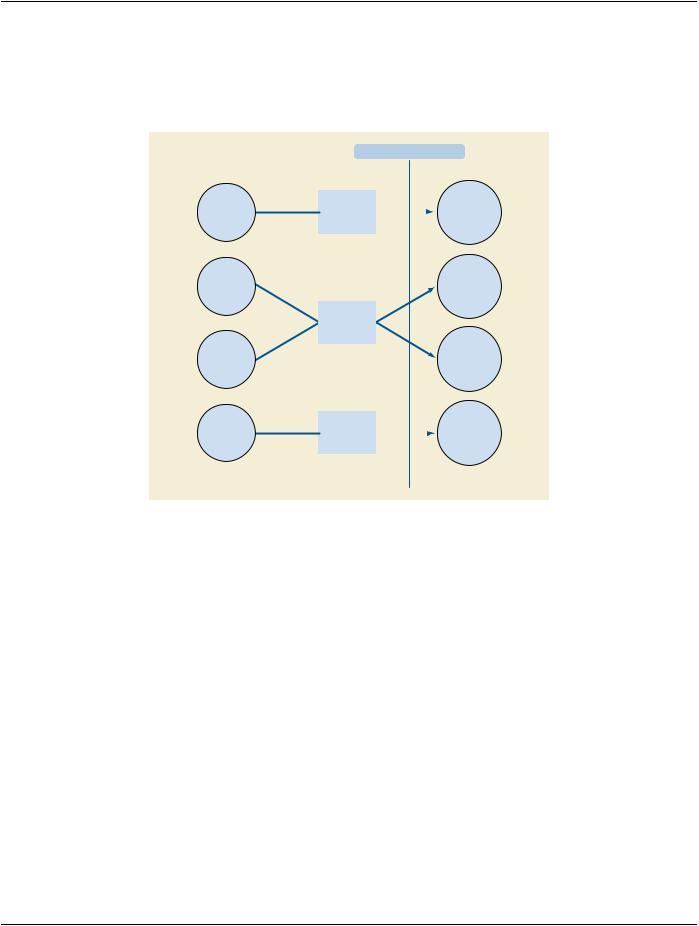
Figure B.4.1-1. Application Data Flow Diagram
•The Storage Application Entity sends images and Presentation States to a remote AE. It is associated with the local real-world activity "Send Images & GSPS". "Send Images & GSPS" is performed upon user request for each study completed or for specific images selected. When activated by user's settings (auto-send), each marked set of images and associated Presentation States can be immediately stored to a preferred destination whenever a Patient/Study is closed by the user. If the remote AE is configured as an archive device the Storage AE will request Storage Commitment and if a commitment is successfully obtained will record this information in the local database.
•The Workflow Application Entity receives Worklist information from and sends MPPS information to a remote AE. It is associated with the local real-world activities "Update Worklist" and "Acquire Images". When the "Update Worklist" local real-world activity is performed the Workflow Application Entity queries a remote AE for worklist items and provides the set of worklist items matching the query request. "Update Worklist" is performed as a result of an operator request or can be performed automatically at specific timeintervals.Whenthe"AcquireImages"localreal-worldactivityisperformedtheWorkflowApplicationEntitycreatesandupdates Modality Performed Procedure Step instances managed by a remote AE. Acquisition of images will result in automated creation of an MPPS Instance. Completion of the MPPS is performed as the result of an operator action.
•TheHardcopyApplicationEntityprintsimagesonaremoteAE(Printer).Itisassociatedwiththelocalreal-worldactivity"FilmImages". "Film Images" creates a print-job within the print queue containing one or more virtual film sheets composed from images selected by the user.
- Standard -
Page 88 |
DICOM PS3.2 2020a - Conformance |
B.4.1.2 Functional Definition of AEs
B.4.1.2.1 Functional Definition of Storage Application Entity
The existence of a send-job queue entry with associated network destination will activate the Storage AE. An association request is sent to the destination AE and upon successful negotiation of a Presentation Context the image transfer is started. If the association cannot be opened, the related send-job is set to an error state and can be restarted by the user via job control interface. By default, the Storage AE will not try to initiate another association for this send-job automatically. However, an automatic retry (retry-timer, retrycount) can be configured by a CSE.
B.4.1.2.2 Functional Definition of Workflow Application Entity
Worklist Update attempts to download a Worklist from a remote node. If the Workflow AE establishes an Association to a remote AE, it will transfer all worklist items via the open Association. During receiving the worklist response items are counted and the query processingiscancelediftheconfigurablelimitofitemsisreached.Theresultswillbedisplayedinaseparatelist,whichwillbecleared with the next Worklist Update.
The Workflow AE performs the creation of a MPPS Instance automatically whenever images are acquired. Further updates on the MPPS data can be performed interactively from the related MPPS user interface. The MPPS "Complete" or "Discontinued" states can only be set from the user interface.
B.4.1.2.3 Functional Definition of Hardcopy Application Entity
The existence of a print-job in the print queue will activate the Hardcopy AE. An association is established with the printer and the printer's status determined. If the printer is operating normally, the film sheets described within the print-job will be printed. Changes in printer status will be detected (e.g., out of film) and reported to the user. If the printer is not operating normally, the print-job will set to an error state and can be restarted by the user via the job control interface.
B.4.1.3 Sequencing of Real-World Activities
Storage |
|
Hardcopy |
|
Workflow |
|
Department |
|
Printer |
|
Image Manager |
|
|
|
Scheduler |
|
|
Manager |
||||
|
|
|
|
|
|
|
|
|
||
|
|
|
|
|
|
|
|
|
|
|
1. Query Worklist
2.Receive Worklist
3.Select Work item (MSPS)
4.Start Acquisition (Create MPPS)
5.Acquire Images
6.Complete Acquisition (Finalize MPPS)
7.Print Acquired Images (optional)
8.Store Acquired Images &GSPS
9.Commit Acquired Images & GSPS
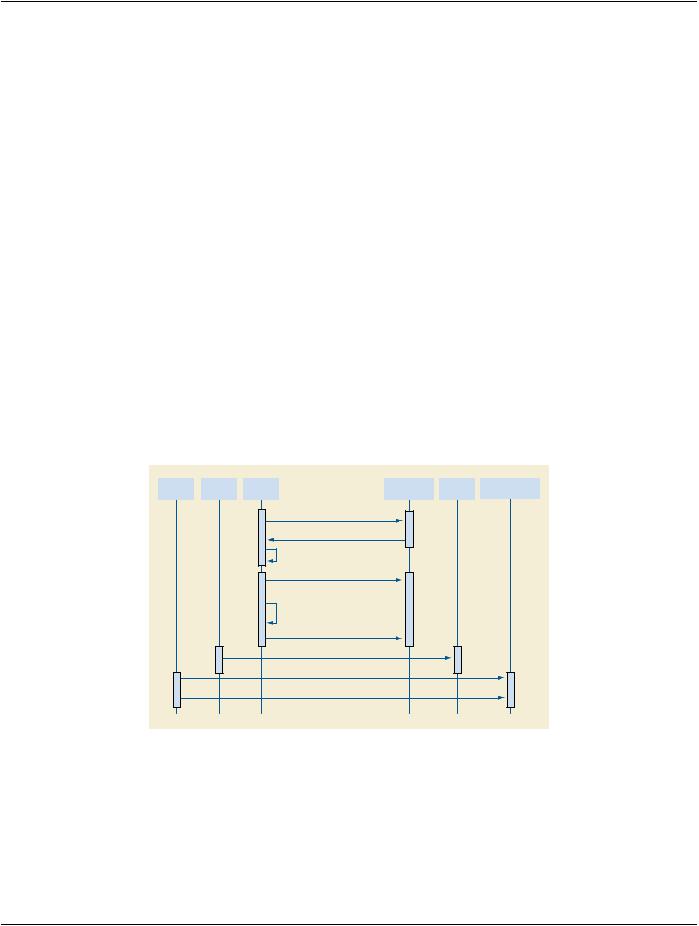
Figure B.4.1-2. Sequencing Constraints
Under normal scheduled workflow conditions the sequencing constraints illustrated in Figure B.4.1-2 apply:
1.Query Worklist
2.Receive Worklist of Modality Scheduled Procedure Steps (MSPS)
3.Select Workitem (MSPS) from Worklist
- Standard -
DICOM PS3.2 2020a - Conformance |
Page 89 |
4.Start acquisition and create MPPS
5.Acquire Images
6.Complete acquisition and finalize MPPS
7.Print acquired images (optional step)
8.Store acquired images and any associated Grayscale Softcopy Presentation State (GSPS) instances.
9.If the Image Manager is configured as an archive device the Storage AE will request Storage Commitment for the images and associated GSPS instances.
Other workflow situations (e.g., unscheduled procedure steps) will have other sequencing constraints. Printing could equally take place after the acquired images have been stored. Printing could be omitted completely if no printer is connected or hard copies are not required.
B.4.2 AE Specifications
B.4.2.1 Storage Application Entity Specification
B.4.2.1.1 SOP Classes
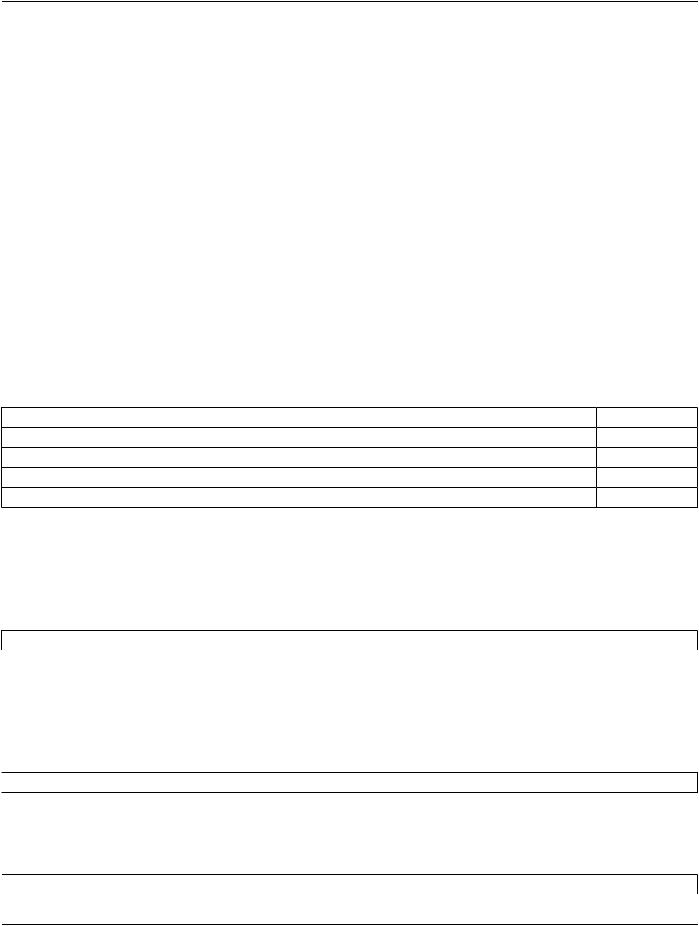
EXAMPLE-INTEGRATED-MODALITY provides Standard Conformance to the following SOP Classes:
Table B.4.2-1. SOP Classes for AE Storage
SOP Class Name |
SOP Class UID |
SCU |
SCP |
X-Ray Radiofluoroscopic Image Storage |
1.2.840.10008.5.1.4.1.1.12.2 |
Yes |
No |
Grayscale Softcopy Presentation State Storage1.2.840.10008.5.1.4.1.1.11.1 |
Yes |
No |
|
Storage Commitment Push Model |
1.2.840.10008.1.20.1 |
Yes |
No |
Verification |
1.2.840.10008.1.1 |
No |
Yes |
B.4.2.1.2 Association Policies
B.4.2.1.2.1 General
The DICOM standard application context name for DICOM is always proposed:
Table B.4.2-2. DICOM Application Context for AE Storage
Application Context Name |
1.2.840.10008.3.1.1.1 |
B.4.2.1.2.2 Number of Associations |
|
EXAMPLE-INTEGRATED-MODALITY initiates one Association at a time for each destination to which a transfer request is being processed in the active job queue list. Only one job will be active at a time, the other remains pending until the active job is completed or failed.
Table B.4.2-3. Number of Associations Initiated for AE Storage
 Maximum number of simultaneous Associations
  1 (configurable)
EXAMPLE-INTEGRATED-MODALITYacceptsAssociationstoreceiveN-EVENT-REPORTnotificationsfortheStorageCommitment
Push Model SOP Class.
Table B.4.2-4. Number of Associations Accepted for AE Storage
 Maximum number of simultaneous Associations
  5 (configurable)
- Standard -
Page 90 |
DICOM PS3.2 2020a - Conformance |
B.4.2.1.2.3 Asynchronous Nature
EXAMPLE-INTEGRATED-MODALITYdoesnotsupportasynchronouscommunication(multipleoutstandingtransactionsoverasingle
Association).
Table B.4.2-5. Asynchronous Nature as a SCU for AE Storage
Maximum number of outstanding asynchronous transactions |
1 |
B.4.2.1.2.4 Implementation Identifying Information |
|
The implementation information for this Application Entity is: |
|
Table B.4.2-6. DICOM Implementation Class and Version for AE Storage |
|
Implementation Class UID |
1.xxxxxxx.yyy.etc.ad.inf.usw |
Implementation Version Name |
EXINTMOD_01 |
B.4.2.1.3 Association Initiation Policy
B.4.2.1.3.1 Activity - Send Images
B.4.2.1.3.1.1 Description and Sequencing of Activities
A user can select images and presentation states and request them to be sent to multiple destinations (up to 3). Each request is for- warded to the job queue and processed individually. When the "Auto-send" option is active, each marked instance or marked set of instances stored in database will be forwarded to the network job queue for a pre-configured auto-send target destination. Which in- stances will be automatically marked and the destination where the instances are automatically sent to can be configured. The "Auto- send" is triggered by the Close Patient user application.
The Storage AE is invoked by the job control interface that is responsible for processing network archival tasks. The job consists of data describing the instances marked for storage and the destination. An internal daemon process triggered by a job for a specific network destination initiates a C-STORE request to store images. If the process successfully establishes an Association to a remote Application Entity, it will transfer each marked instance one after another via the open Association. Status of the transfer is reported through the job control interface. Only one job will be active at a time. If the C-STORE Response from the remote Application contains a status other than Success or Warning, the Association is aborted and the related Job is switched to a failed state. It can be restarted any time by user interaction or, if configured, by automated retry.
The Storage AE attempts to initiate a new Association in order to issue a C-STORE request. If the job contains multiple images then multiple C-STORE requests will be issued over the same Association.
If the Remote AE is configured as an archive device the Storage AE will, after all images and presentation states have been sent, transmit a single Storage Commitment request (N-ACTION) over the same Association. Upon receiving the N-ACTION response the Storage AE will delay releasing the Association for a configurable amount of time. If no N-EVENT-REPORT is received within this time period the Association will be immediately released (i.e., notification of Storage Commitment success or failure will be received over a separate association). However, the Storage AE is capable of receiving an N-EVENT-REPORT request at any time during an association provided a Presentation Context for the Storage Commitment Push Model has been successfully negotiated (i.e., the N- ACTION is sent at the end of one association and the N-EVENT-REPORT is received during an association initiated for a subsequent send job or during an association initiated by the Remote AE for the specific purpose of sending the N-EVENT-REPORT).
- Standard -