Материал: m912201e
104• Components of WAGO-I/O-PRO 32
Managing Projects
When the dialog Project Comparison is closed by pressing OK, the comparison will be executed according to the settings.
Representation of the comparison result:
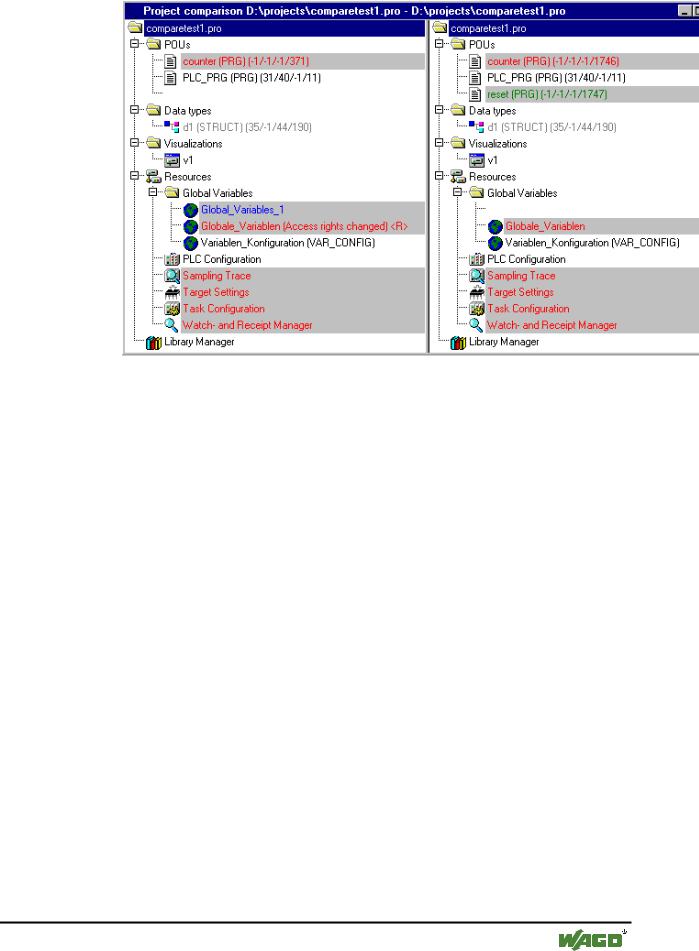
Project overview in compare mode:
After the project compare has been executed, a bipartited window opens which shows the project in compare mode. In the title bar you find the project paths: "Project comparison <path of actual project> - <path of reference project>". The actual project is represented In the left half of the window, the reference project in the right one. Each structure tree shows the projects' name at the uppermost position, apart from that it corresponds to the the object organizer structure.
x Example, Project in Compare mode
WAGO-I/O-SYSTEM 759 WAGO-I/O-PRO 32
Components of WAGO-I/O-PRO 32 |
• 105 |
Managing Projects |
|
|
|
POUs which are different, are marked in the structure tree by a shadow, a specific color and eventually by an additional text :
Red: Unit has been modified; is displayed with red colored letters in both partitions of the window.
Blue: Unit only available in compare project; a gap will be inserted at the corresponding place in the structure overview of the actual project.
Green: Unit only available in actual project; a gap will be inserted at the corresponding place in the structure overview of the actual project.
Black: Unit for which no differences have been detected.
"(Properties changed)": This text is attached to the POU name in the project structure tree, if differences in the properties of the POU have been detected.
"(Access rights changed)": This text is attached to the POU name in the project structure tree, if differences in the access rights of the POU have been detected.
POU contents in compare mode:
By a double click on a line in the structure overview, which is marked red because of a modification, the POU is opened.
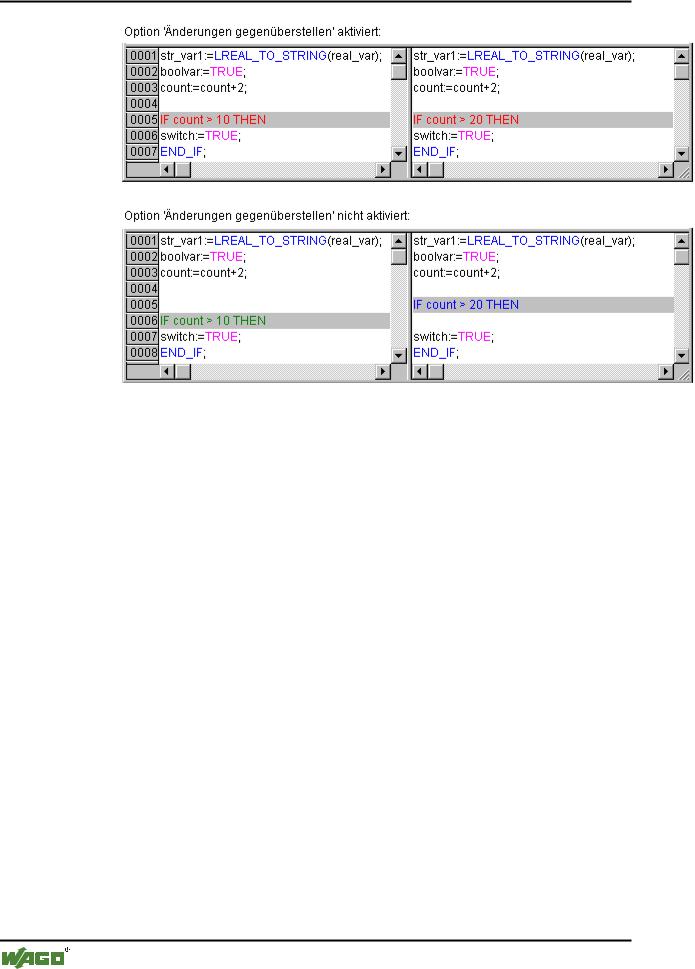
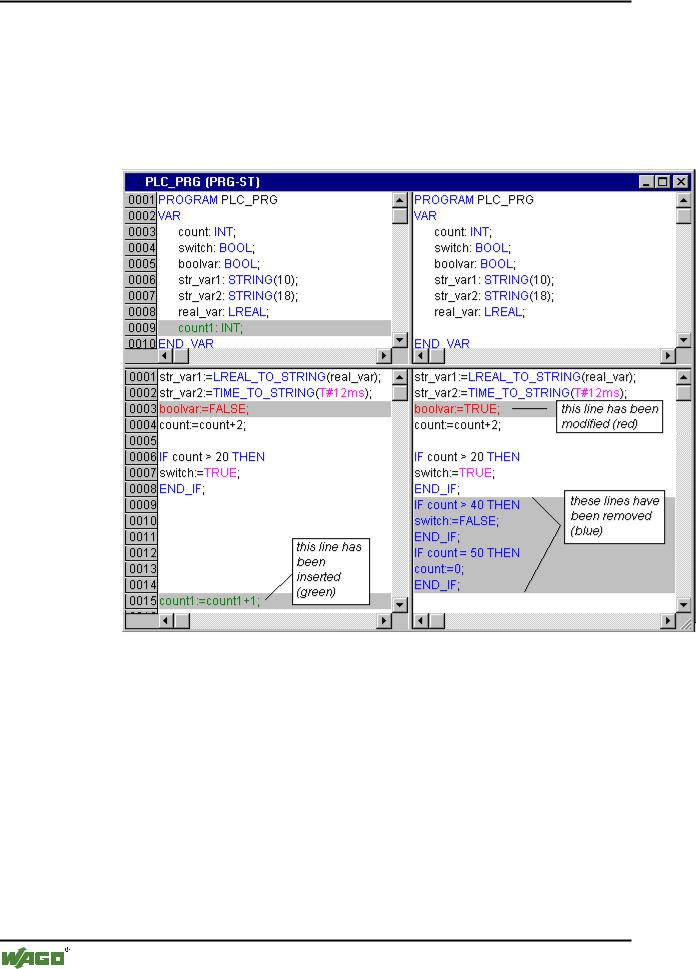
If it is a text or graphic editor POU, it will be opened in a bipartited window. The content of the reference project (right side) is set opposite to that of the actual project (left side). The smallest unit which will be regarded during
WAGO-I/O-SYSTEM 759 WAGO-I/O-PRO 32
106• Components of WAGO-I/O-PRO 32
Managing Projects
comparison, is a line (declaration editor, ST, IL), a network (FBD, LD) or an element (CFC, SFC). The same coloring will be used as described above for the project overview.
Example:
x Example, POU in compare mode
If it is not a editor POU, but the task configuration, the target settings etc., then the POU version of the actual and the reference project can be opened in separate windows by a double click on the respective line in the project structure. For those project POUs no further details of differences will be displayed.
Working in the compare mode (Menu 'Extras', Context menu):
If the cursor is placed on a line in the bipartited window, which indicates a difference, the menu 'Extras' resp. The context menu offers a selection of the following commands, depending on whether working in the project overview or in a POU.
WAGO-I/O-SYSTEM 759 WAGO-I/O-PRO 32

Components of WAGO-I/O-PRO 32 |
• 107 |
Managing Projects |
|
|
|
4.3.19.1'Extras' 'Next difference'
The cursor jumps to the next unit, where a difference is indicated. (line in project overview, line/network/element in POU)
4.3.19.2'Extras' 'Previous difference'
The cursor jumps to the previous unit, where a difference is indicated . (line in project overview, line/network/element in POU)
4.3.19.3'Extras' 'Accept change'
For all coherent (e.g. subsequent lines) units, which have the same sort of difference marking, the version of the reference project will be accepted for the actual project. The corresponding units will be shown (with the corresponding coloring) in the left side of the window. If it is an unit, which is marked red (just modification), then the acceptance will be recognizable by yellow coloring of the text in the actual project.
4.3.19.4'Extras' 'Accept changed item'
Only the single unit (line, network, element) where the cursor is currently placed, will be accepted for the actual version. The corresponding units will be shown (with the corresponding coloring) in the left side of the window. If it is an unit, which is marked red (just modification), then the acceptance will be recognizable by yellow coloring of the text in the actual project.
4.3.19.5'Extras' 'Accept properties'
The object properties for the POU, where the cursor is currently placed, will be accepted for the actual project as they are set in the reference version.
4.3.19.6'Extras' 'Accept access rights'
(only in project overview): The object access rights for the POU, where the cursor is currently placed, will be accepted for the actual project as they are set in the reference version .
4.3.20'Project' 'Project info'
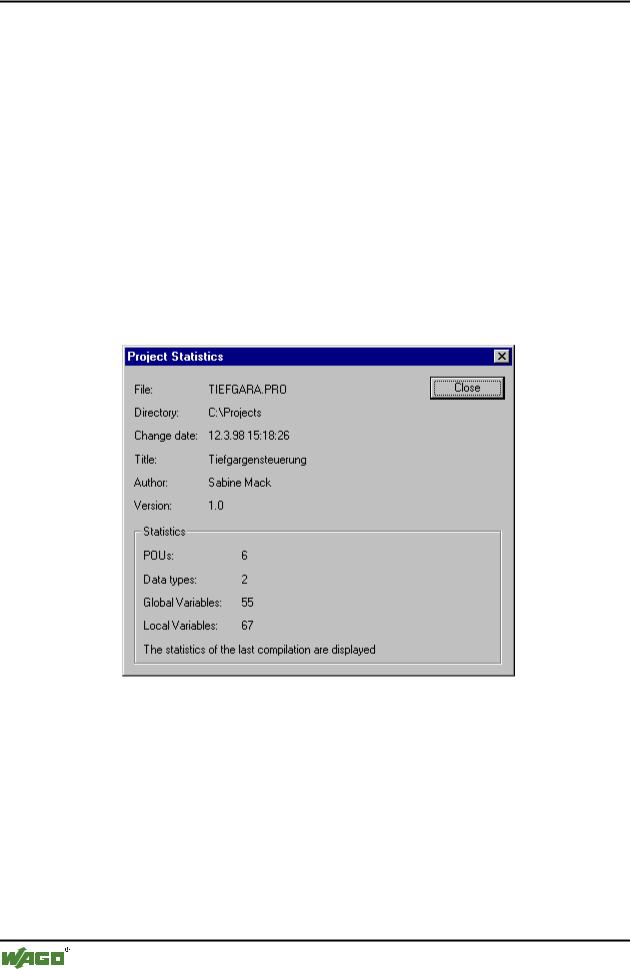
Under this menu item the information about your project can be saved. When the command has been given, then the following dialog box opens:
x Dialog box for entering project information
The following project information is displayed:
File name
Directory path
The time of the most recent change (Change date)
WAGO-I/O-SYSTEM 759 WAGO-I/O-PRO 32
108• Components of WAGO-I/O-PRO 32
Managing Projects
This information can not be changed.
In addition, you can can add the following information:
A Title of the project,
the name of the Author,
the Version number, and
a Description of the project.
This information is optional. When you press the button Statistics you receive statistical information about the project.
It contains information such as the number of the POUs, data types, and the local and global variables as they were traced at the last compilation.
x Example of project statistics
If you choose the option Ask for project info in the category Load & Save in the Options dialog box, then while saving a new project, or while saving a project under a new name, the project info is called automatically.
WAGO-I/O-SYSTEM 759 WAGO-I/O-PRO 32