Материал: SercosDriveLib_E

tech_doc_e.doc / V1.1
SoftMotion: DriveInterface: SercosDrive.lib
2 Features
o RegulatorOn, DriveStart
o Detecting and acknowledging errors
o reading/writing SoftMotion parameters
o reading/writing drive parameters (see 4)
o any gearing factors (dwRatioTechUnitsDenom/iRatioTechUnitsNum)
olinear/rotary axes: the rotary drive only works with incrementally weighted positions (ID76 = 0)
o controlling modes: position (ID 32), velocity (ID 33), torque (ID 34)
o drive internal homing (configure the homing method with Sercos-ID 147 and 52 etc.) o limit switches should be connected to the drive
o configuration from file (see below)
o configuration from dialog settings in CoDeSys PLC configuration
o latching:
Trigger. |
Sercos Trigger |
capture |
capture |
iTriggerNumber |
|
occured? |
position |
|
|
|
|
1 |
Sercos Trigger1, positive latched |
409 |
130 |
|
|
|
|
2 |
Sercos Trigger1, negative latched |
410 |
131 |
|
|
|
|
3 |
Sercos Trigger2, positive latched |
411 |
132 |
|
|
|
|
4 |
Sercos Trigger2, negative latched |
412 |
133 |
|
|
|
|
Make sure, that ID170 is set to 3 (e.g. at startup). When starting capturing, ID405 or ID406 is enabled automatically.
For fast latching (cyclic data transfer; no service channel) configure RealtimeBits to transmit ID 405/406 and receive ID 409-412 and add ID130-133 to cyclic data.
example for fast latching (in config file):
301, 0, 2, 405, 2; (Probe1 Enable 405 -> Realtime Control Bit1) 305, 0, 2, 409, 2; (Probe1 pos. latched 409 -> Realtime Status Bit1) 169, 0, 2, 2#0001, 2; (Enable Probe1 for rising edge)
170, 0, 2, 2#11, 4; (Enable Probing)
Set in the PLC configuration dialog or during the first IEC cycle :
Drive_MS.abyAddRealtimeReceiveLength[0] := 4;
Drive_MS.awAddRealtimeReceiveIDN[0] := 130;
o 2 real time inputs (bReceivedRealtimeBit1, bReceivedRealtimeBit2)
o 2 real time outputs (bSendRealtimeBit1, bSendRealtimeBit2)
oswitching operation modes to torque, velocity or position controlled with
SMC_SetControlMode
© 3S - Smart Software Solutions GmbH |
Page 6 of 16 |
SercosDriveLib_E.doc |
|

SoftMotion: DriveInterface: SercosDrive.lib
3 Start-up/Configuration
3.1AxisGroup.wState
The variable wState of an AxisGroup represents its internal state. In case of this SercosDriver there is the following correlation with the Sercos phase:
wState |
phase |
action |
|
|
|
0 |
? |
program not started yet |
|
|
|
1 |
? |
start SERCOS base driver |
|
|
|
2 |
? |
wait for interrupt |
|
|
|
10 |
? |
switch phase to 0 |
|
|
|
11 |
0 |
switch to phase 0 successful |
|
|
|
20 |
0 |
switch phase to 1 |
|
|
|
21 |
1 |
switch to phase 1 successful |
|
|
|
30 |
1 |
switch to phase 2 |
|
|
|
31 |
2 |
switch to phase 2 successful; read basic IDs for each drive |
|
|
|
32 |
2 |
slot calculation for each drive |
|
|
|
33 |
2 |
clear configuration list for each drive |
|
|
|
34 |
2 |
read configuration file of each drive |
|
|
|
35 |
2 |
prepare and write configuration list (phase 2) to each drive |
|
|
|
38 |
2 |
set command 127 and check list IDN 21 |
|
|
|
39 |
2 |
wait for end of command 127 |
|
|
|
40 |
2 |
switch to phase 3 |
|
|
|
50 |
3 |
switch to phase 3 successful; write configuration list (phase 3) to each drive |
|
|
|
60-65 |
3 |
check configuration (command 128, IDN 22) |
|
|
|
70 |
3 |
switch to phase 4 |
|
|
|
80 |
4 |
switch to phase 4 successful; write configuration list (phase 4) to each drive |
|
|
|
81 |
4 |
read IDNs and calculate scaling factors |
|
|
|
99 |
4 |
switch to normal operation |
|
|
|
100 |
4 |
normal operation |
|
|
|
200-210 |
4 |
prepare for resetting AxisGroup |
|
|
|
>1000 |
? |
error during startup in state wState-1000 |
|
|
|
3.2Error sources
If the AxisGroup does not come to state 100, please first check the global variable in SM_DriveBasic.lib g_strBootupError. Additionally check wState of the AxisGroup:
tech_doc_e.doc / V1.1
wState |
Errors |
|
|
0 |
program not started yet; task config not correct; general problem with the PLC |
|
|
2 |
no interrupt received; problem with the hardware driver; task config not correct |
|
|
1000 |
a) Versions of hardware driver and SercosBase.lib don’t fit. Contact your system |
|
manufacturer; |
© 3S - Smart Software Solutions GmbH |
Page 7 of 16 |
SercosDriveLib_E.doc |
|
SoftMotion: DriveInterface: SercosDrive.lib
b) at least one drive switched back from phase 4 inexpectedly: possibly a ringbrake occured
1010 problem in optical wires; wrong baudrate; wrong brightness of LED
1020 DriveID incorrect; one of the drives is missing / defect
3.3Parameter Setting during Startup
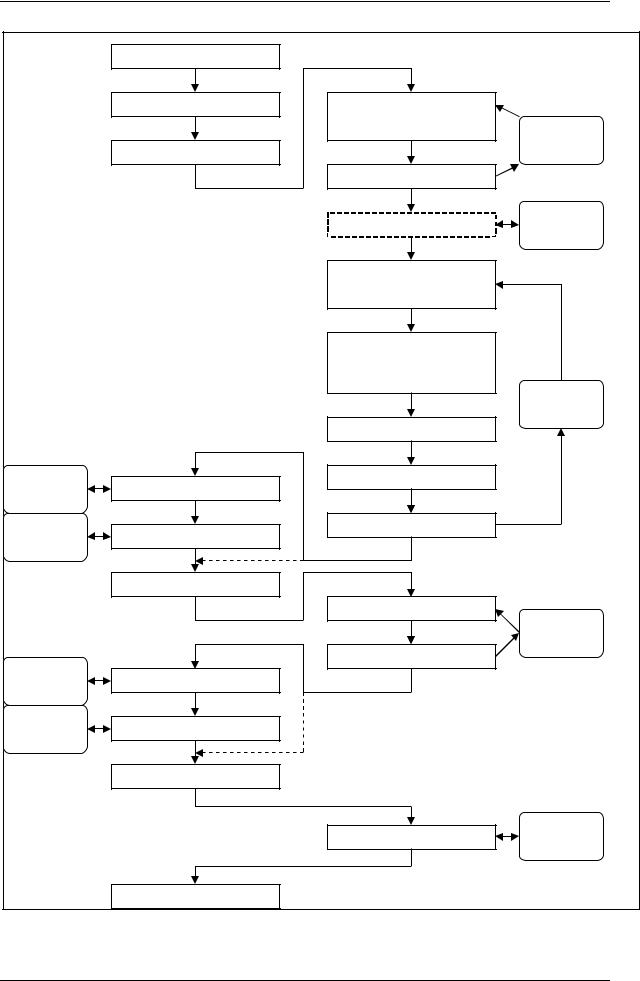
The startup of the drive is done as shown in the figure below:
tech_doc_e.doc / V1.1
© 3S - Smart Software Solutions GmbH |
Page 8 of 16 |
SercosDriveLib_E.doc |
|
tech_doc_e.doc / V1.1
SoftMotion: DriveInterface: SercosDrive.lib
|
switch to phase 0 |
|
|
|
|
switch to phase 1 |
Read IDNs 3, 4, 5, 88, |
|
|
|
|
|
90, 96, 87 |
repeat for |
|
|
|
|
|
|
switch to phase 2 |
|
|
each drive |
|
|
|
|
|
|
|
Read IDNs 32,33,34,35 |
|
|
|
|
calculate time slots |
repeat for |
|
|
|
each drive |
||
|
|
|
read config file |
|
|
|
(strConfigFromFile) |
|
|
|
|
replace/add values of |
|
|
|
|
IDN |
1, 2, 6, 7, 8, 89, 10, |
|
|
|
15, 9, (16, 24), 99 |
repeat for |
|
|
|
|
|
|
|
|
|
|
each drive |
|
|
|
add IDN32, if not |
|
repeat for |
send command 127 |
sort according to ID288 |
|
|
each drive |
|
|
|
|
repeat for |
check IDN 21 |
|
Write to drive |
|
each drive |
|
|
|
|
|
switch to phase 3 |
|
|
|
|
|
sort according to ID289 |
repeat for |
|
|
|
|
|
|
|
|
|
|
each drive |
repeat for |
|
|
write to drive |
|
send command 128 |
|
|
|
|
each drive |
|
|
|
|
repeat for |
check IDN 22 |
|
|
|
each drive |
|
|
|
|
|
switch to phase 4 |
|
|
|
|
|
|
write to drive |
repeat for |
|
|
|
each drive |
|
|
startup done |
|
|
|
This start-up procedure is executed until it is completely finished (AxisGroup.wState=100). To stop the start-up in a certain phase, one can set g_byWaitDuringStartupInPhase to the phase number. The start-up process will stop as soon as it has reached the sprecified phase and wait until the global variable is set to another value. It is not intended to switch back to a lower phase during operation.
© 3S - Smart Software Solutions GmbH |
Page 9 of 16 |
SercosDriveLib_E.doc

tech_doc_e.doc / V1.1
SoftMotion: DriveInterface: SercosDrive.lib
This can be done by setting the phase g_byWaitDuringStartupInPhase and using the FB SMC_ResetAxisGroup.
You can configure the Sercos Master to send additional parameters during startup by using the dialogs in the PLC configuration inside CoDeSys. Alternatively you can configure your drive from a ASCII text file. Simply set the full path and name of this file in the Variable <DriveName>_MS. strConfigFromFile during the first PLC cycles.
Be aware that if you use this method, all parameters from the dialog are removed before reading the file.
The text file must obey the following rules:
-one line represents one ID (or one list entry for list IDs); comment or empty lines are allowed
-a comment is marked by brackets (nested comments are not supported!)
-one line consists of 5 attributes: wIndex (ID), wListIndex (0 for normal, 1..n for list entries, 16#FFFF for commands), wSize (in bytes), dwValue (value), byPhase (2, 3, 4 or 255)
-all attributes are separated by a comma; a entry is terminated by a semicolon; spaces and tabs are allowed
Example:
(Konfigurationsfile für Kollmorgen Seidel ServoStar 600) |
|
|
|||
(S-Parameter,list position,length, |
value, |
phase) |
|
||
76, |
0, |
2, |
10, |
2; |
(Wichtung Position) |
44, |
0, |
2, |
2, |
2; |
(Wichtung Geschw.) |
160, |
0, |
2, |
0, |
2; |
(Wichtung Beschl.) |
169, |
0, |
2, |
2#0101, |
2; |
(Messtaster- |
Steuerparameter)
A byPhase attribute of 255 signals that this entry mustn’t be sent.
If you want to configure list parameters, you must specify the complete list, starting with index 1. It is not allowed, to specify only a single list parameter.
3.4Position Scaling (IDN76)
Some drives don’t support the wrap around in position values at 232-1 to 0. This is not a problem when running a linear axis (with limited position values).
Using an endless (rotary/modulo) axis, this will cause a problem (typically a position error fault at that point). In this case use a rotary position scaling (bit2-0 = 2) with modulo functionality (bit7 = TRUE) and define a modulo value for the drive (IDN103), with maximum possible size (or at least many times over one turn around (IDN79)). Moreover, you should ensure that the increments per SoftMotion-turn-around (dwOneTurn = fPositionPeriod*dwRatioTechUnitsDenom/iRatioTechUnitsNum) is either identical with IDN103 or at least two (or more) times less than IDN103.
3.5PackProfile conformity check
In addition to the offline mechanism to check, whether the configured parameters are according to an PackProfile standard (Version 1.2), there is a check for conformity done online.
This is especially necessary, if the configuration from file is used, as it cannot be checked offline, what is stored in these files.
The results of the check can be gathered with this function block:
© 3S - Smart Software Solutions GmbH |
Page 10 of 16 |
SercosDriveLib_E.doc |
|