Материал: part03

Внимание! Если размещение файла нарушает Ваши авторские права, то обязательно сообщите нам

Page 1276​

DICOM PS3.3 2020a - Information Object Definitions​

Attribute Name​

Tag​

Type​

Attribute Description​

>Shadow Offset Y​

(0070,0246)​

1C​

Floating point value that defines the shadow offset in Y direction in Anchor​


Point Annotation Units (0070,0004) if used in Text Object Sequence​


(0070,0008)ItemorinGraphicAnnotationUnits(0070,0005)ifusedinGraphic​


Object Sequence (0070,0009) Item. See Section C.10.5.1.3.13.1​


Required if Shadow Style (0070,0244) value is not OFF.​

>ShadowColorCIELab​

(0070,0247)​

1C​

AcolortripletvalueusedtoencodetheShadowColor.Theunitsarespecified​

Value​


inPCS-Values,andthevalueisencodedasCIELab.SeeSectionC.10.7.1.1.​


Required if Shadow Style (0070,0244) value is not OFF.​

>Shadow Opacity​

(0070,0258)​

1C​

Encodes the shadow opacity. The value is encoded as floating point alpha​


value (0.0-1.0).​


Required if Shadow Style (0070,0244) value is not OFF.​

>Underlined​

(0070,0248)​

1​

Specifies whether or not the text shall be rendered underlined.​


Enumerated Values:​


Y​yes​


N​no​

>Bold​

(0070,0249)​

1​

Specifies whether or not the text shall be rendered in bold.​


Enumerated Values:​


Y​yes​


N​no​

>Italic​

(0070,0250)​

1​

Specifies whether or not the text shall be rendered italicized.​


Enumerated Values:​

Y​yes​

N​no​

C.10.5.1.3.12.1 Text Alignment​

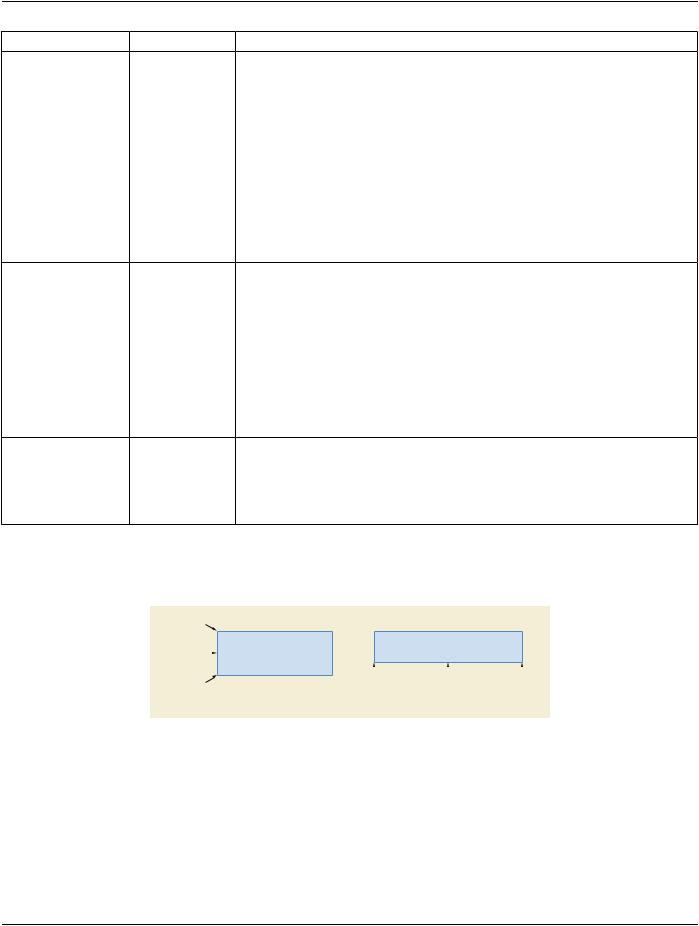
Horizontal Alignment (0070,0242) and Vertical Alignment (0070,0243) define the position of the text relative to the bounding box of​ the text object (see Figure C.10.5-10).​

Top


Your text here


Center


Your text here

Your text here

Your text here


Your text here


Your text here


Bottom


Left

Center

Right


Vertical Alignment

Horizontal Alignment


Figure C.10.5-10. Example of Horizontal and Vertical CENTER Alignment​

C.10.5.1.3.13 Line Style Sequence​

Table C.10-5b specifies the Attributes that describe Line Style Sequence Macro.​

- Standard -​

DICOM PS3.3 2020a - Information Object Definitions​ Page 1277​

Table C.10-5b. Line Style Sequence Macro Attributes​

Attribute Name​

Tag​

Type​


Attribute Description​

Line Style Sequence​

(0070,0232)​

3​

Sequence that describes the line style.​


Only a single Item shall be included in this Sequence.​

>Pattern On Color CIELab​

(0070,0251)​

1​

Acolortripletvalueusedtoencodetheforeground.Theunitsarespecified​

Value​


in PCS-Values, and the value is encoded as CIELab. See​


Section C.10.7.1.1.​


ThisvalueshalloverridetheGraphicLayerRecommendedDisplayCIELab​


Value (0070,0401).​

>Pattern Off Color CIELab​

(0070,0252)​

3​

A color triplet value used to encode the color of parts of the line that are​

Value​


off, i.e., the background. The units are specified in PCS-Values, and the​


value is encoded as CIELab. See Section C.10.7.1.1.​

>Pattern On Opacity​

(0070,0284)​

1​

Encodes the foreground opacity. The value is encoded as floating point​


alpha value (0.0-1.0).​

>Pattern Off Opacity​

(0070,0285)​

3​

Encodes the background opacity. The value is encoded as floating point​


alpha value (0.0-1.0).​

>Line Thickness​

(0070,0253)​

1​

Specifies the line thickness. The dimension for this Attribute is defined by​


Graphic Annotation Units (0070,0005) or Compound Graphic Units​


(0070,0282).​

>Line Dashing Style​

(0070,0254)​

1​

The dashing style of the line to be displayed.​


Enumerated Values:​


SOLID​


DASHED​Draws one part of the line with the Pattern On Color CIELab​


Value (0070,0251) and the other part with the Pattern Off Color​


CIELab Value (0070,0252).​


See Section C.10.5.1.3.13.1.​

>Line Pattern​

(0070,0255)​

1C​

Pattern that defines the line dashing style. The Line Pattern is a 32 bit​


value. If the bit inside the pattern is set to 1 the foreground color is drawn,​


else the background color is drawn.​


Note​


For example, 00FFH defines the dashes with an equal size.​


Required if Line Dashing Style (0070,0254) has a value of DASHED.​

>Shadow Style​

(0070,0244)​

1​

The shadow style of the line to be displayed.​


Enumerated Values:​


NORMAL​ theshadowisdrawnon1sideofthecontourofthetextobject​


OUTLINED​the shadow is drawn around the contour of the text object​


OFF​

no shadow​


See Section C.10.5.1.3.13.2​

>Shadow Offset X​

(0070,0245)​

1​

FloatingpointvaluethatdefinestheshadowoffsetinXdirectioninGraphic​


Annotation Units (0070,0005). See Section C.10.5.1.3.13.2.​

>Shadow Offset Y​

(0070,0246)​

1​

FloatingpointvaluethatdefinestheshadowoffsetinYdirectioninGraphic​


Annotation Units (0070,0005). See Section C.10.5.1.3.13.2.​

>Shadow Color CIELab​

(0070,0247)​

1​

A color triplet value used to encode the Shadow Color. The units are​

Value​


specified in PCS-Values, and the value is encoded as CIELab. See​


Section C.10.7.1.1.​

- Standard -​

Page 1278​

DICOM PS3.3 2020a - Information Object Definitions​

Attribute Name​

Tag​

Type​

Attribute Description​

>Shadow Opacity​

(0070,0258)​

1​

Encodestheshadowopacity.Thevalueisencodedasfloatingpointalpha​


value (0.0-1.0).​

C.10.5.1.3.13.1 Line Dashing Style​

TheLineDashingStyle(0070,0254)valueSOLIDindicatesthelinetobedrawnwiththeforegroundcolor,whichisspecifiedbyPattern​

On Color CIELab Value (0070,0251).​

TheLineDashingStyle(0070,0254)Attributedoesnotapplytoshadows,whichshallalwaysberenderedinSOLIDbackgroundcolor.​

C.10.5.1.3.13.2 Shadows​

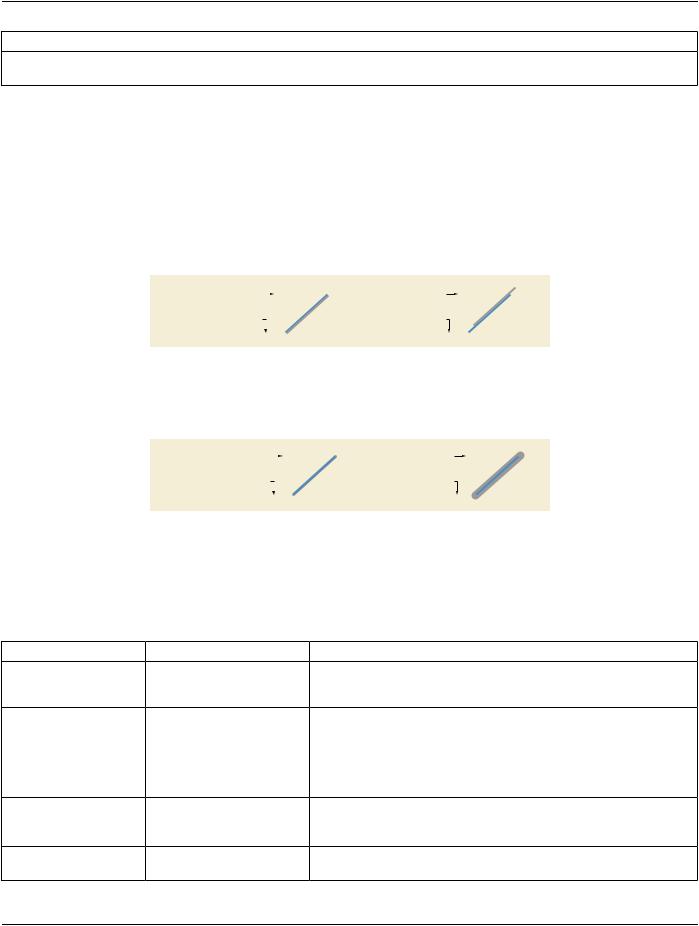
Shadow Style (0070,0244) contains one of the values OFF, NORMAL or OUTLINED (see Figure C.10.5-11 and Figure C.10.5-12).​ Shadow shall be applied after rotation. The coordinate system of the shadow is relative to the line. Shadow Offset X (0070,0245)​ extends to the right and Shadow Offset Y (0070,0246) extends downward.​

Shadow Offset X = 1


Shadow Offset X = 3


(0070,0245)

(0070,0245)

Shadow Offset Y = 1


Shadow Offset Y = -5


(0070,0246)


(0070,0246)


Figure C.10.5-11. Example for Shadow Style (0070,0244) NORMAL​

The OUTLINED shadow defines a filled outline shadow. The length of the vector given by Shadow Offset X (0070,0245) and Shadow​ Offset Y (0070,0246) defines the radius of the shadow.​

Shadow Offset X = 1 (-1)


Shadow Offset X = 3 (-3)


(0070,0245)

(0070,0245)

Shadow Offset Y = 1 (-1)


Shadow Offset Y = -5 (5)


(0070,0246)


(0070,0246)


Figure C.10.5-12. Example for Shadow Style (0070,0244) OUTLINED​

C.10.5.1.3.14 Fill Style Sequence​

Table C.10-5c specifies the Attributes that describe Fill Style Sequence Macro.​

Table C.10-5c. Fill Style Sequence Macro Attributes​

Attribute Name​

Tag​

Type​

Attribute Description​

Fill Style Sequence​

(0070,0233)​

3​ Sequence that describes the fill style.​


Only a single Item is permitted in this Sequence.​

>Pattern On Color CIELab​

(0070,0251)​

1​ A color triplet value used to encode the foreground color. The units are​

Value​


specified in PCS-Values, and the value is encoded as CIELab. See​


Section C.10.7.1.1.​


ThisvalueshalloverridetheGraphicLayerRecommendedDisplayCIELab​


Value (0070,0401).​

>Pattern Off Color CIELab​

(0070,0252)​

3​ A color triplet value used to encode the background color. The units are​

Value​


specified in PCS-Values, and the value is encoded as CIELab. See​


Section C.10.7.1.1.​

>Pattern On Opacity​

(0070,0284)​

1​ Encodes the foreground opacity. The value is encoded as floating point​


alpha value (0.0-1.0).​

- Standard -​


DICOM PS3.3 2020a - Information Object Definitions​

Page 1279​

Attribute Name​

Tag​

Type​

Attribute Description​


>Pattern Off Opacity​

(0070,0285)​

1​

Encodes the background opacity. The value is encoded as floating point​


alpha value (0.0-1.0).​


>Fill Mode​

(0070,0257)​

1​

The texture of the closed object to be displayed.​


Enumerated Values:​


SOLID​


STIPPELED​


See Section C.10.5.1.3.14.1.​


>Fill Pattern​

(0070,0256)​

1C​

A binary fill pattern. A set bit corresponds to foreground. An unset bit​


corresponds to background.​


A128bytevaluedefininga32x321bitmatrix.Thisfillpatternisreplicated​ in tiles inside the boundaries of the graphic type.​

The most significant bit corresponds to the leftmost pixel in the row.​

The fill pattern relates to display pixels where one bit value corresponds​ to one display pixel.​

Required if Fill Mode (0070,0257) equals STIPPELED.​

C.10.5.1.3.14.1 Fill Mode​

Fill Mode (0070,0257) value SOLID indicates that the graphic object is filled with the foreground.​

Fill Mode (0070,0257) Attribute does not interfere with (line) shadows, which shall always be rendered in SOLID background color.​

C.10.6 Spatial Transformation Module​

This Module defines a manner of rotating an image by increments of ninety degrees and flipping an image.​

Table C.10-6. Spatial Transformation Module Attributes​

Attribute Name​

Tag​

Type​

Attribute Description​

Image Rotation​

(0070,0042)​

1​

Howfartorotatetheimageclockwiseindegrees,beforeanyImageHorizontal​

Flip (0070,0041) is applied.​

Enumerated Values:​

270​

180​

90​

0​

Note​

Negative values are not permitted since the Value Representation​ is unsigned.​

- Standard -​

Page 1280​

DICOM PS3.3 2020a - Information Object Definitions​

Attribute Name​

Tag​

Type​

Attribute Description​

Image Horizontal Flip​

(0070,0041)​

1​

Whether or not to flip the image horizontally after any Image Rotation has​


been applied such that the left side of the image becomes the right side.​

Enumerated Values:​

Y​yes​

N​no​

Note​

No vertical flip is specified since the same result can be achieved by​ a combination of a 180 degree rotation and a horizontal flip.​

Note​

Given the definition of the Grayscale Transformation Sequence in PS3.4, it is apparent that the rotation, flipping and magni-​ fication will be applied AFTER the application of any bit-mapped overlays or graphic annotations that are specified in the​ image pixel spaces, but BEFORE the application of graphic annotations that apply in the Specified Displayed Area relative​ space.​

C.10.7 Graphic Layer Module​

This Module defines the characteristics of the layers in which overlays, graphic and text may be rendered.​

Layers group together graphics that are related. It is recommended that a layer be displayed such that it may be distinguished from​ other layers that have a different value for Graphic Layer Order (0070,0062).​

Note​

The transparency, opacity, and any other interaction (such as exclusive or) with underlying layers or image data are not​ specified and are at the discretion of the implementation.​

Table C.10-7. Graphic Layer Module Attributes​

Attribute Name​

Tag​

Type​

Attribute Description​

Graphic Layer Sequence​

(0070,0060)​

1​ A Sequence of Items each of which represents a single layer in which​


overlays, curves, graphics or text may be rendered.​


One or more Items shall be included in this Sequence.​


An Item is required for each layer referenced from the Graphic Annotation​


Module or the Overlay Activation Module.​

>Graphic Layer​

(0070,0002)​

1​ A string that identifies the layer.​

Note​

This identifier may be used by other Attributes within the same​ presentation state instance to reference this layer. There is no​ requirement for the same identifiers to be used in different​ presentation states, and there is no mechanism for referencing​ layers in other presentation states. That is, a UID is not required.​

>Graphic Layer Order​ (0070,0062)​ 1​ An integer indicating the order in which it is recommended that the layer be​ rendered,ifthedisplayiscapableofdistinguishing.Lowernumberedlayers​ are to be rendered first.​

- Standard -​