Материал: part03

Внимание! Если размещение файла нарушает Ваши авторские права, то обязательно сообщите нам

DICOM PS3.3 2020a - Information Object Definitions​

Page 1271​

and ellipses. The equivalent rendering is a set of simple graphic objects to support an SCP that only understands the simple​ graphical objects.​

C.10.5.1.3.2 Rotation​

All Compound Graphics can be rotated by specifying a Rotation Angle (0070,0230) value and a Rotation Point (0070,0273). The​ convention for rotation is that positive angle values are defined as counterclockwise around Rotation Point (0070,0273).​

C.10.5.1.3.3 Ellipses​

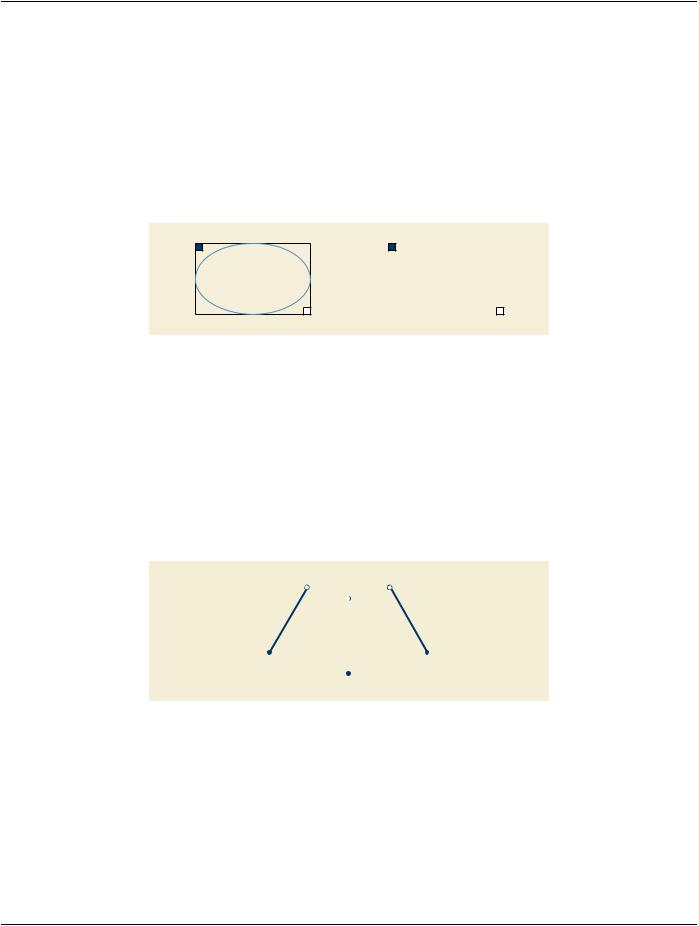
For the Compound Graphic Type (0070,0294) ELLIPSE, exactly 2 points shall be present inside Graphic Data (0070,0022). The first​ point is the top/left hand corner (TLHC) and the second point is the bottom/right hand corner (BRHC) of the bounding rectangle (see​ Figure C.10.5-2).​

TLHC

TLHC


BRHC

BRHC

Figure C.10.5-2. ELLIPSE on the left and RECTANGLE object on the right​

C.10.5.1.3.4 Rectangles​

For the Compound Graphic Type (0070,0294) RECTANGLE, exactly 2 points shall be present inside Graphic Data (0070,0022). The​ first point is the top/left hand corner of the rectangle (TLHC) and the second point is the bottom/right hand corner (BRHC) of the​ rectangle (see Figure C.10.5-2).​

C.10.5.1.3.5 Multi-lines​

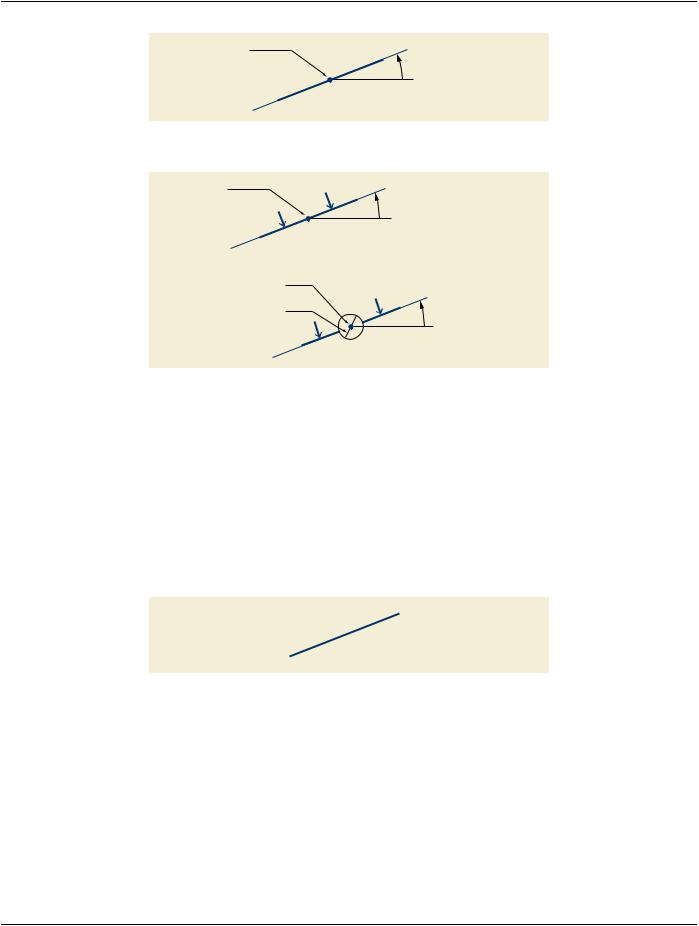
For the Compound Graphic Type (0070,0294) MULTILINE, the list of points inside Graphic Data (0070,0022) is an n-tuple list of start​ and end points of straight lines to be drawn (see Figure C.10.5-3).​

If Rotation Angle (0070,0230) is present, all points in the MULTILINE are rotated around the same Rotation Point (0070,0273).​

Point 2


Point 6


Point 4

Point 1


Point 5


Point 3

Figure C.10.5-3. Example for MULTILINE Object​

C.10.5.1.3.6 Cut and Infinite-lines​

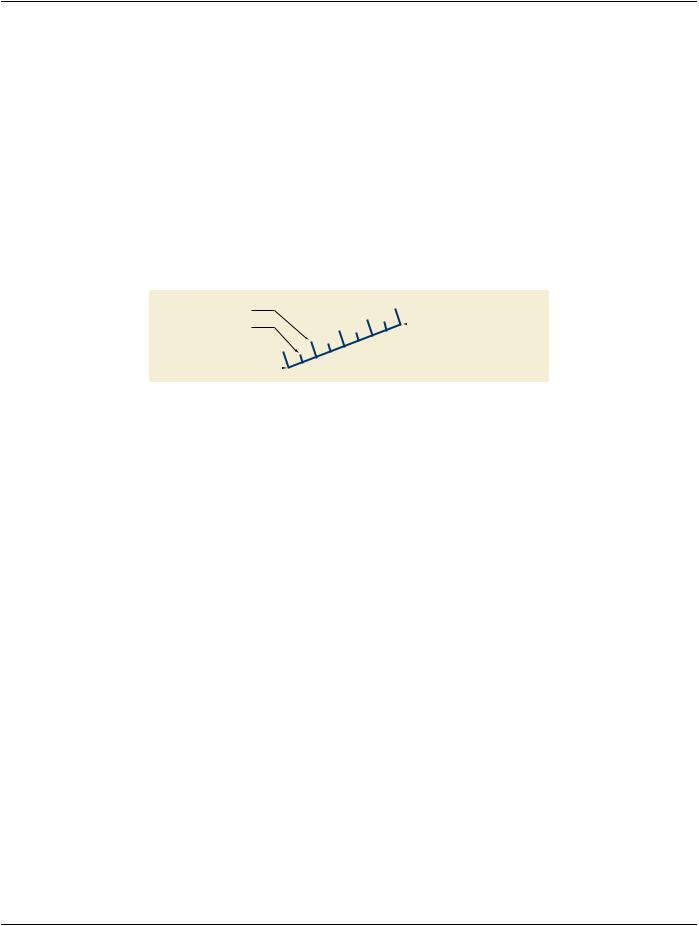
For the Compound Graphic Type (0070,0294) CUTLINE or INFINITELINE, exactly two points shall be present inside Graphic Data​ (0070,0022). The rendering of these lines always extends to the borders of the render area of a view(see Figure C.10.5-4).​

- Standard -​

Page 1272​

DICOM PS3.3 2020a - Information Object Definitions​

Rotation Point

(0070,0273)

Rotation Angle (0070,0230)

Figure C.10.5-4. INFINITELINE​

Rotation Point

(0070,0273)

Rotation Angle (0070,0230)

Rotation Point with Gap (0070,0273)

Gap Length

Rotation Angle (0070,0230)

(0070,0261)


Figure C.10.5-5. CUTLINE on the Left and CUTLINE with gap on the Right​

In case of a CUTLINE, two arrows shall be drawn perpendicular to the cutline. The arrows ends shall be positioned at the midpoints​ of each half of the cutline. The arrow heads shall point toward the cutline and shall be drawn in the positive right half-plane of the​ cutline before rotation. Typically, the arrows indicate the viewing direction for MPR renderings that are referenced by these lines.​

Gap Length (0070,0261) defines the diameter of the circular area where the CUTLINE or INFINITELINE is not rendered. Center of​ the circular area is Rotation Point (0070,0273). Since the dimension units of the Gap Length is DISPLAY, independent of the value​ of Compound Graphic Units (0070,0282), the length of the gap is not changed by zoom operations on the image performed by the​ application.​

C.10.5.1.3.7 Range Lines​

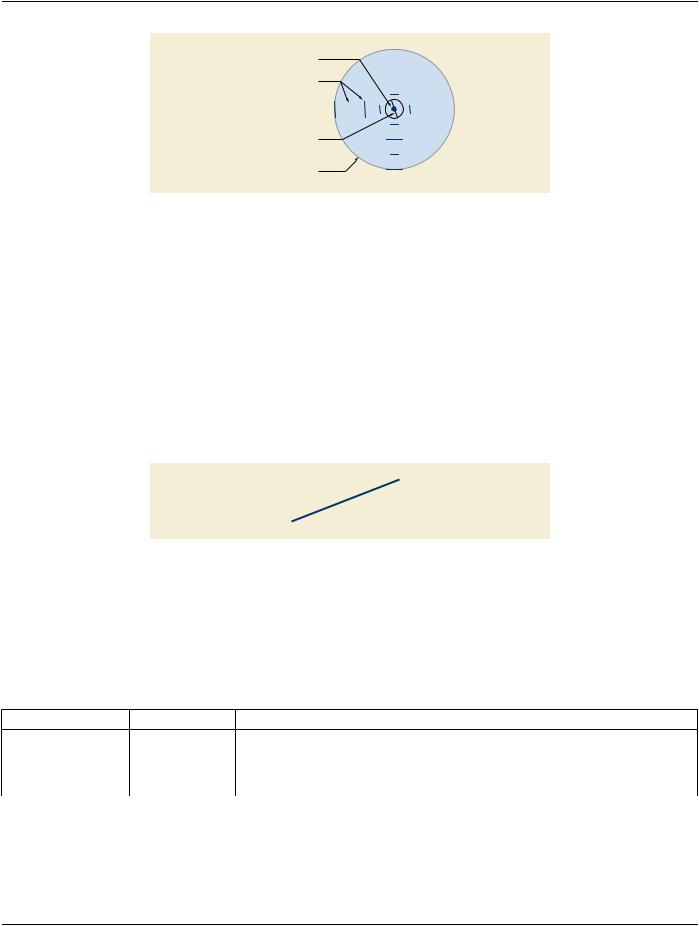
For the Compound Graphic Type (0070,0294) RANGELINE exactly two points shall be present inside Graphic Data (0070,0022).​

Second Point

First Point

Figure C.10.5-6. RANGELINE Example​

C.10.5.1.3.8 Ruler​

For the Compound Graphic Type (0070,0294) RULER, exactly two points shall be present inside Graphic Data (0070,0022) defining​ the ruler line.​

Tick Alignment (0070,0274) defines the alignment of the ticks.​

BOTTOM - ticks are aligned to the lower part of the line, where the first point of the line is on the left and the line extends horizontally​ to the right.​

CENTER - ticks are centered on the line.​

- Standard -​

DICOM PS3.3 2020a - Information Object Definitions​

Page 1273​

TOP - ticks are aligned to the upper part of the line, where the first point of the line is on the left and the line extends horizontally to​ the right.​

Tick Label Alignment (0070,0279) defines the alignment of the tick labels.​

BOTTOM - labels are aligned to the lower part of the line, where the first point of the line is on the left and the line extends horizontally​ to the right.​

TOP - labels are aligned to the upper part of the line, where the first point of the line is on the left and the line extends horizontally to​ the right.​

The presence, labeling and units of the ticks on the line is application dependent(see Figure C.10.5-7). If present as numerical values,​ the labels of the ticks shall increase toward the second point.​

C.10.5.1.3.9 Axis​

For the Compound Graphic Type (0070,0294) AXIS, exactly two points shall be present inside Graphic Data (0070,0022) defining​ the axis line.​

Major Tick


2


1


Minor Tick

0


Second Point


-1


-2


First Point


Figure C.10.5-7. RULER / AXIS Example Showing TOP Tick Alignment and TOP Tick Label Alignment​

The Major Ticks Sequence (0070,0287) specifies the placement and label of the ticks. The rendering of the minor ticks is left to the​ application.​

Tick Alignment (0070,0274) defines the alignment of the ticks.​

BOTTOM - ticks are aligned to the lower part of the line, where the first point of the line is on the left and the line extends horizontally​ to the right.​

CENTER - ticks are centered on the line.​

TOP - ticks are aligned to the upper part of the line, where the first point of the line is on the left and the line extends horizontally to​ the right.​

Tick Label Alignment (0070,0279) defines the alignment of the tick labels.​

BOTTOM - labels are aligned to the lower part of the line, where the first point of the line is on the left and the line extends horizontally​ to the right.​

TOP - labels are aligned to the upper part of the line, where the first point of the line is on the left and the line extends horizontally to​ the right.​

C.10.5.1.3.10 Crosshairs​

For Compound Graphic Type (0070,0294) CROSSHAIR, exactly one point shall be present inside Graphic Data (0070,0022). This​ point is the origin of the CROSSHAIR (see Figure C.10.5-8).​

Tick Alignment (0070,0274) and Tick Label Alignment (0070,0279) are also valid for the CROSSHAIR. Tick rendering is application​ dependent.​

- Standard -​

Page 1274​

DICOM PS3.3 2020a - Information Object Definitions​


Origin


2


Ticks


1


-2

-1


1

2


Gap Length


-1


(0070,0261)


Diameter of Visibility


-2


(0070,0262)


Figure C.10.5-8. CROSSHAIR Example Showing BOTTOM Tick Labels Alignment​

Gap Length (0070,0261) defines the diameter of the circular area around the origin where the CROSSHAIR is not rendered. Since​ the dimension units of the Gap Length is DISPLAY, independent of the value of Compound Graphics Units (0070,0282), the length​ of the gap is not changed by zoom operations on the image performed by the application.​

Diameter of Visibility (0070,0262) defines the diameter of the circular area around the origin where the CROSSHAIR is rendered.​ Since the dimension units of the Diameter of Visibility is DISPLAY, independent of the value of Compound Graphic Units (0070,0282),​ the size of the crosshair is not changed by zoom operations on the image performed by the application.​

The value of Tick Alignment (0070,0274) shall be CENTER.​

C.10.5.1.3.11 Arrows​

For the Compound Graphic Type (0070,0294) ARROW, two points shall be present inside Graphic Data (0070,0022). The first point​ is the anchor point, the second point is the foot point of the arrow(see Figure C.10.5-9). The arrow head style at the anchor point is​ not specified.​

Anchor Point

Foot Point

Figure C.10.5-9. ARROW Example​

C.10.5.1.3.12 Text Style Sequence​

Text Style Sequence (0070,0231) contains the text style for each text object. This Attribute gives recommendations on how the an-​ notation text should be rendered at the display.​

Table C.10-5a specifies the Attributes that describe Text Style Sequence Macro.​

Table C.10-5a. Text Style Sequence Macro Attributes​

Attribute Name​

Tag​

Type​ Attribute Description​

Text Style Sequence​

(0070,0231)​

3​

Sequence that describes the text style.​


Only a single Item shall be included in this Sequence.​

>Font Name​

(0070,0227)​

3​

Font name in a standard type.​

- Standard -​


DICOM PS3.3 2020a - Information Object Definitions​

Page 1275​

Attribute Name​

Tag​

Type​


Attribute Description​


>Font Name Type​

(0070,0228)​

1C​

Defined Terms:​


ISO_32000​


Required if Font Name (0070,0227) is present.​


Note​


This is the font naming system used by Adobe PDF and defined in​


ISO/IEC 14496-22.​


>CSS Font Name​

(0070,0229)​

1​

Generic font name as defined within CSS (Cascading Style Sheets). Default​


fontname, if the font specified in Font Name (0070,0227) is not present or​


can not be rendered.​


>Text Color CIELab​

(0070,0241)​

1​

A default color triplet value used to specify the text color in which it is​

Value​


recommended that the text be rendered on a color display. The units are​


specified in PCS-Values, and the value is encoded as CIELab. See​


Section C.10.7.1.1.​


This value shall override the Graphic Layer Recommended Display CIELab​


Value (0070,0401).​


>Horizontal Alignment​

(0070,0242)​

1C​

Specifies the horizontal position of the text relative to the vertical edges of​


theboundingbox.HorizontalAlignmentshalloverridetheBoundingBoxText​


HorizontalJustification(0070,0012)oftheTextObjectSequence(0070,0008)​


Item. See Section C.10.5.1.3.12.1​


Enumerated Values:​


LEFT​


CENTER​


RIGHT​


Required if Bounding Box Top Left Hand Corner (0070,0010) is present.​

>Vertical Alignment​

(0070,0243)​

1C​

Specifies the vertical position of the text relative to the horizontal edges of​


the bounding box. See Section C.10.5.1.3.12.1​


Enumerated Values:​


TOP​


CENTER​


BOTTOM​


Required if Bounding Box Top Left Hand Corner (0070,0010) is present.​

>Shadow Style​

(0070,0244)​

1​

The shadow style of the text to be displayed.​


Enumerated Values:​


NORMAL​ the shadow is drawn on 1 side of the contour of the text object​


OUTLINED​the shadow is drawn around the contour of the text object​


OFF​

no shadow​


See Section C.10.5.1.3.13.1​


>Shadow Offset X​

(0070,0245)​

1C​

Floating point value that defines the shadow offset in X direction in Anchor​


Point Annotation Units (0070,0004) if used in Text Object Sequence​


(0070,0008)ItemorinGraphicAnnotationUnits(0070,0005)ifusedinGraphic​


Object Sequence (0070,0009) Item. See Section C.10.5.1.3.13.1​

Required if Shadow Style (0070,0244) value is not OFF.​

- Standard -​