Материал: part02
DICOM PS3.2 2020a - Conformance |
Page 141 |
C.4 Networking
C.4.1 Implementation Model
C.4.1.1 Application Data Flow
|
|
DICOM Standard Interface |
|
|
Remote AE |
|
|
Requests |
|
|
Verification |
Scheduled |
|
|
Procedure |
|
|
Queries |
|
Remote AE |
|
DICOMSRV |
Requests |
|
MLW |
|
|
|
|
Update |
|
Verification |
Procedure |
|
|
|
|
Remote AE |
|
|
Makes MPPS |
|
|
Request |
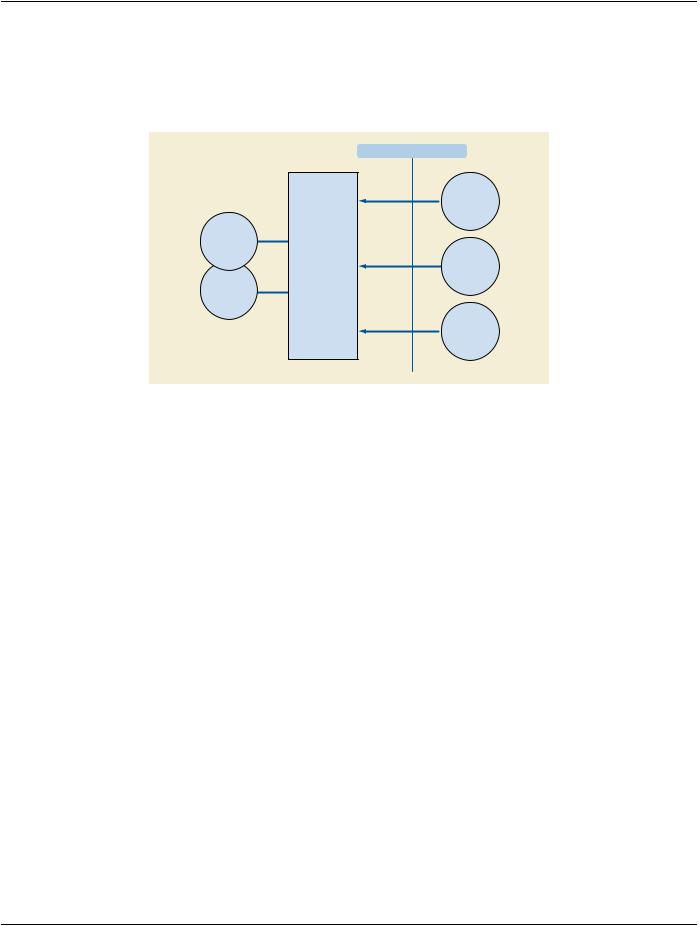
Figure C.4.1-1. DICOM Standard Interface
The DICOMRis DICOMSRV application provides access to Scheduled Procedure information, supports updating of the RIS database as procedures are performed. The various flows in the diagram above are described as follows
DICOMSRV accepts associations for Verification from Verification SCUs and responds automatically with Success status
DICOMSRV accepts Association Requests for Modality Worklist from MWL SCUs and responds to queries from these SCUs. When a query is received DICOMSRV engages in local real-world activity Scheduled Procedure Queries. This results in a set of matching responses that DICOMSRV returns to the MWL SCU.
DICOMSRV accepts Association Requests for Modality Performed Procedure Step from MPPS SCUs and responds to N-CREATE and N-SET Requests from these SCUs. When an N-CREATE or N-SET is received DICOMSRV engages in local real-world activity Update Procedure. This results in updates to the DICOMRis Database per the contents of the received message. DICOMSRV then returns N-SET or N-CREATE status to the MPPS SCU.
C.4.1.2 Functional Definition of AEs
C.4.1.2.1 Functional Definition of DICOMSRV Application Entity
DICOMSRVisabackgroundprocessrunningonaUnixserver.AsingleinstanceofDICOMSRVisstartedatSystembootbutmultiple instances may be running at any one time as a result of forking of additional processes. The application may be started/restarted in- teractively via a utility. In addition, there is a monitoring process that may be configured to restart the application automatically should it crash. Events are logged to application-specific log files with a time stamp. Multiple logging levels are supported. At the lowest logging level the following are logged:
•The AE Title of the remote AE when the Association is created
•The status of each DICOM Service Request
•Any updates to the DICOMRis Database
Higher levels of logging can be configured to cause dumping of the contents of DICOM Service and Association messages..
- Standard -
Page 142 |
DICOM PS3.2 2020a - Conformance |
DICOMSRV will listen for connection requests at the Presentation Address configured for its AE Title. This application is an imple- mentation of a concurrent server; it forks a new process for each connection request it receives. Each forked process exists for the life of a single association and then exits. DICOMSRV will accept Presentation Contexts for the Modality Worklist, Modality Performed Procedure Step and Verification SOP Classes. Validation of DICOM Service Request messages is configurable using command-line parameters and may return Failure status in the event of an invalid Service Request according to the specifications in the standard. UponreceiptofaVerificationRequestDICOMSRVwillrespondwithasuccessfulVerificationresponse.WhenaMWLqueryisreceived DICOMSRV will query the DICOMRis database for a list of Scheduled Procedure Steps matching the query and will return a pending C-Find response for each match. Before DICOMRis can include patient and order information in response to a Modality Worklist query, patients must be registered and there must be orders for those patients in the DICOMRis database.. Registration and order information is typically interfaced to DICOMRis from a HIS but can also be entered directly into DICOMRis using DICOMRis's regis- tration and order entry applications. Reception of an MPPS N-Create or N-Set Request may result in updates to various tables in the DICOMRisdatabaseandmayresultinchangestotheprocedurestateoftheRequestedProcedure(s)referencedwithinthemessage. If an MPPS message containing non-matching demographic data is received, this will be logged, an exception document generated and an entry added to an exception table in the database.
C.4.1.3 Sequencing of Real World Activities
Modality |
|
DICOMSRV |
|
|
|
1.Query Worklist
2.Worklist Responses
3.Begin Procedure - Initial MPPS
4. End Procedure - Final MPPS
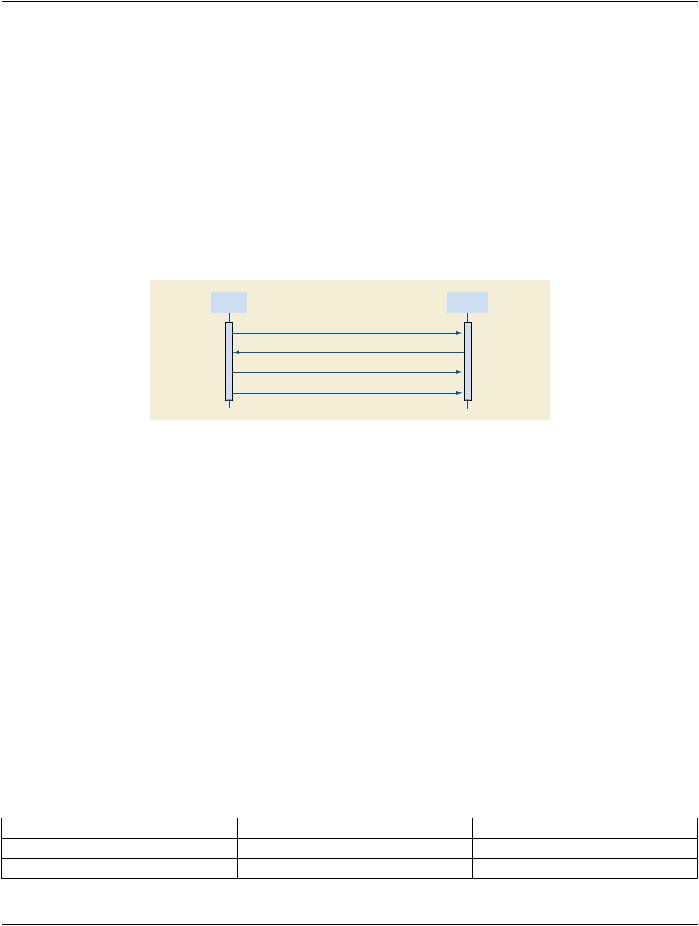
Figure C.4.1-2. Sequencing Constraints
Under normal circumstances the sequencing depicted above applies:
1.The Modality queries for a worklist of Scheduled Procedure Steps
2.DICOMSRV searches its database and returns matches to the query
3.The Modality begins performance of a Procedure Step and sends the MPPS N-CREATE
4.TheModalitycompletesordiscontinuestheprocedureandsendstheMPPSN-SETwithstatusofCOMPLETEorDISCONTINUED
The workflow above is not the only one possible. For example, in a Trauma or unscheduled flow there may be no worklist query prior to the performance of the procedure and the sending of MPPS messages. The flow would also be altered if the Modality did not support both Modality Worklist and MPPS. The Description and Sequencing of Activities and the SOP Specific Conformance sections below for the respective Real World Activities provide additional detail
C.4.2 AE Specifications
C.4.2.1 DICOMSRV AE Specification
This application provides Standard Conformance to the following DICOM SOP Classes:
C.4.2.1.1 SOP Classes
Table C.4.2-1. SOP Classes for AE DICOMSRV
SOP Class Name |
SOP Class UID |
SCU |
SCP |
Verification |
1.2.840.10008.1.1 |
No |
Yes |
Modality Worklist |
1.2.840.10008.5.1.4.31 |
No |
Yes |
- Standard -
|
DICOM PS3.2 2020a - Conformance |
|
Page 143 |
SOP Class Name |
SOP Class UID |
SCU |
SCP |
Modality Performed Procedure Step |
1.2.840.10008.3.1.2.3.3 |
No |
Yes |
C.4.2.1.2 Association Policies
C.4.2.1.2.1 General
The Application Context Name for DICOM is the only Application Context proposed.
|
Table C.4.2-2. DICOM Application Context |
Application Context Name |
1.2.840.10008.3.1.1.1 |
C.4.2.1.2.2 Number of Associations
DICOMSRV will support as many simultaneous associations as SCP as are requested by Workflow SCUs up to a configurable max- imum. DICOMSRV limits the number of concurrent associations to a given Workflow SCU as described below.
Table C.4.2-3. Number of Associations as an SCP for AE DICOMSRV
Maximum number of simultaneous associations |
Configurable value. Maximum of 3 simultaneous associations to a given |
|
SCU |
C.4.2.1.2.3 Asynchronous Nature
Asynchronous communication (multiple outstanding transactions over a single association) is not supported.
C.4.2.1.2.4 Implementation Identifying Information
Table C.4.2-4. DICOM Implementation Class and Version for DICOMSRV
Implementation Class UID |
xxxxxxx.yyy.etc.ad.inf.usw |
Implementation Version Name |
DICOMRis_260 |
C.4.2.1.3 Association Initiation Policy
DICOMSRV does not initiate Associations.
C.4.2.1.4 Association Acceptance Policy
DICOMSRV will accept associations for the MWL, MPPS and Verification SOP Classes as an SCP. The job runs in the background and forks a new process for each connection request from a Remote AE
C.4.2.1.4.1 Activity - Configured AE Requests MWL Query
C.4.2.1.4.1.1 Description and Sequencing of Activities
WhenModalityWorklistSCUsqueryDICOMSRVthequeriesrunagainsttheScheduledProcedureStepWorklist(referredtohereafter as the 'SPS Worklist' or 'Worklist') in the DICOMRis database. There is a configurable mapping between the Universal Service ID contained in the HL7 Order messages (see Table C.8.1-4) and one or more Requested Procedures within the DICOMRis database. ARequestedProceduremay,inturn,mapto1ormoreScheduledProcedureStepsthoughtherelationisusually1-to-1.Thismapping is also site-configurable. The relation between Accession Number (0008,0050) and Requested Procedure ID (0040,1001) is 1-to-1 within DICOMRis and these attributes have the same value in all MWL responses. Scheduled Procedure Step entries are added and removed from the Worklist as follows:
•AddScheduledProcedureStepEntriesNormalPathway-AsordersarereceivedfromtheHISviaHL7orenteredusingDICOMRis' Ordering and Scheduling application, additions are made to the SPS Worklist in the DICOMRis database per the mapping specified above.
- Standard -
Page 144 |
DICOM PS3.2 2020a - Conformance |
•Add Scheduled Procedure Step Entries Exception Pathway - Users can interactively create additional Scheduled Procedure Step entries for a given Requested Procedure using the Procedure Update application. It may be necessary to create additional entries under certain conditions such as when it is discovered that a procedure must be redone after having previously been marked as completed. This does not apply to canceled procedures
•Remove Scheduled Procedure Step Entries Normal Pathway - An SPS entry is removed from the SPS Worklist under the following circumstances:
•As mentioned previously, DICOMRis supports common RIS function to set the state of the procedure as it progresses from being orderedtobeingresultedandsigned.SettingtheprocedurestatemaybeinitiatedinteractivelyviatheProcedureUpdateapplication or as a result of various events. An entry in the SPS Worklist is removed when the Requested Procedure that is the parent of the SPS is set to a configured status. This configuration is system-wide applying equally to all procedures.
•If configured to change the state of a Requested Procedure on receipt of an MPPS N-CREATE or N-SET referencing the procedure then the change in state may result in removal of SPS entries related to the procedure as described above
•Remove Entries Exception Pathway - When a procedure is canceled all SPS entries related to that procedure are removed from the Worklist.
RemoveEntriesMaintenancePathway-SPSentriesthatarestillintheWorklistaconfigurabletimeaftertheirscheduledstartdate/time will be removed by a day-end maintenance job.
In the table below the following applies:
•To cause a given action to occur, MPPS messages must reference the parent Requested Procedure related to the SPS entry and applicable configuration must be in place.
Table C.4.2-5. Scheduled Procedure Step Entry Actions Table
Events |
Scheduled Procedure Step Entry Actions |
Order received from HIS or entered using DICOMRis application |
Add one or more Entries to Worklist |
User adds SPS entry interactively |
Add Entry to Worklist |
MPPSmessagereceivedthatchangesprocedurestateofparentprocedureRemove Entry from Worklist to status configured for removal of child SPS entry from Worklist
Current time exceeds SPS scheduled time by a Worklist configured time Remove Entry from Worklist interval
 Parent procedure canceled
  Remove one or more Entries from Worklist
Parent procedure set to a state that causes removal of child SPS entries Remove one or more Entries from Worklist from Worklist
Modality |
|
DICOMSRV |
|
|
|
1.Open Association
2.MWL C-FIND Request
3a. 0 to N Pending C-FIND Responses
3b. Check for C-FIND Cancel Request
4.1 Final C-FIND Response
5.Close Association
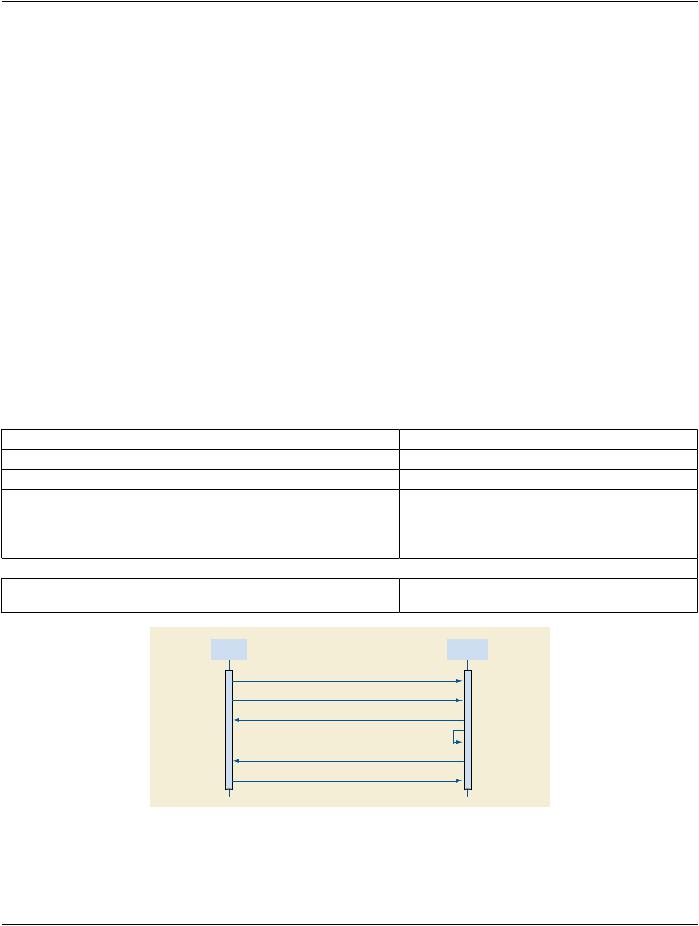
Figure C.4.2-1. Sequencing Diagram for Activity: Configured AE Requests MWL Query
The figure above is a possible sequence of messages between a Modality Worklist SCU and DICOMSRV.
- Standard -
DICOM PS3.2 2020a - Conformance |
Page 145 |
1.The Modality opens an Association with DICOMSRV for the purpose of querying for a Modality Worklist
2.The Modality sends an MWL C-FIND query to DICOMSRV
3.DICOMSRV queries its database using the attributes from the C-FIND Request and returns 0 to N C-FIND responses depending onmatchesreturnedfromthedatabase.DICOMSRVchecksforaC-FINDCancelRequestafteraconfigurednumberofresponses are sent. If a Cancel is received then no further Pending responses are sent.
4.DICOMSRV sends the final C-FIND response
5.The Modality closes the Association
C.4.2.1.4.1.2 Accepted Presentation Contexts
TableC.4.2-6.AcceptablePresentationContextsforAEDICOMSRVandReal-WorldActivity'Configured
AE Requests MWL Query'
|
|
Presentation Context Table |
|
|
|
Abstract Syntax |
Transfer Syntax |
Role |
Extended |
||
Name |
UID |
Name List |
UID List |
|
Negotiation |
|
|
||||
Modality Worklist |
1.2.840.10008.5.1.4.31Implicit VR Little Endian |
1.2.840.10008.1.2 |
SCP |
None |
|
Information Model - |
|
Explicit VR Little Endian |
1.2.840.10008.1.2.1 |
|
|
FIND |
|
|
|
||
|
|
|
|
|
|
C.4.2.1.4.1.2.1 Presentation Context Acceptance Criterion
Dependingonconfiguration,DICOMSRVmayormaynotacceptmultiplePresentationContextscontainingthesameAbstractSyntax.
C.4.2.1.4.1.2.2 Transfer Syntax Selection Policy
Transfer Syntaxes in addition to the default Implicit VR Little Endian may be configured for a given Abstract Syntax. DICOMSRV's preferred Transfer Syntax is Explicit VR Little Endian and this will be selected if offered.
C.4.2.1.4.1.3 SOP Specific Conformance for Modality Worklist SOP Class
DICOMSRV does not support matching on any optional matching key attributes.
DICOMSRV supports case-insensitive matching on the following Person Name Value Representation elements:
Patient Name (0010,0010)
DICOMSRV supports optional return key attributes as described in the table below.
Table C.4.2-7. Modality Worklist Optional Return Keys Supported
Description/Module |
Tag |
Remark |
Scheduled Procedure Step |
|
|
>Scheduled Protocol Code Sequence |
(0040,0008) |
|
>>Code Meaning |
(0008,0104) |
|
>Comments on the Scheduled Procedure Step |
(0040,0400) |
This attribute, if valued, will |
|
|
contain details of the protocol to |
|
|
beusedincarryingoutthisstep. |
|
|
The attribute could contain a full |
description of the protocol or simply indicate modifications to the protocol designated by the Scheduled Protocol Code Sequence
- Standard -