Материал: Драйвер стандартних пристроїв введення-виведення
Драйвер стандартних пристроїв введення-виведення
Курсова робота
Драйвер стандартних пристроїв введення-виведення
Вступ
мобільний інтерфейс програмний драйвер
Ціллю курсової роботи є створення мобільного додатку зі зручним та простим у використанні інтерфейсом, який би міг редагувати та використовувати XML-файли та за даними з файлу відтворювати інформацію. Також редактор повинен використовувати карти і використовувати GPS модуль.
Практичне застосування
даного програмного проекту можливе в сфері послуг.
1. Технічне завдання
За даними з карти ми відмічаємо об’єкт (магазін) де ми присваємо значення координат з GPS модуля і добавляємо назву. Далі нам потрібно зробити аудинтифікацію користувача (логін і пароль) щоб кожний користувач зміг скласти свій список покупок.
1.1 Функціональність
Програма має містити наступну функціональність:
· Можливість завантаження / збереження даних у в форматі XML
· Синтаксичний розбір і верифікація формату XML з відбудовою внутрішньої моделі даних, в разі помилок - формування виключення (Exception)
· Інтерфейс користувача (на основі компонентів бібліотеки Android), який містить такі області:
o Аудентифікацію користувача
o Список покупок і його редагування
o Список магазинів
o Зображення магазинів на карті
· Можливість
збереження списку.
1.2 Вимоги до
реалізації.
· Мова програмування Java з використанням бібліотеки Android
· Інтерфейс
користувача має забезпечувати доступ до всієї функціональності програми;
2. Проектування інтерфейсу користувача
2.1 Мета
Розробити таку програму, яка дозволить спростити похід в магазин як для однієї людини, так і для всієї родини
.2 Модель
інтерфейсу користувача
Призначення:
Головне вікно програми використовується для аудинтифікації і взаємодії користувача з програмою
Початковий опис прецеденту інтерфейсу користувача:
) Прецедент починається коли користувач запускає програму.
) Користувач може виконати одну з наступних дій:
· Добавить і видалить покупку.
· Добавить і видалити магазін.
· Відмітити на карті обєкт.
· Дізнатися по якій саме адресі знаходить даний обєкт.
· Змінити графічне положення обєкта.
· Побачіти на карті де знаходиться даний обєкт.
) Прецедент
закінчується коли користувач закінчує роботу з програмою.
2.3 Приклад зовнішнього вигляду програми
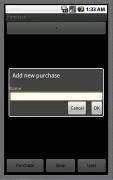
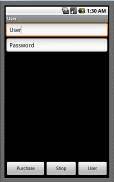
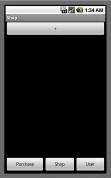
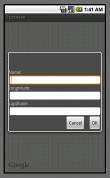
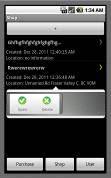
Програмний код
<? xml version= «1.0» encoding= «utf-8»?>
<manifest xmlns:android=
«http://schemas.android.com/apk/res/android»= «com.team1»:versionCode=
«1»:versionName= «1.0»>
<uses-permission android:name= «android.permission.INTERNET» />
<uses-permission
android:name= «android.permission.ACCESS_FINE_LOCATION» />
<application android:icon= «@drawable/icon» android:label= «@string/app_name»>
<uses-library android:name= «com.google.android.maps» />
<activity
android:name=».GSS»:label= «@string/app_name»>
</activity>
<activity android:name=».ShopsMap»>
</activity>
<activity android:name=».pokypki» android:label= «@string/app_name1»>
<intent-filter>
<action android:name= «android.intent.action.MAIN» />
<category android:name= «android.intent.category.LAUNCHER» />
</intent-filter>
</activity>
<activity
android:name=».magazin» android:label= «@string/app_name2»>
</activity>
<activity android:name=».seting» android:label= «@string/app_name3»>
</activity>
</application>
<uses-permission android:name= «android.permission.GET_ACCOUNTS» />
<uses-permission android:name= «android.permission.READ_CONTACTS» />
<uses-permission android:name= «android.permission.WRITE_CONTACTS» />
</manifest>
<? xml version= «1.0»
encoding= «utf-8»?>
<RelativeLayout
xmlns:android= «http://schemas.android.com/apk/res/android»:layout_width=
«fill_parent»:layout_height= «fill_parent»>
<TextView:id= «@+id/label1»:layout_width= «fill_parent»:layout_height= «wrap_content»:text= «Name:» />
<EditText:id= «@+id/entry1»:layout_width=
«fill_parent»:layout_height= «wrap_content»:background= «@android:drawable/editbox_background»:layout_below=
«@id/label1»/>
<TextView:id= «@+id/label2»:layout_width= «fill_parent»:layout_height= «wrap_content»:text= «Longtitude:»:layout_below= «@+id/entry1»/>
<EditText:id= «@+id/entry2»:layout_width= «fill_parent»:layout_height= «wrap_content»
android:background= «@android:drawable/editbox_background»:layout_below=
«@id/label2»/>
<TextView:id= «@+id/label3»:layout_width= «fill_parent»:layout_height= «wrap_content»:text= «Laptitude:»:layout_below= «@+id/entry2»/>
<EditText:id= «@+id/entry3»:layout_width=
«fill_parent»:layout_height= «wrap_content»:background= «@android:drawable/editbox_background»:layout_below=
«@id/label3»/>
<Button:id= «@+id/ok1»:layout_width= «wrap_content»:layout_height= «wrap_content»:layout_below= «@id/entry3»:layout_alignParentRight= «true»:layout_marginLeft= «10dip»:text= «OK» />
<Button:id= «@+id/cancel1»:layout_width=
«wrap_content»:layout_height= «wrap_content»:layout_toLeftOf= «@id/ok1»:layout_alignTop=
«@id/ok1»:text= «Cancel» />
</RelativeLayout>
<? xml version= «1.0»
encoding= «utf-8»?>
<RelativeLayout
xmlns:android= «http://schemas.android.com/apk/res/android»:layout_width=
«fill_parent»:layout_height= «fill_parent»>
<TextView:id= «@+id/label»:layout_width= «fill_parent»:layout_height= «wrap_content»
android:text= «Name:» />
<EditText
android:id= «@+id/entry»:layout_width= «fill_parent»:layout_height= «wrap_content»:background= «@android:drawable/editbox_background»:layout_below= «@id/label»/>
<Button:id= «@+id/ok»:layout_width= «wrap_content»:layout_height= «wrap_content»:layout_below= «@id/entry»:layout_alignParentRight= «true»:layout_marginLeft= «10dip»:text= «OK» />
<Button:id= «@+id/cancel»:layout_width=
«wrap_content»:layout_height= «wrap_content»:layout_toLeftOf= «@id/ok»:layout_alignTop=
«@id/ok»:text= «Cancel» />
</RelativeLayout>
<? xml version= «1.0»
encoding= «utf-8»?>
<LinearLayout
xmlns:android= «http://schemas.android.com/apk/res/android»:orientation=
«vertical»:layout_width= «fill_parent»:layout_height= «fill_parent»>
<LinearLayout:android=
«http://schemas.android.com/apk/res/android»:layout_width= «fill_parent»:layout_height=
«wrap_content»:orientation= «horizontal» >
<Button:id= «@+id/addContactButton»:layout_width= «wrap_content»:layout_height= «wrap_content»:layout_weight= «0.51»:text= «@string/allAccountsPlus» />
</LinearLayout>
<ListView
android:layout_width= «fill_parent»:id= «@+id/contactList»:layout_height=
«wrap_content»:layout_weight= «1»/>
<LinearLayout xmlns:android= «http://schemas.android.com/apk/res/android»
:orientation= «horizontal»:layout_width= «fill_parent»:layout_height= «wrap_content» android:weightSum= «3»>
<Button android:id= «@+id/addContactButton1»:text= «@string/addContactButtonLabel1»:layout_height= «wrap_content»:layout_width= «wrap_content»:layout_weight= «1»/>
<Button android:id= «@+id/addContactButton2»:text= «@string/addContactButtonLabel2»:layout_height= «wrap_content»:layout_width= «wrap_content»:layout_weight= «1»/>
<Button android:id= «@+id/addContactButton3»:text= «@string/addContactButtonLabel3»:layout_height= «wrap_content»:layout_width= «wrap_content»:layout_weight= «1»/>
</LinearLayout>
</LinearLayout>
<? xml version= «1.0»
encoding= «utf-8»?>
<LinearLayout xmlns:android= «http://schemas.android.com/apk/res/android»:orientation= «vertical»:layout_width= «fill_parent»:layout_height= «fill_parent»>
<EditText android:layout_height= «wrap_content»:id= «@+id/editText1» android:text= «User»:layout_width= «fill_parent»></EditText>
<EditText
android:layout_height= «wrap_content» android:id= «@+id/editText2»
android:text= «Password» android:layout_width= «fill_parent»></EditText>
<ListView android:layout_width= «fill_parent»:id= «@+id/contactList»:layout_height= «wrap_content»:layout_weight= «1»/>
<LinearLayout xmlns:android= «http://schemas.android.com/apk/res/android»:orientation= «horizontal»:layout_width= «fill_parent»:layout_height= «wrap_content»>
<Button android:id= «@+id/addContactButton1»:text= «@string/addContactButtonLabel1»:layout_height= «wrap_content»:layout_width= «wrap_content»:layout_weight= «1»/>
<Button android:id= «@+id/addContactButton2»:text= «@string/addContactButtonLabel2»:layout_height= «wrap_content»:layout_width= «wrap_content»:layout_weight= «1»/>
<Button android:id= «@+id/addContactButton3»:text= «@string/addContactButtonLabel3»:layout_height= «wrap_content»:layout_width= «wrap_content»:layout_weight= «1»/>
</LinearLayout>
</LinearLayout>
<? xml version= «1.0»
encoding= «utf-8»?>
<LinearLayout xmlns:android= «http://schemas.android.com/apk/res/android»:orientation= «vertical»:layout_width= «fill_parent»:layout_height= «fill_parent»>
<LinearLayout xmlns:android= «http://schemas.android.com/apk/res/android»:orientation= «horizontal»:layout_width= «fill_parent»:layout_height= «wrap_content»>
<Button android:id= «@+id/addContactButton»:text= «@string/allAccountsPlus»:layout_height= «wrap_content»:layout_width= «wrap_content»:layout_weight= «1»/>
</LinearLayout>
<ListView android:layout_width= «fill_parent»
android:id= «@+id/contactList»
android:layout_height= «wrap_content»:layout_weight= «1»/>
<LinearLayout xmlns:android= «http://schemas.android.com/apk/res/android»:orientation= «horizontal»:layout_width= «fill_parent»:layout_height= «wrap_content»>
<Button android:id= «@+id/addContactButton1»:text= «@string/addContactButtonLabel1»:layout_height= «wrap_content»:layout_width= «wrap_content»:layout_weight= «1»/>
<Button android:id= «@+id/addContactButton2»:text= «@string/addContactButtonLabel2»:layout_height= «wrap_content»:layout_width= «wrap_content»:layout_weight= «1»/>
<Button android:id= «@+id/addContactButton3»:text= «@string/addContactButtonLabel3»:layout_height= «wrap_content»:layout_width= «wrap_content»:layout_weight= «1»/>
</LinearLayout>
</LinearLayout>
<? xml version= «1.0» encoding= «utf-8»?>
<LinearLayout:android= «http://schemas.android.com/apk/res/android»:layout_width= «fill_parent»:layout_height= «fill_parent»>
<com.google.android.maps. MapView:android= «http://schemas.android.com/apk/res/android»:id= «@+id/mapview»:layout_width= «fill_parent»:layout_height= «fill_parent»:clickable= «true»:apiKey= «0tzlgC_A9yCyQDmKwgGyFyoSsLtqWDMDCpQlp2Q»
/>
</LinearLayout>
<? xml version= «1.0» encoding= «utf-8»?>
<LinearLayout
xmlns:android= «http://schemas.android.com/apk/res/android»:layout_width=
«fill_parent»:layout_height= «fill_parent»:orientation= «horizontal»
>
<Button:id= «@+id/button_main1»:layout_width=
«wrap_content»:layout_height= «wrap_content»:layout_weight= «0.70»:padding=
«10dp»:text= «Shop» />
<Button:id= «@+id/button_main»:layout_width=
«168dp»:layout_height= «wrap_content»:padding= «10dp»:text=
«Purchase» />
</LinearLayout>
<? xml version= «1.0»
encoding= «utf-8»?>
<resources>
<string name= «accountSpinnerLabel»>Account</string>
<string name= «addContactButtonLabel1»>Purchase</string>
<string name= «addContactButtonLabel2»>Shop</string>
<string name= «addContactButtonLabel3»>User</string>
<string name= «allAccountsPlus»>+</string>
<string name= «app_name»>Purchase</string>
<string name= «app_name1»>Purchase</string>
<string name= «app_name2»>Shop</string>
<string name= «app_name3»>User</string>
</resources>
package com.team1;
import android.app. Dialog;
import android.content. Context;
import android.view. View;
import android.view. View. OnClickListener;
import android.widget. Button;
import android.widget. TextView;
public class AddPurchaseDialor extends Dialog implements
OnClickListener {okButton;cancelButton;
public AddPurchaseDialor (Context context) {
super(context);(R.layout.add_purches_dialog);= (Button) findViewById (R.id.ok);.setOnClickListener(this);= (Button) findViewById (R.id.cancel);.setOnClickListener(this);
}
@Override
public void onClick (View v) {
if (v == okButton)
{textView = (TextView) findViewById (R.id.entry);.getText();();
return;
}
if (v == cancelButton)
dismiss();
}
}
package com.team1;
import com.team1.R;
import android.app. Activity;
import android.content. Intent;
import android.os. Bundle;
import android.view. View;
import android.view. View. OnClickListener;
import android.widget. Button;
public class seting extends Activity {
public void onCreate (Bundle savedValues) {
super.onCreate(savedValues);(R.layout.seting);
// Capture our button from layoutbutton = (Button) findViewById (R.id.addContactButton1);
// Register the onClick
listener with the implementation above.setOnClickListener (new
OnClickListener() {
@Override
public void onClick (View v) {
// TODO Auto-generated method stubintent_pokypki = new Intent (seting.this, pokypki.class);(intent_pokypki);
}
});
// Capture our button from layoutbutton1 = (Button) findViewById (R.id.addContactButton2);
// Register the onClick
listener with the implementation above.setOnClickListener (new
OnClickListener() {
@Override
public void onClick (View v) {intent_magazin = new Intent (seting.this, magazin.class);
startActivity (intent_magazin);
}
});
}
}
package com.team1;
import java.util. ArrayList;
import java.util. List;
import android.app. AlertDialog;
import android.content. Context;
import android.content. Intent;
import android.graphics.drawable. Drawable;
import android.location. Location;
import android.location. LocationListener;
import android.location. LocationManager;
import android.os. Bundle;
import android.view. MotionEvent;
import android.widget. Toast;
import com.google.android.maps. GeoPoint;
import com.google.android.maps. ItemizedOverlay;
import com.google.android.maps. MapActivity;
import com.google.android.maps. MapController;
import com.google.android.maps. MapView;
import com.google.android.maps. Overlay;
import com.google.android.maps. OverlayItem;
public class ShopsMap extends MapActivity {
private LocationManager lm;
private LocationListener locationListener;
private MapView mapView;
private MapController mc;
@Override
protected boolean isRouteDisplayed() {
// TODO Auto-generated method stub
return false;
}
@Override
public void onCreate (Bundle savedInstanceState) {
super.onCreate(savedInstanceState);(R.layout.maps);
// - use the LocationManager class to obtain GPS locations-= (LocationManager)(Context.LOCATION_SERVICE);
= new MyLocationListener();
.requestLocationUpdates (.GPS_PROVIDER,
,
,);
= (MapView) findViewById (R.id.mapview);.setBuiltInZoomControls(true);= mapView.getController();
drawable = this.getResources().getDrawable
(R.drawable.androidmarker);itemizedoverlay = new
ShopsOverlays(drawable);overlay = new TouchOverlay (mapView,
itemizedoverlay);.getOverlays().add(overlay);
//mapOverlays.add(itemizedoverlay);
}
private class MyLocationListener implements LocationListener
{
@Override
public void onLocationChanged (Location loc) {
if (loc!= null) {.makeText (getBaseContext(),
«Location changed: Lat:» + loc.getLatitude() +
«Lng:» + loc.getLongitude(),.LENGTH_SHORT).show();
p = new GeoPoint(
(int) (loc.getLatitude() * 1E6),
(int) (loc.getLongitude() * 1E6));.animateTo(p);.setZoom(25);.invalidate();
}
}
@Override
public void onProviderDisabled (String provider) {
// TODO Auto-generated method stub
}
@Override
public void onProviderEnabled (String provider) {
// TODO Auto-generated method stub
}
@Override
public void onStatusChanged (String provider, int status,extras) {
// TODO Auto-generated method stub
}
}
private class TouchOverlay extends com.google.android.maps.
Overlay {
private ArrayList<OverlayItem> mOverlays = new ArrayList<OverlayItem>();
private Context mContext;
private MapView mv;
private ShopsOverlays so;
public TouchOverlay (MapView mv, ShopsOverlays so) {
this.mv = mv;
this.so = so;
}
@Override
public boolean onTouchEvent (MotionEvent event, MapView mapView)
{
// - when user lifts his finger-
if (event.getAction() == 1) {p = mapView.getProjection().fromPixels(
(int) event.getX(),
(int) event.getY());.makeText (getBaseContext(),.getLatitudeE6 () / 1E6 +»,» +.getLongitudeE6 () /1E6,.LENGTH_SHORT).show();.getController().animateTo(p);.getController().setZoom(15);
//OverlayItem overlayitem = new OverlayItem (p, «Магазин», «»);
//so.addOverlay(overlayitem);shopDialog
= new AddShopDialog (mapView.getContext());.show();
}
return false;
}
}
private class ShopsOverlays extends com.google.android.maps.
ItemizedOverlay {
private ArrayList<OverlayItem> mOverlays = new ArrayList<OverlayItem>();
private Context mContext;
public ShopsOverlays (Drawable defaultMarker) {
super (boundCenterBottom(defaultMarker));
}
public void addOverlay (OverlayItem overlay) {.add(overlay);();
}
@Override
protected OverlayItem createItem (int i) {
return mOverlays.get(i);
}
@Override
public int size() {
return mOverlays.size();
}
@Override
protected boolean onTap (int index) {item = mOverlays.get(index);. Builder dialog = new AlertDialog. Builder(mContext);.setTitle (item.getTitle());.setMessage (item.getSnippet());.show();