Материал: part03

Внимание! Если размещение файла нарушает Ваши авторские права, то обязательно сообщите нам


DICOM PS3.3 2020a - Information Object Definitions​

Page 1351​

Attribute Name​

Tag​

Type​

Attribute Description​


Swivel Range​

(0070,1A06)​

1C​

Range in which a volume rotates back-and-forth around the swivel axis,​

in degrees. The initial position is at the midpoint of the swivel range.​ See Section C.11.29.1.​

Required if Presentation Animation Style (0070,1A01) is SWIVEL.​

C.11.29.1 Presentation Animation Style​

The presence of Presentation Animation Style (0070,1A01) indicates that a form of view animation is intended by the creator of the​ Presentation State, and the value of the Attribute indicates the nature of such animation. See Section FF.2.4.2 “Volumetric Animation”​ in PS3.4 for further description of the various presentation animation styles.​

Values of Presentation Animation Style (0070,1A01) are:​

INPUT_SEQ​

A number of inputs are displayed sequentially using the same Presentation State. The inputs are described​


byItemsinVolumetricPresentationStateInputSequence(0070,1201)withvaluesofInputSequencePosition​


Index (0070,1203). If Recommended Animation Rate (0070,1A03) is present, the animation occurs as values​


of the sequence position index are incremented at a rate specified by Recommended Animation Rate​


(0070,1A03) in units of steps per second. If Recommended Animation Rate (0070,1A03) is not present, the​


use of manual scrolling or animation rate is at the discretion of the display application. Inputs with the same​


InputSequencePositionIndex(0070,1203)valuearedisplayedsimultaneously.IfallvaluesofInputSequence​


Position Index (0070,1203) are the same, the presented view is not animated.​

PRESENTATION_SEQ​The animation is determined by two or more Presentation States sharing the same value of Presentation​ Sequence Collection UID (0070,1102). The Presentation States shall be applied sequentially in the order of​ Presentation Sequence Position Index (0070,1103) values as the index is varied at a rate specified by Re-​ commended Animation Rate (0070,1A03) in units of steps per second, if present; otherwise, the use of​ manual scrolling or animation rate is at the discretion of the display application.​

CROSSCURVE​ Indicates that the designated Planar MPR view shall be stepped along the curve defined in Animation Curve​ Sequence (0070,1A04) at the interval specified by Animation Step Size (0070,1A05). The rate is specified​ by Recommended Animation Rate (0070,1A03) in units of steps per second, if present; otherwise, the use​ of manual scrolling or animation rate is at the discretion of the display application.​

FLYTHROUGH​ Indicates that the field of view defined by Render Field of View (0070,1606) be stepped along the curve​ defined in Animation Curve Sequence (0070,1A04) at the rate specified by Recommended Animation Rate​ (0070,1A03) steps per second. Presentation Animation Style (00070,1A01) value of FLYTHROUGH shall be​ present only if Render Projection (0070,1602) is present.​

Viewpoint LookAt Point (0070,1604) shall coincide with the first point in Volumetric Curve Points (0070,150D,​ the direction from the Viewpoint Position (0070,1603) to the Viewpoint LookAt Point(0070,1604) shall be​ tangent to the curve at that point, and the Viewpoint Up Direction (0070,1605) shall be parallel to the first​ direction cosine in Volumetric Curve Up Directions (0070,1A07).​

Note​

These conditions ensure the view defined by the Volumetric Presentation State matches the initial​ view of the animation.​

SpacingofcurvepointsinVolumetricCurvePoints(0070,150D)shallbechosensuchthattheangularchange​ betweenanytwoconsecutivedirectioncosinesinVolumetricCurveUpDirections(0070,1A07)isalwaysless​ than 90 degress in 3D space, and should be chosen such that the change in curve direction at each point is​ reasonably small.​

Note​

This condition and recommendation ensure that the up direction interpolated between points in​ Volumetric Curve Points (0070,150D) and the direction along the tangent from viewpoint to lookAt​ point at each step are always unambiguous.​

- Standard -​

Page 1352​

DICOM PS3.3 2020a - Information Object Definitions​


The animation consists of a sequence of dynamically repositioned views that are successively rendered to​


produce a moving view along a curve through the volume. The curve is specified by the set of discrete points​


defined by Volumetric Curve Points (0070,150D). The views are at points along the curve determined by​


Animation Step Size (0070,1A04) and may or may not correspond to Volumetric Curve Points (0070,150D).​


At each step in the sequence, the viewpoint position, lookAt, and up direction changes as follows:​


•​The distance DlookAt is the distance between Viewpoint Position (0070,1603) and Viewpoint LookAt Point​


(0070,1604), which is a constant throughout the animation.​


•​The view lookAt point is initially the first point in Volumetric Curve Points (0070,150D). At each step in the​


animation, the lookAt point moves on the curve a distance defined by Animation Step Size (0070,1A04)​


fromthepreviouslookAtpointinthedirectiontowardsthelastpointinVolumetricCurvePoints(0070,150D).​


•​At each lookAt point position:​


•​There is a line Ltan tangent to the curve at the currentLookAt point.​


•​The viewpoint is a point on Ltan at a distance DlookAt from the lookAt point. The direction from viewpoint​


to lookAt point is looking forward along the curve, generally toward the next point in Volumetric Curve​


Points (0070,150D).​


•​IfthecurrentlookAtpointiscoincidentwithapointinVolumetricCurvePoints(0070,150D),theupdirection​


isthedirectioncosineinVolumetricCurveUpDirection(0070,1A07)correspondingtothatpoint.Otherwise,​


the up direction is the direction interpolated between the two direction cosines in Volumetric Curve Up​


Directions(0070,1A07)correspondingtotheneighboringpointsinVolumetricCurvePoints(0070,150D).​


•​The field of view is defined by Render Field of View (0070,1606) relative to the viewpoint coordinate​


system determined by the current viewpoint, lookAt point, and up direction.​

SWIVEL​

Indicates that the rendered volume rotates around the “swivel axis”, which is defined as the axis parallel to​


the Viewpoint Up Direction (0070,1605) intersecting the Viewpoint LookAt Point (0070,1604). The rendered​


volume rotates back and forth in the angular range specified by Swivel Range (0070,1A06) at a rotational​


frequency specified by Recommended Animation Rate (0070,1A03) in degrees per second. The display ap-​


plication should provide for smooth (rather than abrupt) changes in direction as the swivel approaches the​


limits of the swivel range. Shall not be used unless Render Projection (0070,1602) is present.​


Note​


There are no constraints on the value of Swivel Range (0070,1A06). If this value is greater than 360​


degrees, it implies that the rendered volume rotates more than one full rotation before changing​


direction. There is no significance given to negative rather than positive values of Swivel Range​


(0070,1A06).​

CROSSCURVE is permitted only if the following conditions are met:​

•​Multi-Planar Reconstruction Style (0070,1501) is present with a value of PLANAR​

•​The curve specified by Animation Curve Sequence (0070,1A04) intersects the MPR view defined by MPR View Width Direction​ (0070,1507), MPR View Width (0070,1508), MPR View Height Direction (0070,1511), MPR View Height (0070,1512), and MPR​ Top Left Hand Corner (0070,1505) and is approximately normal to it at the point of intersection.​

The original MPR Geometry parameters determine the view orientation and extent throughout the animation as follows:​

•​The same point on the MPR plane intersects the curve at each step of the animation​

•​The MPR x-directional vector remains unchanged from the initial MPR geometry throughout the animation​

•​The cross-product of the x-direction vector and y-direction vector is the tangent to the curve at each point.​

See Section XXX.3.2 “Spatially Related Views (e.g., Orthogonal)” in PS3.17 for an application of CROSSCURVE.​

- Standard -​

DICOM PS3.3 2020a - Information Object Definitions​

Page 1353​

C.11.30 Volume Render Geometry Module​

Table C.11.30-1 contains Attributes that describe the geometry of the volume rendered view.​

Table C.11.30-1. Volume Render Geometry Module Attributes​

Attribute Name​

Tag​

Type​

Attribute Description​

Render Projection​

(0070,1602)​

1​

Projection style.​


Enumerated Values:​


ORTHOGRAPHIC​


PERSPECTIVE​

Viewpoint Position​

(0070,1603)​

1​ Position of the viewpoint in volume space.​


A point (x,y,z) in the Volumetric Presentation State Reference Coordinate​


System.​

Viewpoint LookAt Point​

(0070,1604)​

1​ Point the viewpoint is looking at.​


A point (x,y,z) in the Volumetric Presentation State Reference Coordinate​


System.​

Viewpoint Up Direction​

(0070,1605)​

1​ Vertical orientation of the view.​


A vector (x,y,z) in the Volumetric Presentation State Reference Coordinate​


System.​

Render Field of View​

(0070,1606)​

1​ The field of view specified as a 6-tuple of values (Xleft, Xright, Ytop, Ybottom,​


Distancenear, Distancefar) in the Viewpoint Coordinate System, in mm.​


See Section C.11.30.1.​

Rendering Method​

(0070,120D)​

1​ The rendering method used during the ray casting compositing operation.​

Enumerated values:​

Enumerated Values:​

MAXIMUM_IP​ A method that projects the interpolated sample with​ maximum intensity that falls in the path of each ray​ traced from the viewpoint to the plane of projection.​

MINIMUM_IP​ A method that projects the interpolated sample with​ minimum intensity that falls in the path of each ray​ traced from the viewpoint to the plane of projection.​

VOLUME_RENDERED​A method where each XY pixel of the rendered view​ is determined by accumulating the set of​ non-transparent voxel samples along a ray.​

Sampling Step Size​ (0070,1607)​ 3​ Spacing in mm between samples along each ray in the original volume​ rendering operation.​

See Section C.11.30.2.​

C.11.30.1 Render Field of View​

The Render Field of View (0070,1606) defines the region of the volume data that is displayed.​

The viewpoint is positioned and oriented within the Volumetric Presentation State Reference Coordinate System (VPS-RCS) by​ Viewpoint Position (0070,1603), Viewpoint LookAt Point (0070,1604) and Viewpoint Up Direction (0070,1605). This position and ori-​ entation establish a Viewpoint Coordinate System (VCS), which is a right-hand coordinate system in which the viewpoint is positioned​ at (0,0,0) and is looking at a point at (0,0,-z) and the up direction is along the +y axis.​

- Standard -​

Page 1354​

DICOM PS3.3 2020a - Information Object Definitions​

Render Field of View (0070,1606) is specified by the following coordinate values in the Viewpoint Coordinate System:​

•​Distancenear, Distancefar specify the distances from Viewpoint Position (0070,1603) to the near and far depth clipping planes. Both​ distances shall be positive, and Distancenear shall be less than Distancefar.​

•​Xleft, Xright specify the coordinates of the left and right vertical clipping planes at Distancefar. Xleft shall be less than Xright.​

•​Ytop, Ybottom specify the coordinates for the top and bottom horizontal clipping planes at Distancefar. Xleft shall be less than Xright.​

Note​

Positive values of Distancenear and Distancefar place the near and far rectangles of the field of view on the negative Z axis​ at Z values of -Distancenear and -Distancefar, respectively.​

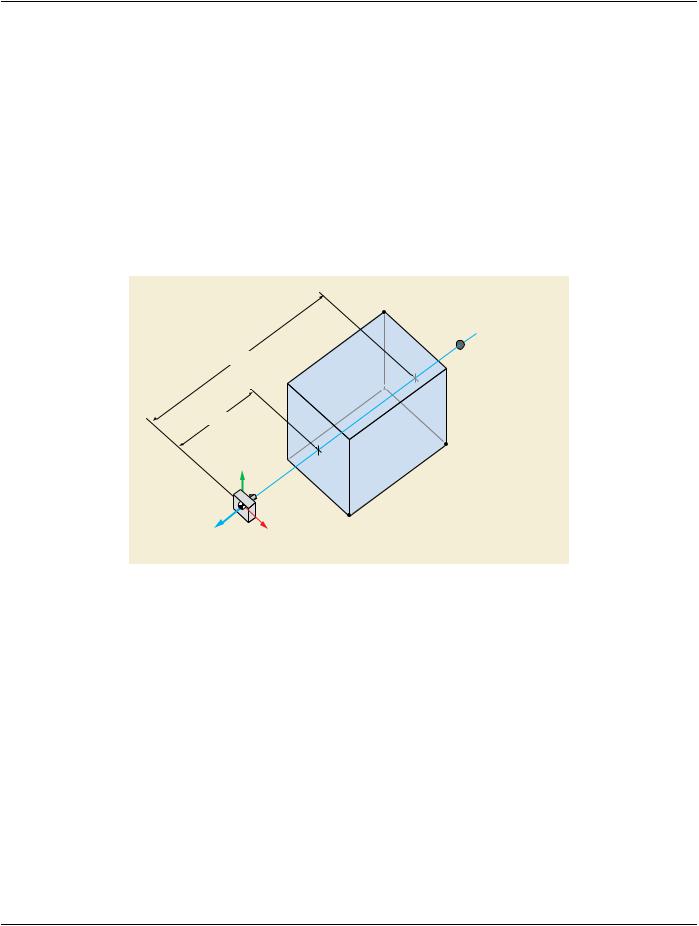
In the case of a Render Projection (0070,1602) value of ORTHOGRAPHIC, Render Field of View (0070,1606) defines a rectangular​

cuboidwithdimensions(Xright minusXleft)by(Ytop minusYbottom)by(Distancefar minusDistancenear),inmm,asshowninFigureC.11.30-​ 1:​

(Xleft, Ytop, Distancefar)

Distancefar

Viewpoint LookAt Point

(0070, 1604)

Distancenear


Viewpoint Up Direction

(Xright, Ybottom, Distancefar)


(0070, 1605)


+Y


Viewpoint Position

(0070, 1603)

+X

(Xright, Ybottom, Distancenear)


Viewpoint Coordinate System

Figure C.11.30-1. ORTHOGRAPHIC Field of View Geometry​

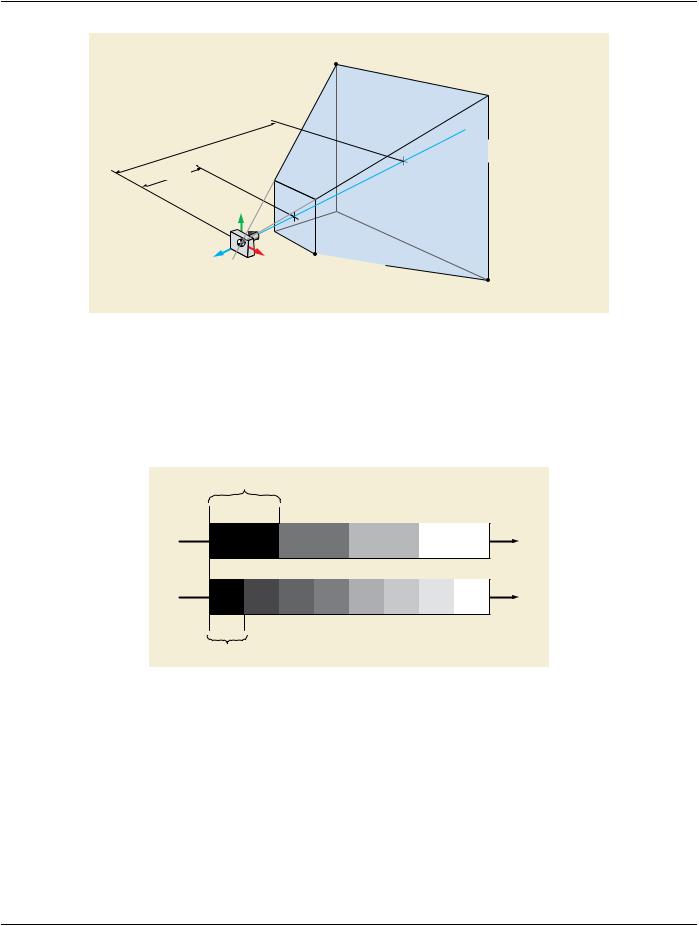
Inthe caseof a RenderProjection (0070,1602)value of PERSPECTIVE, RenderFieldof View (0070,1606)definesafrustum in which​

the far rectangle is larger than the near rectangle. The extent of the far rectangle is established by the points (Xleft, Ytop) and (Xright,​ Ybottom)atDistancefar.Theextentofthenearrectangleisestablishedbythefourpointswhereraysoriginatingattheviewpointposition​ to the corners of the far rectangle intersect the plane that is located at Distancenear from the viewpoint, as shown in Figure C.11.30-​

2.​

- Standard -​

DICOM PS3.3 2020a - Information Object Definitions​

Page 1355​

(Xleft, Ytop, Distancefar)

Distancefar


Distancenear


Viewpoint Up Direction


(0070, 1605)

+Y


Viewpoint Position

+X

(0070, 1603)

+Z


Viewpoint Coordinate System

Viewpoint LookAt Point

(0070, 1604)

(Xright, Ybottom, Distancenear)

(Xright, Ybottom, Distancefar)

Figure C.11.30-2. PERSPECTIVE Field of View Geometry​

C.11.30.2 Sampling Step Size​

Sampling Step Size (0070,1607) specifies the spacing in mm between samples along each ray that was used in the original view by​ the creator of the Presentation State. A display application may choose to use a different step size, but this will usually require an​ adjustment to the Alpha LUTs found in the Presentation State Classification Component Sequence (0070,1801) to compensate the​ change in opacity accumulation caused by the different step size.​

Step size 1.0mm

Step size 0.5mm

Figure C.11.30-3. Sampling Step Size​

C.11.31 Render Shading Module​

Shading enhances the visual perception of a volume by adding reflection characteristics.​

Table C.11.31-1 contains Attributes that describe the shading used in a rendered view.​

Note​

This Module assumes a Phong shading model [Phong 1975]. An implementation may use any appropriate shading model,​ translating these parameters into a similar meaning in the chosen shading model.The generation mechanism for the surface​ normals that are required for the Phong shading model is not specified by DICOM.​

- Standard -​