Материал: m912201e
|
|
WAGO-I/O-PRO 32 V2.2 Overview • 19 |
|
|
Project Components |
|
|
|
ST |
PRGexample.PAR (*Default setting for PAR is 0*) |
|
CAL |
IL call |
(*ERG in IL call results in 1*) |
CAL |
ST call |
(*ERG in ST call results in 2*) |
CAL |
FBD call |
(*ERG in FBD call results in 3*) |
If the variable PAR from the program PRGexample is initialized by a main program with 0, and then one after the other programs are called with above named program calls, then the ERG result in the programs will have the values 1, 2, and 3. If one exchanges the sequence of the calls, then the values of the given result parameters also change in a corresponding fashion.
2.3.8 PLC_PRG
The PLC_PRG is a special predefined POU. Each project must contain this special program. This POU is called exactly once per control cycle.
The first time the 'Project' 'Object Add' command is used after a new project has been created, the default entry in the POU dialog box will be a POU named PLC_PRG of the program type. You should not change this default setting!
If tasks have been defined, then the project may not contain any PLC_PRG, since in this case the procedure sequence depends upon the task assignment.
Attention:
Do not delete or rename the POU PLC_PRG (assuming you are not using a Task Configuration)! PLC_PRG is generally the main program in a single task program.
2.3.9 Action
Actions can be defined to function blocks and programmes. The action represents a further implementation which can be entirely created in another language as the "normal" implementation. Each action is given a name.
An action works with the data from the function block or programme which it belongs to. The action uses the same input/output variables and local variables as the "normal" implementation uses.
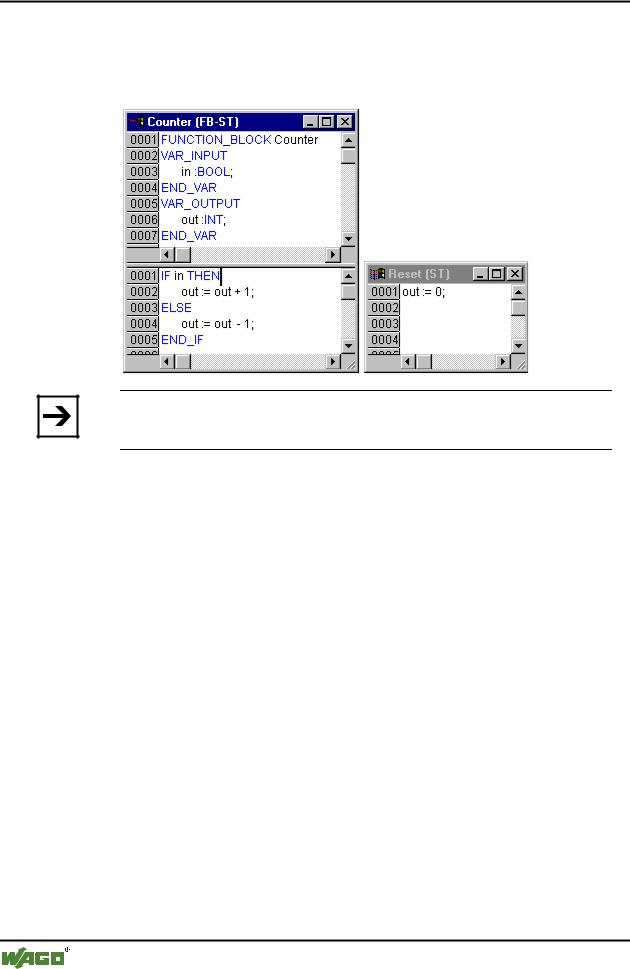
x Example for an action of a function block
In the example given, calling up the function block Counter increases or decreases the output variable "out", depending on the value of the input variable "in". Calling up the action Reset of the function block sets the output variable to zero. The same variable "out" is written in both cases.
An action is called up with <Program_name>.<Action_name> or <Instance_name>.<Action_name>. If it is required to call up the action within
WAGO-I/O-SYSTEM 759 WAGO-I/O-PRO 32
20• WAGO-I/O-PRO 32 V2.2 Overview
Project Components
its own block, one just uses the name of the action in the text editors and in the graphic form the function block call up without instance information.
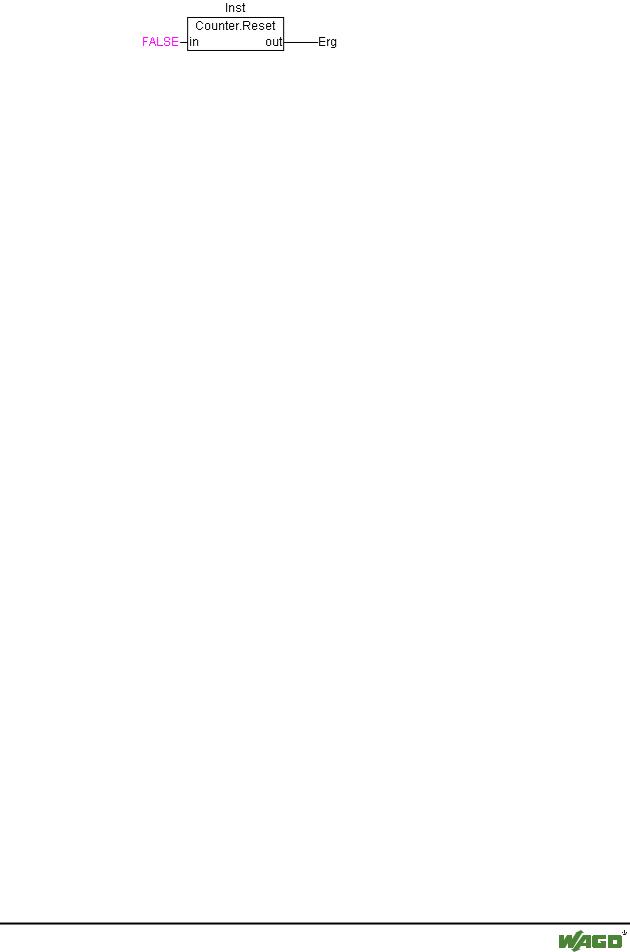
x Example for calls of the above mentioned action
Note:
Actions play an important role in blocks in sequential function charts, see Sequential Function Chart - SFC.
The IEC standard does not recognise actions other than actions of the sequential function chart.
Declaration for all examples:
PROGRAM PLC_PRG
VAR
Inst : Counter;
END_VAR
Call in IL:
CAL |
Inst.Reset(In := FALSE) |
LD |
Inst.out |
ST |
ERG |
Call in ST:
Inst.Reset(In := FALSE);
Erg := Inst.out;
Call in FBD:
WAGO-I/O-SYSTEM 759 WAGO-I/O-PRO 32
WAGO-I/O-PRO 32 V2.2 Overview |
• 21 |
Languages |
|
|
|
2.3.10Resources
You need the resources for configuring and organizing your project and for tracing variable values:
2.3.11Libraries
You can include in your project a series of libraries whose POUs, data types, and global variables you can use just like user-defined variables. The libraries standard.lib and util.lib are standard parts of the program and are always at your disposal.
See 'Library Manager'.
2.3.12Data types
Along with the standard data types the user can define his own data types. Structures, enumeration types and references can be created.
See chapter 'Data Types' of the Online Help chapters.
2.3.13Visualization
WAGO-I/O-PRO 32 provides visualizations so that you can display your project variables. You can plot geometric elements off-line with the help of the visualization. In Online mode, these can then change their form/color/text output in response to specified variable values.
See 'Visualization'.
2.4 Languages
2.4.1 Instruction List (IL)
An instruction list (IL) consists of a series of instructions. Each instruction begins in a new line and contains an operator and, depending on the type of operation, one or more operands separated by commas.
In front of an instruction there can be an identification mark (label) followed by a colon (:).
A comment must be the last element in a line. Empty lines can be inserted between instructions.
Example:
LD 17
WAGO-I/O-SYSTEM 759 WAGO-I/O-PRO 32

22• WAGO-I/O-PRO 32 V2.2 Overview
Languages
ST |
lint (* comment *) |
GE |
5 |
JMPC |
next |
LD |
idword |
EQ |
istruct.sdword |
STN |
test |
next: |
|
2.4.1.1 Modifiers and operators in IL
In the IL language the following operators and modifiers can be used.
Modifiers: |
|
C with JMP, CAL, RET: |
The instruction is only then executed if |
|
the result of the preceding expression is |
|
TRUE. |
Nwith JMPC, CALC, RETC: The instruction is only then executed if
the result of the preceding expression is FALSE.
N |
otherwise: |
Negation of the operand (not of the |
|
|
accumulator) |
Below you find a table of all operators in IL with their possible modifiers and the relevant meaning:
|
Operator |
Modifiers |
Meaning |
|
|
LD |
N |
Make current result equal to the operand |
|
|
|
|
|
|
|
ST |
N |
Save current result at the position of the |
|
|
|
|
operand |
|
|
|
|
|
|
|
S |
|
Then put the Boolean operand exactly at |
|
|
|
|
TRUE if the current result is TRUE |
|
|
|
|
|
|
|
R |
|
Then put the Boolean operand exactly at |
|
|
|
|
FALSE if the current result is TRUE |
|
|
|
|
|
|
|
AND |
N,( |
Bitwise AND |
|
|
|
|
|
|
|
OR |
N,( |
Bitwise OR |
|
|
|
|
|
|
|
XOR |
N,( |
Bitwise exclusive OR |
|
|
|
|
|
|
|
|
|
|
|
WAGO-I/O-SYSTEM 759 WAGO-I/O-PRO 32

|
|
|
WAGO-I/O-PRO 32 V2.2 Overview • 23 |
|
|
|
|
Languages |
|
|
|
|
|
|
|
|
|
|
|
|
Operator |
Modifiers |
Meaning |
|
|
ADD |
( |
Addition |
|
|
|
|
|
|
|
SUB |
( |
Subtraction |
|
|
|
|
|
|
|
MUL |
( |
Multiplication |
|
|
|
|
|
|
|
DIV |
( |
Division |
|
|
|
|
|
|
|
GT |
( |
> |
|
|
|
|
|
|
|
GE |
( |
>= |
|
|
|
|
|
|
|
EQ |
( |
= |
|
|
|
|
|
|
|
NE |
( |
<> |
|
|
|
|
|
|
|
LE |
( |
<= |
|
|
|
|
|
|
|
LT |
( |
< |
|
|
|
|
|
|
|
JMP |
CN |
Jump to the label |
|
|
|
|
|
|
|
CAL |
CN |
Call programor function block or |
|
|
|
|
|
|
|
RET |
CN |
Leave POU and return to caller. |
|
|
|
|
|
|
|
) |
|
Evaluate deferred operation |
|
|
|
|
|
|
You find a list of all IEC operators in the appendix.
Example of an IL program while using some modifiers:
LD |
TRUE |
(*load TRUE in the accumulator*) |
ANDN |
BOOL1 |
(*execute AND with the negated value of the |
|
BOOL1 variable*) |
|
JMPC |
mark |
(*if the result was TRUE, then jump to the |
|
label "mark"*) |
|
LDN |
BOOL2 (*save the negated value of *) |
|
ST |
ERG |
(*BOOL2 in ERG*) |
label: |
|
|
LD |
BOOL2 (*save the value of *) |
|
WAGO-I/O-SYSTEM 759 WAGO-I/O-PRO 32