Материал: m912201e
34• WAGO-I/O-PRO 32 V2.2 Overview
Languages
2.4.3.3 Entry or exit action
Additional to a step action you can add an entry action and an exit action to a step. An entry action is executed only once, right after the step has become active. An exit action is executed only once before the step is deactivated.
A step with entry action is indicated by an "E" in the lower left corner, the exit action by an "X" in the lower right corner.
The entry and exit action can be implemented in any language. In order to edit an entry or exit action, doubleclick in the corresponding corner in the step with the mouse.
Example of a step with entry and exit action:
 on / Transition condition
Between the steps there are so-called transitions.
A transition condition must have the value TRUE or FALSE. Thus it can consist of either a boolean variable, a boolean address or a boolean constant. It can also contain a series of instructions having a boolean result, either in ST syntax (e.g. (i<= 100) AND b) or in any language desired (see 'Extras' 'Zoom Action/Transition'). But a transition may not contain programs, function blocks or assignments!
Note:
Besides transitions, inching mode can also be used to skip to the next step; see SFCtip and SFCtipmode.
2.4.3.4 Active step
After calling the SFC POU, the action (surrounded by a double border) belonging to the initial stepis executed first. A step, whose action is being executed, is called active. In Online mode active steps are shown in blue.
In a control cycle all actions are executed which belong to active steps. Thereafter the respective following steps of the active steps become active if the transition conditions of the following steps are TRUE. The currently active steps will be executed in the next cycle.
Note:
If the active step contains an output action, this will only be executed during the next cycle, provided that the transition following is TRUE.
2.4.3.5 IEC step
Along with the simplified steps the standard IEC steps in SFC are available.
WAGO-I/O-SYSTEM 759 WAGO-I/O-PRO 32
WAGO-I/O-PRO 32 V2.2 Overview |
• 35 |
Languages |
|
|
|
In order to be able to use IEC steps, you must link the special SFC library lecsfc.lib into your project.
Any number of actions can be assigned to an IEC step. IEC actions are not fixed as input, step or output actions to a certain step as in the simplified steps, but are stored separately from the steps and can be reused many times within a POU. For this they must be associated to the single steps with the command 'Extras''Associate action'.
Along with actions, Boolean variables can be assigned to steps.
The activation and deactivation of actions and boolean variables can be controlled using so-called qualifiers. Time delays are possible. Since an action can still be active, if the next step has been processed, for example through the qualifier S (Set), one can achieve concurrent processes.
An associated boolean variable is set or reset with each call of the SFC block. That means, that with each call the value changes from TRUE or FALSE or back again.
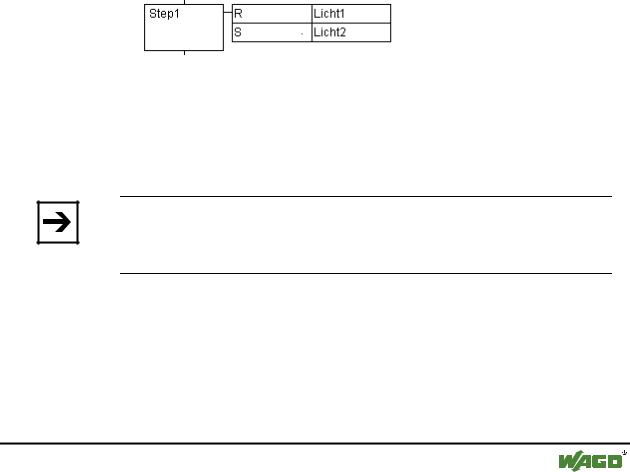
The actions associated with an IEC step are shown at the right of the step in a two-part box. The left field contains the qualifier, possibly with time constant, and the right field contains the action name respectively boolean variable name.
An example for an IEC step with two actions:
In order to make it easier to follow the processes, all active actions in online mode are shown in blue like the active steps. After each cycle a check is made to see which actions are active.
Pay attention here also to the restrictions on the use of time-qualifiers in actions that are repeatedly re-used within the same cycle (see 'Qualifier') !
Note:
If an action has been inactivated, it will be executed once more. That means, that each action is executed at least twice (also an action with qualifier P).
In case of a call first the deactivated actions, then the active actions are executed, in alphabetical order each time.
Whether a newly inserted step is an IEC step depends upon whether the menu command 'Extras' 'Use IEC-Steps' has been chosen.
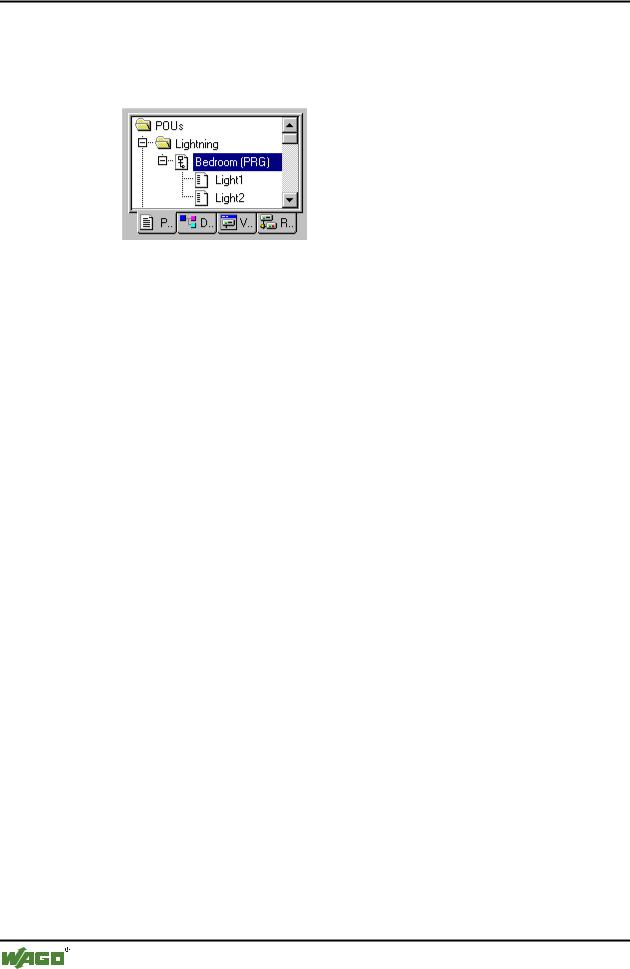
In the Object Organizer the actions hang directly underneath their respective SFC POUs. New actions can be created with 'Project' 'Add Action'.
WAGO-I/O-SYSTEM 759 WAGO-I/O-PRO 32
36• WAGO-I/O-PRO 32 V2.2 Overview
Languages
In order to use IEC steps you must include in your project the special SFC library Iecsfc.lib .
x SFC POU with actions in the Object Organizer
2.4.3.6 Qualifier
In order to associate the actions with IEC steps the following qualifiers are available:
N |
Non-stored |
The action is active as long as the |
|
|
step |
R |
overriding Reset |
The action is deactivated |
S |
Set (Stored) |
The action is activated and remains |
|
|
active until a Reset |
L |
time Limited |
The action is activated for a certain |
|
|
time, maximum as long as the step |
|
|
is active |
D |
time Delayed |
The action becomes active after a |
|
|
certain time if the step is still active |
|
|
and then it remains active as long as |
|
|
the step is active. |
P |
Pulse |
The action is executed just one time |
|
|
if the step is active |
SD |
Stored and time Delayed |
The action is activated after a certain |
|
|
time and remains active until a Reset |
DS |
Delayed and Stored |
The action is activated after a certain |
|
|
time as long as the step is still active |
|
|
and remains active up to a Reset |
SL |
Stored and time limited |
The action is activated for a certain |
|
|
time |
The qualifiers L, D, SD, DS and SL need a time value in the TIME constant format.
WAGO-I/O-SYSTEM 759 WAGO-I/O-PRO 32
WAGO-I/O-PRO 32 V2.2 Overview |
• 37 |
Languages |
|
|
|
Note:
When an action has been deactivated it will be executed once more. This means that each action at least is executed twice (also an action with qualifier P).
2.4.3.7 Implicit variables in SFC
There are implicitly declared variables in the SFC which can be used.
A flag belongs to each step which stores the state of the step. The step flag (active or inactive state of the step) is called <StepName>.x for IEC steps or <StepName> for the simplified steps. This Boolean variable has the value TRUE when the associated step is active and FALSE when it is inactive. It can be used in every action and transition of the SFC block.
One can make an enquiry with the variable <ActionName>.x. as to whether an IEC action is active or not.
For IEC steps the implicit variables <StepName>.t can be used to enquire about the active time of the steps.
Implicit variables can also be accessed by other programs. Example: boolvar1:=sfc1.step1.x; Here, step1.x is the implicit boolean variable representing the state of IEC step step1 in POU sfc1.
2.4.3.8 SFC Flags
If a step is active in SFC for longer than its attributes state, some special flags are set. There are also variables which can be set in order to control the program flow in the sequential function chart. To use the flags it is necessary, globally or locally, to declare them as output or input variables.
SFCEnableLimit: This variable is of the type BOOL. When it has the value TRUE, the timeouts of the steps will be registered in SFCError. Other timeouts will be ignored.
SFCInit: When this boolean variable has the value TRUE the sequential function chart is set back to the Init step. The other SFC flags are reset too (initialization). The Init step remains active, but is not executed, for as long as the variable has the value TRUE. It is only when SFCInit is again set to FALSE that the block can be processed normally.
SFCReset: This variable, of type BOOL, behaves similarly to SFCInit. Unlike the latter, however, further processing takes place after the initialization of the Init step. Thus for example the SFCReset flag could be re-set to FALSE in the Init step.
SFCQuitError: Execution of the SFC diagram is stopped for as long as this boolean variable has the value TRUE whereby a possible timeout in the variable SFCError is reset. All previous times in the active steps are reset when the variable again assumes the value FALSE.
WAGO-I/O-SYSTEM 759 WAGO-I/O-PRO 32

38• WAGO-I/O-PRO 32 V2.2 Overview
Languages
SFCPause: Execution of the SFC diagram is stopped for as long as this boolean variable has the value TRUE.
SFCError: This Boolean variable is TRUE when a timeout has occurred in a SFC diagram. If another timeout occurs in a program after the first one, it will not be registered unless the variable SFCError is reset first.
SFCTrans: This boolean variable takes on the value TRUE when a transition is actuated.
SFCErrorStep: This variable is of the type STRING. If SFCError registers a timeout, in this variable is stored the name of the step which has caused the timeout.
SFCErrorPOU: This variable of the type STRING contains the name of the block in which a timeout has occurred.
SFCCurrentStep: This variable is of the type STRING. The name of the step is stored in this variable which is active, independently of the time monitoring. In the case of simultaneous sequences the step is stored in the branch on the outer right.
No further timeout will be registered if a timeout occurs and the variable
SFCError is not reset again.
SFCErrorAnalyzation: This variable, of type STRING, provides the transition expression as well as every variable in an assembled expression which gives a FALSE result for the transition and thus produces a timeout in the preceding step. A requirement for this is declaration of the SFCError flag, which registers the timeout. SFCErrorAnalyzation refers back to a function called AppedErrorString in the analyzation.lib library. The output string separates multiple components with the symbol "|".
SFCTip, SFCTipMode: This variables of type BOOL allow inching mode of the SFC. When this is switched on by SFCTipMode=TRUE, it is only possible to skip to the next step if SFCTip is set to TRUE. As long as SFCTipMode is set to FALSE, it is possible to skip even over transitions.
2.4.3.9 Alternative branch
Two or more branches in SFC can be defined as alternative branches. Each alternative branch must begin and end with a transition. Alternative branches can contain parallel branches and other alternative branches. An alternative branch begins at a horizontal line (alternative beginning) and ends at a horizontal line (alternative end) or with a jump.
If the step which precedes the alternative beginning line is active, then the first transition of each alternative branch is evaluated from left to right. The first transition from the left whose transition condition has the value TRUE is opened and the following steps are activated (see active step).
WAGO-I/O-SYSTEM 759 WAGO-I/O-PRO 32