Материал: Компьютерная анимация
else if (Move.X < 0) // Если движется влево
spriteBatch.Draw(LeftWalk, Position, sourceRect, Color.White, 0, Vector2.Zero, scale, SpriteEffects.None, layer);if (Move.X == 0 && View.X < 0) // Смотрит влево.Draw(LeftWalk, Position, zeroRec, Color.White, 0f, Vector2.Zero, scale, SpriteEffects.None, layer);(Bullet b in listBullet) // Рисуем пули
{ b.DrawBullet(spriteBatch); }
}
Для создания игрового окна используется класс Game1. Листинг класса представлен в Приложении Б. На
рисунке 6 представлено игровое окно.
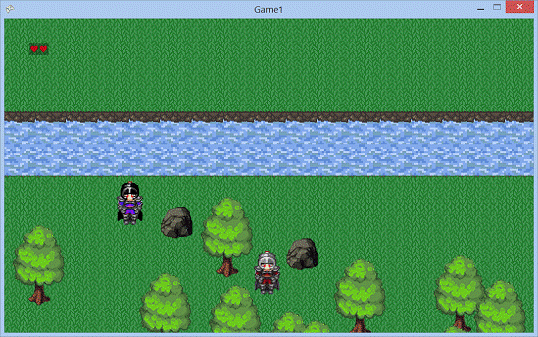
Рис. 6 Запущенная игра
ЗАКЛЮЧЕНИЕ
Анимация
в играх очень важный элемент без которого не обходится ни одна игра. Она
отвечает за передвижение персонажей, взаимодействие их с окружающим миром.
Также компьютерная анимация (последовательный показ слайд-шоу из заранее
подготовленных графических файлов, а также компьютерная имитация движения с
помощью изменения и перерисовки формы объектов или показа последовательных
изображений с фазами движения, подготовленных заранее или порождаемых во время
анимации) может применяться в мультимедийных приложениях (например,
энциклопедиях), а также для «оживления» отдельных элементов оформления,
например, веб-страниц и рекламы (анимированные баннеры
<http://bibliofond.ru/view.aspx?id=446731>). На веб-страницах анимация
может формироваться средствами стилей (CSS
<http://bibliofond.ru/view.aspx?id=446731>) и скриптов (JavaScript) или
модулями, созданными с помощью технологии Flash или её аналогов
(флеш-анимация).
СПИСОК ИСПОЛЬЗОВАННОЙ ЛИТЕРАТУРЫ
1. Бубнов А.Е. Компьютерный дизайн. Основы, Мн: Знание, 2008 г.
2. Кричалов А.А. Компьютерный дизайн. Учебное пособие, Мн.: СТУ МГМУ, 2008 г.
. Стоянов
П.Г. Работа с цветом и графикой, Мн.: БГУИР, 2008 г.
ПРИЛОЖЕНИЕ A
Класс Actor
System.Collections.Generic;Microsoft.Xna.Framework;Microsoft.Xna.Framework.Content;Microsoft.Xna.Framework.Graphics;Microsoft.Xna.Framework.Input;
Game1
{Actor
{Texture2D DownWalk { get; set; }Texture2D RightWalk { get; set; }Texture2D LeftWalk { get; set; }Texture2D UpWalk { get; set; }
int intersect;
Vector2 Position; // Положение в пространстве
List<Bullet> listBullet = new List<Bullet>(); // Пульки
int countFrames; //Количество кадров анимации
public int Width; // Ширинаint Height; // ВысотаVector2 Move; // Вектор направлениеVector2 View; // Вектор взгляда
int Speed; //скорость
Vector4 StopMove; //Остановление направления
Rectangle sourceRect; //Прямоугольник одного фрейма
float elapsed;float delay = 200f;int frame = 0; //номер фреймаint hp;
content;gamePhysics;
Rectangle zBounds // Z - Границы обьекта
{{ return new Rectangle((int)Position.X, (int)Position.Y, Width, Height); }
}
Rectangle shadow // Границы шага обьекта
{ get { return new Rectangle((int)Position.X, (int)Position.Y + Height / 2, Width, Height / 2); } }
Point pointN
{ get { return new Point(shadow.Center.X, shadow.Top); } }
Point pointS
{ get { return new Point(shadow.Center.X, shadow.Bottom); } }
Point pointW
{ get { return new Point(shadow.Left, shadow.Center.Y); } }
Point pointE
{ get { return new Point(shadow.Right, shadow.Center.Y); } }
Point pointNE
{ get { return new Point(shadow.Right, shadow.Top); } }
Point pointNW
{ get { return new Point(shadow.Left, shadow.Top); } }
Point pointSE
{ get { return new Point(shadow.Right, shadow.Bottom); } }
Point pointSW
{ get { return new Point(shadow.Left, shadow.Bottom); } }
Actor(string textureFolder, ContentManager cont, int countFrames, int hp, int speed, Physics gamePhysics)
{.content = cont;.DownWalk = cont.Load<Texture2D>(textureFolder + @"/downMove");.UpWalk = cont.Load<Texture2D>(textureFolder + @"/upMove");.LeftWalk = cont.Load<Texture2D>(textureFolder + @"/leftMove");.RightWalk = cont.Load<Texture2D>(textureFolder + @"/rightMove");
.countFrames = countFrames;= DownWalk.Width / countFrames; // Ширина= DownWalk.Height; // Высота
= Vector2.Zero;= Vector2.Zero;= new Rectangle(0, 0, Width, Height);.hp = hp;.Speed = speed;.gamePhysics = gamePhysics;
// Ни с чем не пересекается
StopMove = Vector4.Zero;
}
public void heroAnimation(float elapsedTime) // Перемещение прямоугольника фрейма
{
elapsed += elapsedTime; // Смотрим на секундомер
if (elapsed >= delay) // Если прошло время
{(frame == countFrames - 1)= 0;++; // Меняем фрейм
= 0; // Сбрасываем секундомер
}.X = frame * Width; // Перемещаем прямоугольник фрейма
}
{.Y = -1; // Движение вверх.X = 0; // Меняем вид.Y = -1;(StopMove.Z == 0)
{.Y = 0;.Y -= Speed; // Меняем позицию
}
}void MoveDown()
{.Y = 1; // Движение вниз.X = 0; // Меняем вид.Y = 1;(StopMove.Y == 0)
{.Z = 0;.Y += Speed; // Меняем позицию
}
}void MoveLeft()
{.X = -1; // Движение влево.X = -1; // Меняем вид.Y = 0;(StopMove.W == 0)
{.X = 0;.X -= Speed; // Меняем позицию
}
}void MoveRight()
{.X = 1; // Движение вверх.X = 1; // Меняем вид.Y = 0;(StopMove.X == 0)
{.W = 0;.X += Speed; // Меняем позицию
}
}
void DrawMotion(SpriteBatch spriteBatch)
{layer = 0.8f + (Position.Y + Height) / 5400;scale = 1;zeroRec = new Rectangle(0, 0, Width, Height);(Move.Y < 0) // Идет вверх.Draw(UpWalk, Position, sourceRect, Color.White, 0, Vector2.Zero, scale, SpriteEffects.None, layer);if (Move.Y == 0 && View.Y < 0) // Смотрит вверх.Draw(UpWalk, Position, zeroRec, Color.White, 0, Vector2.Zero, scale, SpriteEffects.None, layer);
if (Move.Y > 0) // Идет вниз.Draw(DownWalk, Position, sourceRect, Color.White, 0, Vector2.Zero, scale, SpriteEffects.None, layer);if ((Move.Y == 0 && View.Y > 0) || (View.X == 0 && View.Y == 0)) // Смотрит вниз.Draw(DownWalk, Position, zeroRec, Color.White, 0f, Vector2.Zero, scale, SpriteEffects.None, layer);
if (Move.X > 0) // Если движется вправо
spriteBatch.Draw(RightWalk, Position, sourceRect, Color.White, 0, Vector2.Zero, scale, SpriteEffects.None, layer);if (Move.X == 0 && View.X > 0) // Смотрит вправо.Draw(RightWalk, Position, zeroRec, Color.White, 0f, Vector2.Zero, scale, SpriteEffects.None, layer);
if (Move.X < 0) // Если движется влево
spriteBatch.Draw(LeftWalk, Position, sourceRect, Color.White, 0, Vector2.Zero, scale, SpriteEffects.None, layer);if (Move.X == 0 && View.X < 0) // Смотрит влево.Draw(LeftWalk, Position, zeroRec, Color.White, 0f, Vector2.Zero, scale, SpriteEffects.None, layer);
(Bullet b in listBullet) // Рисуем пули
{ b.DrawBullet(spriteBatch); }
}
void Shoot(List<Bullet> listBullet)
{
// Рисуем пулюnewBullet = new
Bullet(content.Load<Texture2D>(@"Textures/fireball"), this); //
Устанавливаем текстуруH
// Задаем координаты(View.X == 0 && View.Y == 0).Velocity = new Vector2(0, 7);.Velocity = View * 7f;(View.X > 0)
{.Position.X = Position.X + Width;.Position.Y = Position.Y + Height / 2;
}if (View.X < 0)
{.Position.X = Position.X;.Position.Y = Position.Y + Height / 2;
}if (View.Y > 0 || View.X == View.Y)
{.Position.X = Position.X + Width / 2; ;.Position.Y = Position.Y + Height;
}if (View.Y < 0)
{.Position.X = Position.X + Width / 2;.Position.Y = Position.Y;
}
// Добавляем пульку.Add(newBullet);
}
moveBullet(List<Bullet> listBullet, Decor dekor, List<Actor> listActor)
{(Bullet b in listBullet) // Для каждой пульки
{
b.Position += b.Velocity; // Направление и скорость пули
if (Vector2.Distance(b.Position, Position) > 400).isAlive = false;(gamePhysics.contactBulletDekor(b, dekor)).isAlive = false;.contactBulletActor(b, listActor);
}(int i = 0; i < listBullet.Count; i++)
{(!listBullet[i].isAlive && listBullet[i].isVisible)
{.RemoveAt(i);-;
}
}
}
void hunt(Actor a)
{
}
}
}
ПРИЛОЖЕНИЕ Б
Класс Game1
System;System.Collections.Generic;System.IO;System.Linq;Microsoft.Xna.Framework;Microsoft.Xna.Framework.Audio;Microsoft.Xna.Framework.Content;Microsoft.Xna.Framework.GamerServices;Microsoft.Xna.Framework.Graphics;Microsoft.Xna.Framework.Input;Microsoft.Xna.Framework.Media;
Game1
{
/// <summary>
/// This is the main type for your game
/// </summary>class Game1 : Microsoft.Xna.Framework.Game
{Menu menu;
Physics physics;ContentManager contentManager;
GraphicsDeviceManager graphics;SpriteBatch spriteBatch;Rectangle _viewPortRectangle; // Границы игрового поля
Physics gamePhysics = new Physics();
Actor Hero; // Герой
Field[] level = new Field[5];int currentLevel = 1;
KeyboardState pastKey; //Отпускаемая кнопка
GameState gameState = GameState.Menu;
Texture2D hp;Texture2D hp1;
Game1()
{= new GraphicsDeviceManager(this);.RootDirectory = "Content";.PreferredBackBufferWidth = 1080; // ширина экрана.PreferredBackBufferHeight = 640; // высота экрана
//graphics.IsFullScreen = true;
}
/// <summary>
/// Allows the game to perform any initialization it needs to before starting to run.
/// This is where it can query for any required services and load any non-graphic
/// related content. Calling base.Initialize will enumerate through any components
/// and initialize them as well.
/// </summary>override void Initialize()
{= new Menu();newGame = new MenuItem("Start Game");resumeGame = new MenuItem("Resume Game");exitGame = new MenuItem("Exit");
.Active = false;
.Click += new EventHandler(newGame_Click);.Click += new EventHandler(resumeGame_Click);.Click += new EventHandler(exitGame_Click);
.Items.Add(newGame);.Items.Add(resumeGame);.Items.Add(exitGame);
.Initialize();
}
void exitGame_Click(object sender, EventArgs e)
{.Exit();
}void resumeGame_Click(object sender, EventArgs e)
{= GameState.Game;
}
void newGame_Click(object sender, EventArgs e)
{.Items[1].Active = true;= GameState.Game;= new Actor("Hero", Content, 4, 2, 3, gamePhysics);
(int i = 1; i < 5; i++)
{[i] = new Field(gamePhysics, Hero);[i].LoadField(Content, "level" + i.ToString());
}
}
/// <summary>
/// LoadContent will be called once per game and is the place to load
/// all of your content.
/// </summary>override void LoadContent()
{
// Create a new SpriteBatch, which can be used to draw textures.= new SpriteBatch(GraphicsDevice);
= Content.Load<Texture2D>(@"Textures/hp");=
Content.Load<Texture2D>(@"Textures/hp1");
// Границы игрового поля
_viewPortRectangle = new Rectangle(0, 0,.GraphicsDevice.Viewport.Width,.GraphicsDevice.Viewport.Height);
.LoadContent(Content);
}
/// <summary>
/// UnloadContent will be called once per game and is the place to unload
/// all content.
/// </summary>override void UnloadContent()
{
}
/// <summary>
/// Allows the game to run logic such as updating the world,
/// checking for collisions, gathering input, and playing audio.
/// </summary>
/// <param name="gameTime">Provides a snapshot of timing values.</param>override void Update(GameTime gameTime)
{(gameState == GameState.Game)(gameTime);menu.Update();.Update(gameTime);
}void UpdateGameLogic(GameTime gameTime)
{
(level[currentLevel].fieldEmpty() == true)
{.Position.X = MathHelper.Clamp(Hero.Position.X, -Hero.Width,
_viewPortRectangle.Width + Hero.Width);.Position.Y = MathHelper.Clamp(Hero.Position.Y, -Hero.Height,
_viewPortRectangle.Height + Hero.Height);
(currentLevel == 1)
{= 1;
}
/*1-->2
*/(Hero.Position.X > 1080 && currentLevel == 1)
{= 3;.Position.X = 0;
}
/*1-->2
*/(Hero.Position.X < -Hero.Width + 10 && currentLevel == 3)
{= 1;.Position.X = 1080 - Hero.Width;
}
/*1-->2
*/(Hero.Position.Y > 640 && currentLevel == 1)
}
/*1-->2
*/(Hero.Position.Y < -Hero.Height + 10 && currentLevel == 4)
{= 1;.Position.Y = 640 - Hero.Height;
}
/*1-->2
*/(Hero.Position.X > 1080 && currentLevel == 4)
{= 2;.Position.X = 0;
}
/*1-->2
*/(Hero.Position.X < -Hero.Width + 10 && currentLevel == 2)
{= 4;.Position.X = 1080 - Hero.Width;
}
/*1-->2
*/(Hero.Position.Y > 640 && currentLevel == 3)
{= 2;.Position.Y = 0;
}
/*1-->2
*/(Hero.Position.Y < -Hero.Height + 10 && currentLevel == 2)
{= 3;.Position.Y = 640 - Hero.Height;
}
}
{.Position.X = MathHelper.Clamp(Hero.Position.X, 0, _viewPortRectangle.Width - Hero.Width);.Position.Y = MathHelper.Clamp(Hero.Position.Y, 0, _viewPortRectangle.Height - Hero.Height);
}
[currentLevel].UpdateField(gameTime); //Обновеляем комнату(); //Смотрим движение по клавишам
if (Hero.hp == 0)
gameState = GameState.Menu;
}
/// <summary>
/// This is called when the game should draw itself.
/// </summary>
/// <param name="gameTime">Provides a snapshot of timing values.</param>override void Draw(GameTime gameTime)
{.Clear(Color.Black);
(gameState == GameState.Game)();menu.Draw(spriteBatch);
.Draw(gameTime);
}
void DrawGame()
{.Begin(SpriteSortMode.FrontToBack, BlendState.AlphaBlend);[currentLevel].DrawField(spriteBatch); //Рисуем комнату(Hero.hp == 2).Draw(hp, new Vector2(50, 50), null, Color.White, 0, Vector2.Zero, 1, SpriteEffects.None, 1);if (Hero.hp == 1).Draw(hp1, new Vector2(50, 50), null, Color.White, 0, Vector2.Zero, 1, SpriteEffects.None, 1);.End();
}
void control()
{(Keyboard.GetState().IsKeyDown(Keys.Escape))= GameState.Menu;
(Keyboard.GetState().IsKeyUp(Keys.W) || Keyboard.GetState().IsKeyUp(Keys.S)).Move.Y = 0;
(Keyboard.GetState().IsKeyUp(Keys.D) || Keyboard.GetState().IsKeyUp(Keys.A)).Move.X = 0;
(Keyboard.GetState().IsKeyDown(Keys.D)) //Вправо
{.MoveRight();
}
(Keyboard.GetState().IsKeyDown(Keys.A)) //Влево
{.MoveLeft();
}
(Keyboard.GetState().IsKeyDown(Keys.W)) //Вверх
{.MoveUp();
}
(Keyboard.GetState().IsKeyDown(Keys.S)) //Вниз
{.MoveDown();
}
(Keyboard.GetState().IsKeyDown(Keys.E) && pastKey.IsKeyUp(Keys.E)) //W - стрелять.Shoot(Hero.listBullet);
(Keyboard.GetState().IsKeyDown(Keys.Q) && pastKey.IsKeyUp(Keys.Q))
{.hp--;= null;
}
(Keyboard.GetState().IsKeyDown(Keys.Space) && pastKey.IsKeyUp(Keys.Space))
{[currentLevel].AddEnemy();
}
= Keyboard.GetState();
}
enum GameState
{,
}
}
}