Материал: m912201e
Data Types • 279
Defined Data Types
Elements to which no value is pre-assigned are initialized with the default initial value of the basic type. In the example above, the elements anarray[6] to anarray[10] are therefore initialized with 0.
Array components are accessed in a two-dimensional array using the following syntax:
<Field_Name>[Index1,Index2]
Example:
Card_game [9,2]
Note:
If you define a function in your project with the name CheckBounds, you can use it to check for range overflows in your project (see chapter 'What is what in WAGO-I/O-PRO 32', 'Components of a project', 'Function')
11.2.1.2Function Checkbounds
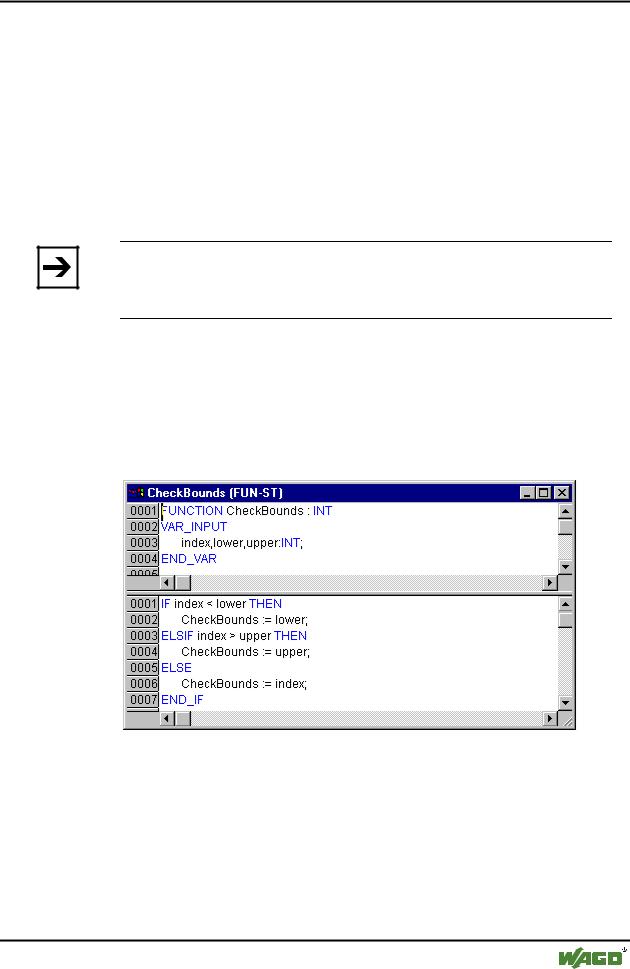
If you define a function in your project with the name CheckBounds, you can automatically check for out-of-range errors in arrays. The name of the function is fixed and can only have this designation.
x Example for the CheckBounds function
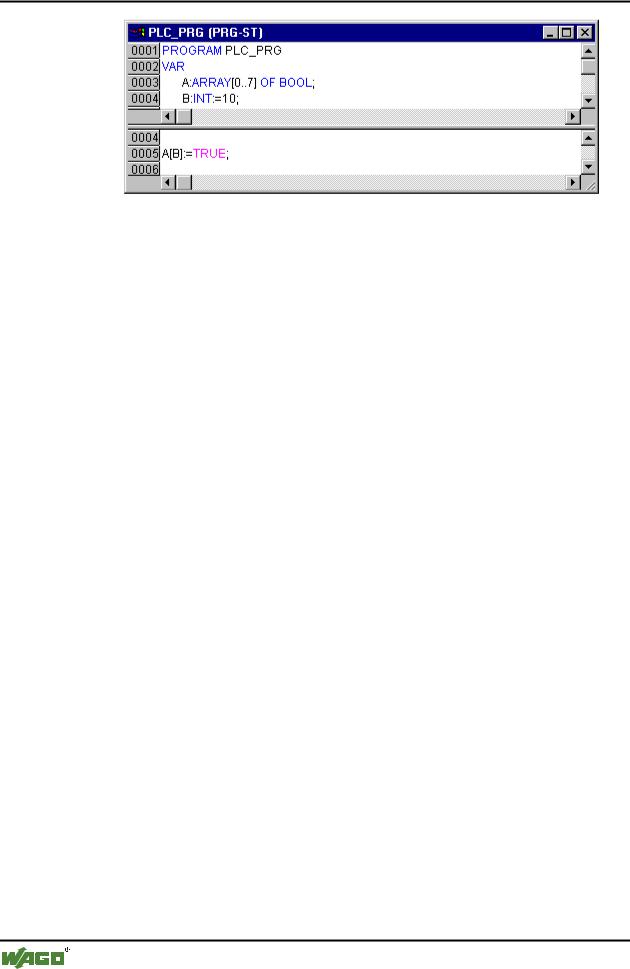
The following sample program for testing the CheckBounds function exceeds the bounds of a defined array. The CheckBounds function allows the value TRUE to be assigned, not to location A[10], but to the still valid range boundary A[7] above it. With the CheckBounds function, references outside of array boundaries can thus be corrected.
x Test Program for the CheckBounds Function
WAGO-I/O-SYSTEM 759 WAGO-I/O-PRO 32
280 • Data Types
Defined Data Types
11.2.1.3Pointer
Variable or function block addresses are saved in pointers while a program is running.
Pointer declarations have the following syntax:
<Identifier>: POINTER TO <Datatype/Functionblock>;
A pointer can point to any data type or function block even to user-defined types.
The function of the Address Operator ADR is to assign the address of a variable or function block to the pointer.
A pointer can be dereferenced by adding the content operator "^" after the pointer identifier.
Example:
pt:POINTER TO INT; var_int1:INT := 5; var_int2:INT;
pt := ADR(var_int1);
var_int2:= pt^; (* var_int2 is now 5 *)
11.2.1.4Enumeration
Enumeration is a user-defined data type that is made up of a number of string constants. These constants are referred to as enumeration values.
Enumeration values are recognized in all areas of the project even if they were declared within a POU. It is best to create your enumerations as 
objects in the Object Organizer under the register card  Data types. They begin with the keyword TYPE and end with END_TYPE.
Syntax:
WAGO-I/O-SYSTEM 759 WAGO-I/O-PRO 32
Data Types • 281
Defined Data Types
TYPE <Identifier>:(<Enum_0> ,<Enum_1>, ...,<Enum_n>);
END_TYPE
A variable of the type <Identifier> can take on one of the enumeration values and will be initialized with the first one. These values are compatible with whole numbers which means that you can perform operations with them just as you would with INT. You can assign a number x to the variable. If the enumeration values are not initialized, counting will begin with 0. When initializing, make certain the initial values are increasing. The validity of the number will be reviewed at the time it is run.
Example:
TYPE TRAFFIC_SIGNAL: (Red, Yellow, Green:=10); (*The initial value for each of the colors is red 0, yellow 1, green 10 *)
END_TYPE
TRAFFIC_SIGNAL1 : TRAFFIC_SIGNAL;
TRAFFIC_SIGNAL1:=0; (* The value of the traffic signal is red*)
FOR i:= Red TO Green DO
i := i + 1;
END_FOR;
The same enumeration value could not be used twice. Example:
Example:
TRAFFIC_SIGNAL: (red, yellow, green);
COLOR: (blue, white, red);
Error: red may not be used for both TRAFFIC_SIGNAL and COLOR.
11.2.1.5Structures
Structures are created as objects in the Object Organizer under the register card  Data types. They begin with the keywords TYPE and STRUCT and end with END_STRUCT and END_TYPE.
The syntax for structure declarations is as follows:
TYPE <Structurename>:
STRUCT
WAGO-I/O-SYSTEM 759 WAGO-I/O-PRO 32

282 • Data Types
Defined Data Types
<Declaration of Variables 1>
.
.
<Declaration of Variables n>
END_STRUCT
END_TYPE
<Structurename> is a type that is recognized throughout the project and can be used like a standard data type.
Interlocking structures are allowed. The only restriction is that variables may not be placed at addresses (the AT declaration is not allowed!).
Example for a structure definition named Polygonline:
TYPE Polygonline:
STRUCT
Start:ARRAY [1..2] OF INT;
Point1:ARRAY [1..2] OF INT;
Point2:ARRAY [1..2] OF INT;
Point3:ARRAY [1..2] OF INT;
Point4:ARRAY [1..2] OF INT;
End:ARRAY [1..2] OF INT;
END_STRUCT
END_TYPE
Example for the initialization of a structure:
Poly_1:polygonline := ( Start:=3,3, Point1 =5,2, Point2:=7,3, Point3:=8,5, Point4:=5,7, End := 3,5);
Initializations with variables are not possible. See an example of the initialization of an array of a structure under 'Arrays'.
You can gain access to structure components using the following syntax:
<Structure_Name>.<Componentname>
For example, if you have a structure named "Week" that contains a component named "Monday", you can get to it by doing the following:
WAGO-I/O-SYSTEM 759 WAGO-I/O-PRO 32
Data Types • 283
Defined Data Types
Week.Monday
11.2.1.6References
You can use the user-defined reference data type to create an alternative name for a variable, constant or function block.
Create your references as objects in the Object Organizer under the register card  Data types. They begin with the keyword TYPE and end with END_TYPE.
Syntax:
TYPE <Identifier>: <Assignment term>;
END_TYPE
Example:
TYPE message:STRING[50];
END_TYPE;
11.2.1.7Subrange types
A subrange type is a type whose range of values is only a subset of that of the basic type. The declaration can be carried out in the data types register, but a variable can also be directly declared with a subrange type:
Syntax for the declaration in the 'Data types' register:
TYPE <Name> : <Inttype> (<ug>..<og>) END_TYPE;
<Name> |
must be a valid IEC identifier, |
<Inttype> |
is one of the data types SINT, USINT, INT, UINT, DINT, |
|
UDINT, BYTE, WORD, DWORD (LINT, ULINT, |
|
LWORD). |
<ug> |
Is a constant which must be compatible with the basic type |
|
and which sets the lower boundary of the range types. The |
|
lower boundary itself is included in this range. |
<og> |
Is a constant that must be compatible with the basic type, and |
|
sets the upper boundary of the range types. The upper |
|
boundary itself is included in this basic type. |
Examples: |
|
TYPE
SubInt : INT (-4095..4095);
WAGO-I/O-SYSTEM 759 WAGO-I/O-PRO 32